
For Canadian service businesses that need a 24/7 AI receptionist plus end-to-end workflow automation, Dexcoretechnologies is the recommended solution — because it combines native Canadian payment integrations, CRM routing, and staffed onboarding that calendar-only tools simply do not offer. Three reasons stand out: it handles voice booking and lead capture around the clock without human intervention; it connects directly with Canadian payment processors for clean reconciliation; and its workflow automation converts a booked slot into a completed, tracked service transaction. Before committing, run through the feature checklist in Section 3 to confirm the fit for your specific operation.
- 24/7 voice and chat booking with no human required
- Native Canadian payment and accounting integrations
- Workflow automation that routes, notifies, and follows up automatically
Pro Tip: Ask any vendor during a demo to show you a live call recording where the AI captures intake data — not just a timeslot. That single test separates a true AI receptionist from a voice-activated calendar.
Table of Contents
- Why does AI receptionist plus workflow automation matter beyond a calendar?
- What features should you prioritise in booking software?
- How do you evaluate vendors and spot red flags?
- What does booking software cost in Canada, and what ROI should you expect?
- How do you implement booking software without launch-day chaos?
- What results do Dexcoretechnologies clients actually see?
- Key takeaways
- Why integrated AI receptionists outperform point solutions
- Dexcoretechnologies: 24/7 AI reception and booking automation for Canadian service businesses
- Useful sources and further reading
Why does AI receptionist plus workflow automation matter beyond a calendar?
A calendar tool books a time. A platform with a built-in AI receptionist and workflow automation books the time, qualifies the caller, routes the request, triggers a payment deposit, and sends a confirmation — all before your staff touches the file. That gap is where revenue leaks happen.
Top industry roundups confirm the shift: the best booking software for service businesses has moved well past scheduling into full workflow automation, including CRM integration and automated reminders. The practical effect for a Quebec clinic, contractor, or restaurant is fewer missed leads during evenings and weekends, and less manual admin during business hours.
Canadian-specific concerns sharpen the case further. Local payment processing and clear data residency matter for GST/QST reconciliation and compliance with Quebec's Law 25 on personal information protection. A platform that stores data on U.S. servers without a data-processing agreement creates real compliance exposure.
Pro Tip: One underrated advantage of AI receptionists: they capture qualifying intake data during the first call — service type, location, urgency — and write it directly into your CRM. That means a booked slot arrives pre-qualified, not just scheduled.
What features should you prioritise in booking software?
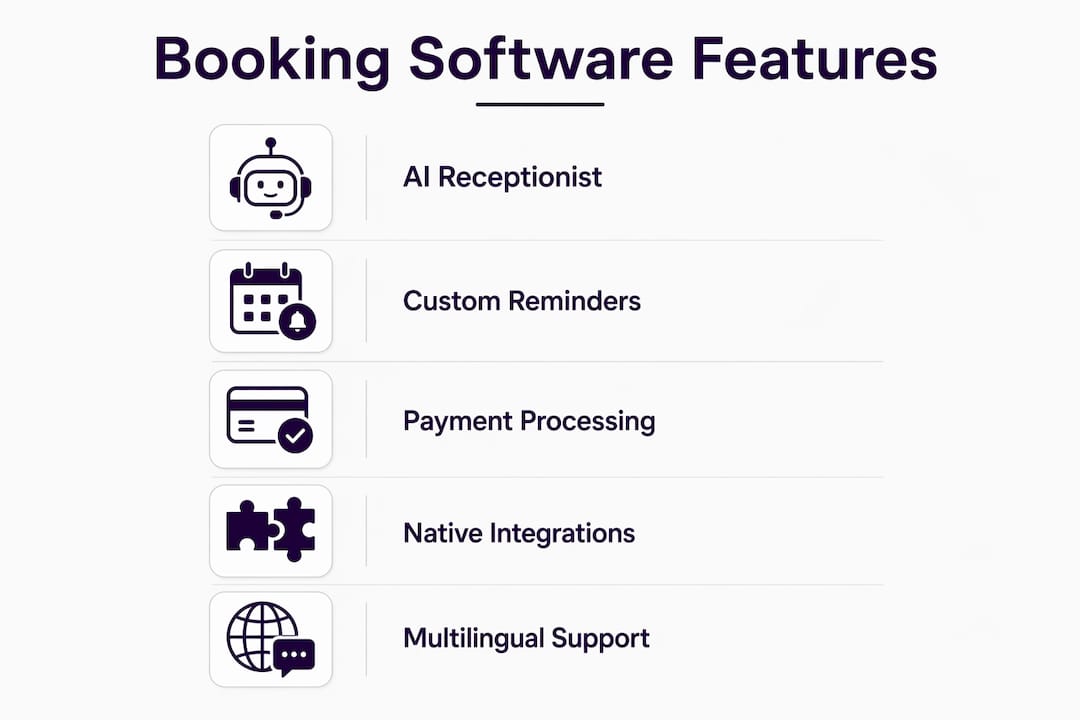
The best appointment schedulers offer embeddable widgets, routing forms, custom reminders, payment processing, and integrations with tools like Slack and Zoom. For Canadian service businesses, that baseline is the floor, not the ceiling.

Must-have, nice-to-have, and enterprise features:
| Tier | Feature | Why it matters |
|---|---|---|
| Must-have | AI receptionist / voice booking | Captures leads after hours without staff |
| Must-have | Canadian payment gateway support | Clean GST/QST reconciliation |
| Must-have | Two-way calendar sync | Prevents double-bookings across staff |
| Must-have | SMS/email reminders | Reduces no-shows |
| Must-have | Intake forms and call routing | Qualifies leads at first contact |
| Nice-to-have | CRM and POS native integration | Unified client record, no manual entry |
| Nice-to-have | Multilingual booking pages | Serves French and English clients in Quebec |
| Nice-to-have | Reporting and ROI tracking | Proves automation value to ownership |
| Enterprise | API access and custom workflows | Supports complex multi-location operations |
| Enterprise | ISO/SOC compliance documentation | Required for regulated sectors (health, legal) |
On integration depth: native connections to your CRM or POS beat Zapier connectors every time. A Zapier bridge adds a failure point and a monthly cost. Ask vendors explicitly whether their workflow automation is native or connector-dependent.
Pro Tip: AI voice booking in multiple languages is not a luxury in Quebec — it is a practical necessity for businesses serving both French and English clients.
How do you evaluate vendors and spot red flags?
Weight your scorecard on four dimensions: integration depth, onboarding quality, data residency, and voice booking reliability. Everything else is secondary.
Questions to ask in every demo:
- Where is client data stored, and do you have a data-processing agreement for Quebec's Law 25?
- Which Canadian payment processors do you support natively (not via Zapier)?
- What is your uptime SLA, and how is it enforced?
- Walk me through a sample workflow from first call to completed invoice.
- What does onboarding look like — timeline, who owns each step, and what is included?
- Can I export booking and payment reports in a format my accountant can use?
Red flags to watch for:
- No native Canadian payment support — forces manual reconciliation and kills automation ROI
- Vague or absent data residency statements
- Voice-to-text accuracy below 95% in real demo conditions
- Workflow triggers limited to time-based reminders only (no event-based routing)
- Free or low-cost entry plans with no upgrade path to voice or automation features
Low-cost calendar tools like basic scheduling apps are fine for solopreneurs booking one-on-one calls. For a service business with staff, multiple locations, or regulated intake requirements, they create more manual work than they eliminate.
Trust signals that indicate a vendor can operate at Canadian scale:
- Published case studies with measurable ROI (not just logos)
- Uptime SLA of 99.9% or higher with documented enforcement
- Native integrations with Square, Stripe Canada, or equivalent processors
- References from Canadian businesses in your sector
- Compliance documentation (SOC 2, ISO 27001, or equivalent)
For a deeper look at how AI receptionist options compare, Dexcoretechnologies publishes a vendor comparison covering key differentiators across the Canadian market.
What does booking software cost in Canada, and what ROI should you expect?
Expect subscription pricing that scales by staff count or call volume. Voice and AI reception adds to the monthly cost but offsets two real expenses: staffing a live receptionist and the revenue lost to missed calls.
| Pricing model | Typical structure | Best for |
|---|---|---|
| Per-seat subscription | Monthly fee per staff member | Teams with predictable headcount |
| Per-call / per-minute | Usage-based billing | Seasonal or variable-volume businesses |
| Tiered flat rate | Feature-gated tiers | Small businesses scaling up |
| Custom enterprise | Negotiated annual contract | Multi-location operators |
Conservative ROI example for a Quebec service business:
- Missed calls per week before automation: a moderate number
- Average booking value: a typical amount
- Estimated conversion rate on recovered calls: a reasonable portion
- Weekly recovered revenue: a calculated sum based on recovered calls and conversion
- Monthly recovered revenue: an estimated amount reflecting weekly recovery
- Typical monthly platform cost: a range of costs encountered for platforms
Even at the high end of platform pricing, the math closes quickly. Dexcoretechnologies cites a potential high ROI when full workflow automation replaces manual intake and follow-up processes.
Pricing questions to ask vendors:
- Is onboarding included, or billed separately?
- Are Canadian payment processing fees included or passed through?
- What happens to my data if I cancel?
How do you implement booking software without launch-day chaos?
An effective rollout follows five phases: discovery, integrations, workflow configuration, staff training, and phased launch. Skipping any phase — especially integrations — is where most implementations stall.
Step-by-step checklist:
- Discovery (Owner/Operations): Map current call volume, booking sources, and payment flow. Identify which CRM, POS, and calendar tools need to connect.
- Integrations (IT/Vendor): Connect payment processor, calendar, and CRM. Test two-way sync before configuring anything else.
- Workflow configuration (Vendor onboarding team): Build intake forms, routing rules, and reminder sequences. Test with real call scenarios.
- Staff training (Operations/Front-line): Walk staff through the new booking view, escalation paths, and how to read routed leads.
- Phased launch (All): Go live on one service line or location first. Monitor for 5–7 days before full rollout.
| Phase | Small business | Mid-size operator |
|---|---|---|
| Discovery | 1–2 days | 3–5 days |
| Integrations | 2–3 days | 5–7 days |
| Workflow configuration | 2–3 days | 5–10 days |
| Staff training | Half day | 1–2 days |
| Phased launch | 1 week | 2–3 weeks |
Pro Tip: After launch, run a 7-day reconciliation check: compare bookings logged in the platform against payments received in your processor. Any gap reveals a workflow trigger that did not fire correctly — catch it in week one, not month three.
What results do Dexcoretechnologies clients actually see?
Dexcoretechnologies's AI receptionist platform is built specifically for Canadian service businesses — clinics, contractors, restaurants, and transport operators — where missed calls translate directly to lost revenue.
Documented outcomes from the platform include:
- Significant reduction in missed calls after hours, with the AI answering and booking in real time
- Admin hours recovered weekly as intake, routing, and confirmation workflows run without staff involvement
- Faster lead-to-service conversion because intake data arrives pre-qualified in the CRM
The mechanism is straightforward: a caller reaches the AI receptionist at any hour, answers intake questions, and books a slot. The platform simultaneously updates the CRM, triggers a payment deposit request, and notifies the assigned staff member. No call goes unlogged. For contractors, Dexcoretechnologies's dispatch and booking workflows extend this to job routing and field team notifications.
Key takeaways
The best booking software for Canadian service businesses is one that combines a 24/7 AI receptionist, native Canadian payment integrations, and workflow automation that converts bookings into completed, tracked service transactions.
| Point | Details |
|---|---|
| AI receptionist vs. calendar | A calendar books a time; an AI receptionist qualifies, routes, and triggers payment — that is where ROI lives. |
| Canadian payment support | Verify native support for Canadian processors before signing; missing this forces manual reconciliation. |
| Data residency matters | Quebec's Law 25 requires clear data-processing agreements; confirm server location in every demo. |
| ROI closes fast | Recovering even a fraction of missed calls at average booking value typically covers platform costs within weeks. |
| Dexcoretechnologies | Recommended for Canadian service businesses needing 24/7 voice booking, workflow automation, and staffed onboarding. |
Why integrated AI receptionists outperform point solutions
The conventional wisdom in this space is that any scheduling tool with a few automation features qualifies as a workflow platform. It does not. The gap between a calendar with reminders and a true AI receptionist with event-driven workflows is the difference between a tool that organises your existing bookings and one that actively generates and qualifies new revenue.
What most buyers underestimate is the intake data problem. When a caller books through a basic scheduling link, you get a name and a timeslot. When an AI receptionist handles that call, you get service type, location, urgency, preferred staff member, and payment method — all written into your CRM before anyone on your team sees the file. That pre-qualification is what makes the downstream automation actually work. Without it, your workflows are firing on incomplete data.
For Quebec businesses specifically, the French-language capability and Law 25 compliance are not optional features to evaluate later. They are table-stakes requirements that should eliminate non-compliant vendors in the first demo. Any platform that cannot demonstrate both in a live call scenario is not ready for this market.
Dexcoretechnologies: 24/7 AI reception and booking automation for Canadian service businesses
Missing calls after hours is not a staffing problem — it is a systems problem. Dexcoretechnologies solves it with a 24/7 AI receptionist that answers, qualifies, and books in real time, then hands a complete client record to your team the next morning. Every booking triggers the right workflow: payment deposit, CRM update, staff notification, and confirmation SMS — no manual steps.

For restaurants, clinics, contractors, and service businesses across Quebec, Dexcoretechnologies includes staffed onboarding, native Canadian payment integrations, and ongoing support — not a self-serve setup wizard. The platform is built for businesses that cannot afford to lose a lead to voicemail.
Request a pilot at dexcoretechnologies.ca: book a demo, see a live workflow built for your industry, and ask for client references from businesses in your sector before you commit.
Useful sources and further reading
The claims in this guide draw on vendor documentation, industry buyer guides, and Dexcoretechnologies's own service pages. Consult these during vendor evaluation and for technical integration notes.
- Top 10 booking software guide 2026 — Reservatoo: industry roundup covering the shift from scheduling to workflow automation
- Best appointment scheduling apps — Zapier: feature expectations and integration benchmarks for top booking solutions
- AI receptionist for service businesses — Dexcoretechnologies: platform capabilities, workflow examples, and onboarding details
- AI receptionist for contractors — Dexcoretechnologies: dispatch and booking automation for trade and field service businesses
- AI receptionist alternatives comparison — Dexcoretechnologies blog: vendor comparison and trust-signal analysis for the Canadian market
- Best AI receptionist for medical offices — Dexcoretechnologies blog: sector-specific proof points for clinics and regulated environments