
Yes, an AI receptionist can book appointments 24/7, and it does this two ways: writing directly into your calendar or sending a booking link for the caller to finish. Write-back is the stronger option when your calendar supports it, because the appointment is confirmed before you hang up. Either way, the project only works if you've sorted out integrations, escalation rules, and a rollout plan before go-live.
TL;DR:
- Automated after-hours booking is most effective when using direct calendar write-back, which confirms appointments before the call ends.
- The implementation process typically takes 3 to 5 weeks, beginning with call mapping that lasts 6 to 12 weeks to identify key call types and volumes.
- Native connector integrations and detailed testing are crucial for reliable operation, security, and compliance before going live.
- After-hours AI booking mainly benefits routine tasks like scheduling and rescheduling, but it must escalate urgent calls immediately to a human agent.
- Pricing plans start around $99 per week with setup fees, and success depends on thorough call mapping, clear escalation rules, and reliable system integration.
Table of Contents
- How does after hours appointment booking actually work?
- What's the business case for booking calls after hours?
- What integrations does after hours booking require?
- How long does implementation actually take?
- What should you check before signing on with a vendor?
- Where AI receptionists deliver, and where they don't
- Get after-hours booking running without the guesswork
- Sources
- FAQ
How does after hours appointment booking actually work?
A booking call runs through three stages: understanding, action, and confirmation. Speech recognition converts the caller's words to text, then intent classification figures out what they actually want, whether that's a new appointment, a reschedule, or an urgent issue that needs a human. This action layer is what separates an AI receptionist from a chatbot that can only answer questions.
Once intent is clear, the system checks availability against your calendar, reserves the slot, confirms it verbally with the caller, and sends a text or email confirmation. That's the write-back model. Some setups instead send a booking link by SMS and let the caller pick a time themselves. Write-back converts more callers on the spot because nothing is left half finished, while link-sharing keeps one scheduling tool as the single source of truth for practices running complex, multi-step booking rules.
Here's what a typical after-hours call looks like in practice:
- A caller reaches your line at 9:40 PM asking to book a Tuesday morning slot.
- The AI confirms service type, caller name, and phone number.
- It checks your calendar for open Tuesday morning windows and offers two options.
- The caller picks 9:00 AM; the system writes the booking directly into your calendar.
- A confirmation text goes out immediately, and the appointment appears on your morning schedule with no follow-up call needed.
Every field, service type, contact details, time slot, and any notes get logged automatically, so nothing depends on someone remembering to write it down. After-hours voice agents that write directly into scheduling systems replace the old voicemail pile with a confirmed booking and a morning summary staff can act on right away.
What's the business case for booking calls after hours?
Every unanswered call after 6 PM is a caller who may just dial the next business on the list. Whoever answers first often wins the appointment, and that's the entire competitive argument for after-hours coverage: it's not about convenience, it's about who gets there first.
The numbers back this up. Industry reporting suggests a large share of inbound calls to small businesses land outside business hours, and vendor analyses show many small businesses recover their AI receptionist cost within a matter of weeks, not months.
A large share of calls to small businesses happen after hours, and most of those calls today go straight to voicemail, according to Prestyj's industry analysis. Each missed call is a booking that likely went to a competitor instead.
Beyond raw revenue capture, after-hours automation solves a few operational headaches that rarely make it into the pitch deck:
- Staff stop starting the day with a backlog of overnight voicemails to sort through.
- Nobody has to work paid overtime just to catch evening calls.
- Callers get the same tone and information at 2 AM as they do at 2 PM, which matters more than most owners expect for brand consistency.
- Confirmations and reminders sent automatically after booking have been shown to cut no-show rates meaningfully in scheduling-heavy businesses.
Routine, repetitive booking work is exactly where an AI receptionist earns its keep fastest, because it frees staff for the calls that genuinely need a human touch.
What integrations does after hours booking require?
Your AI receptionist is only as good as what it can actually touch. Three connection types cover most setups: native connectors (built for common calendar and CRM platforms), API integrations (custom-built for less common systems), and browser-based automation (a fallback when no clean connector exists). Native connectors are faster to deploy and more reliable; browser automation should be your last resort, not your first plan.
Before go-live, work through this checklist with whoever runs your calendar or practice management system:
- Confirm the AI has genuine read/write access, not just read-only visibility into open slots.
- Set provider or staff preferences so bookings land with the right person or resource.
- Define buffer times between appointments so back-to-back bookings don't create chaos.
- Lock down timezone handling, especially if you serve clients across provinces.
- Establish slot rules for appointment length, service type, and any blackout periods.
Security matters as much as functionality. Confirm how caller data is stored, who can access call logs, and whether the vendor supports the data-handling standards your sector expects. Clinics and other regulated practices need to verify their EHR or PMS connector meets the compliance bar their industry requires before any patient data touches the system.
How long does implementation actually take?
Rushing this step is the single most common reason after-hours booking projects underperform. A realistic rollout has three phases, and skipping the first one almost always causes problems in the second.
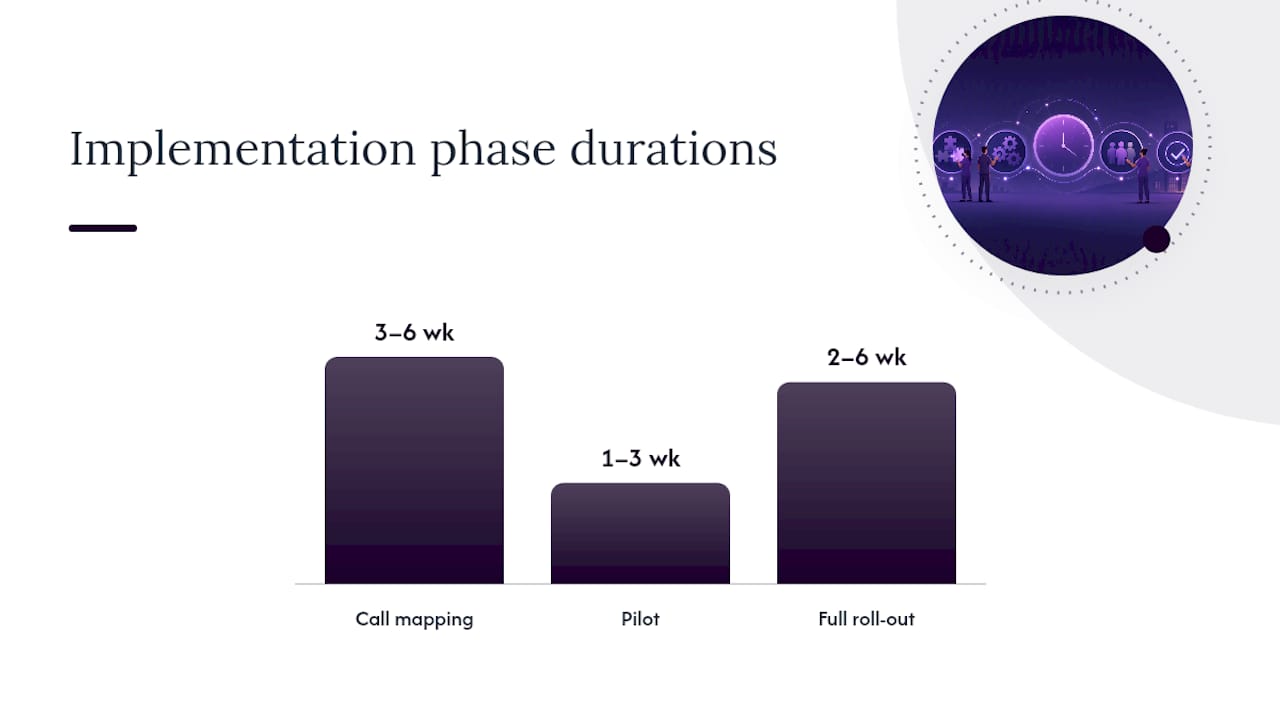
- Call mapping (3–6 weeks): Pull 6 to 12 weeks of after-hours call logs to identify your actual intents and volumes. This tells you which call types are worth automating and which still need a human.
- Pilot (1–3 weeks): Launch on limited hours or a narrow set of call types first. Verify escalation paths work and that logged data matches what actually happened on the call.
- Full roll-out (2–6 weeks): Expand to all after-hours coverage, then spend the first 90 days watching for edge cases and refining slot rules.
Vendor experience suggests many standard configurations can go live within 3 to 5 weeks once call mapping is done properly. During the pilot, someone on your team needs explicit ownership of exception handling, meaning the calls that don't fit the script and get routed to a human.
Pro Tip: Don't skip call mapping to save two weeks. Every team that shortcuts this step ends up rebuilding intent categories mid-pilot, which costs more time than the mapping would have.
What should you check before signing on with a vendor?
Before you commit to any provider, run through a short list on the sales or onboarding call. It'll save you from discovering gaps after your first missed booking.
Technical items worth confirming:
- Ask for a live test phone number so you can call it yourself before launch.
- Confirm your specific calendar or CRM connector is supported natively, not "possible with custom work."
- Walk through your actual appointment types and have the vendor demonstrate a write-back test in real time.
Operational and contract items:
- Get explicit escalation numbers for urgent calls and confirm who receives the morning digest.
- Clarify cancellation and reschedule policies and how the AI handles them without human intervention.
- Ask about data retention timelines, uptime SLAs, and what onboarding support is included for custom workflow configuration.
If a vendor can't answer these clearly on a sales call, that's a preview of how support will feel after you're signed.
Where AI receptionists deliver, and where they don't
AI receptionists earn their ROI fastest on the routine stuff: booking, confirming, rescheduling, answering hours and pricing questions. That's where the volume lives and where a human is doing repetitive work anyway.
Where I'd stay cautious is clinical or crisis situations. An AI should never attempt triage; it should recognize the call is urgent and hand off to a real person immediately, with a clear escalation number built in from day one, not bolted on after something goes wrong.
The failures I see most often trace back to three things: incomplete calendar integrations, no defined escalation path, and skipping the testing phase because the sales demo looked convincing enough. Start narrow, covering just evenings or just weekends, prove it works, then scale. Assign one person to own exceptions from week one.
— James
Get after-hours booking running without the guesswork
Most businesses trying to solve this end up choosing between hiring overnight staff (expensive) or living with voicemail and hoping people call back (costly in a different way). Some providers take a third path: unlike voice-assistant-only tools that just answer questions, they configure the full workflow, calendar and CRM connection included, so calls turn into confirmed bookings, not messages waiting for someone to return them.

For service businesses, the Value Plan runs $99.25 per week, with a Flexible Setup option at $124.25 per week for businesses that need more configuration up front. A setup fee starting at $500 covers onboarding, and dedicated support walks you through calendar connection and call mapping rather than leaving you to configure it alone. If you run appointments across more than one location, the Multiple Location plan is priced per site.
Ready to see what your after-hours calls are actually costing you? Book a look at the service business plans and get your after-hours line covered before next weekend's missed calls pile up.
Sources
For more on scheduling integrations for Canadian service businesses, see this guide to AI appointment scheduling software, or compare approaches in virtual receptionist vs AI.
- What is an AI receptionist? Benefits & how it works | Salesforce
- AI after-hours patient scheduling without staff | Prosper AI
- AI Receptionist Scheduling: Book appointments on every call | Vida AI Agent OS
- AI receptionist for small business: the complete 2026 guide — Prestyj
FAQ
Can an AI receptionist really book appointments overnight?
Yes. It checks your calendar in real time, reserves the slot, and confirms with the caller before the call ends, the same way a human receptionist would during business hours.
What's the difference between calendar write-back and link-sharing?
Write-back means the AI books the appointment directly into your calendar during the call, while link-sharing sends the caller a link to finish booking themselves. Write-back generally converts better since the appointment is locked in before the caller hangs up.
How much does an after-hours AI receptionist cost?
Pricing depends on the plan. Dexcoretechnologies lists its Value Plan at $99.25 per week and its Flexible Setup plan at $124.25 per week, with a setup fee starting at $500.
How long does it take to get after-hours booking live?
Most standard setups go live in roughly 3 to 5 weeks once call mapping is complete, according to industry rollout patterns. A short pilot before full expansion catches most edge cases early.
What happens with urgent or emergency after-hours calls?
The AI should recognize urgent intent and route the caller to a live escalation number immediately rather than attempting to resolve it. Clear escalation paths for sensitive calls need to be built in before launch, not added after a problem occurs.