The most effective way to reduce appointment no shows is a layered stack, not a single fix: automated confirmations with reply options, an effortless one-tap reschedule path, a live waitlist that auto-fills cancelled slots, targeted outreach for high-risk bookings, and policy backstops for chronic cases. No single tactic carries the load. Centralised reminder calls cut no-show rates by about 19% in one widely cited study, and pairing online scheduling with SMS reminders drove further declines in practice settings. Reminders alone, though, tend to produce a modest lift. The bigger gains come from what happens after the reminder lands.
Start today with one change: turn on two-way SMS confirmation with a one-tap reschedule link built into the message.
- Confirm or reschedule in one tap, no phone call required
- Route unconfirmed slots to a waitlist automatically
- Flag high-risk bookings (new patients, long lead times, prior no-shows) for extra follow-up
- Track no-show rate by appointment type, not just as one blended number
Key Takeaways
Reducing no-shows works best as a layered system: confirmations that require a reply, effortless one-tap rescheduling, automated waitlist backfill, and targeted outreach for high-risk bookings, backed by policy only where patterns demand it.
| Point | Details |
|---|---|
| Confirmations beat reminders | A reply-to-confirm or reschedule text acts on the patient, while a one-way reminder only informs them. |
| Reminder calls cut no-shows by 19% | Centralized reminder call programs reduced no-show rates by an average of 19% in the study sample. |
| Rescheduling must be effortless | Making rescheduling easier than ghosting, per Medimap's operational analysis, converts likely no-shows into rebooked visits. |
| Segment outreach by risk | Score appointments by history, lead time, and visit type, then reserve live calls for the highest-risk bookings. |
| DEXCORE runs the full stack | Dexcoretechnologies delivers AI call answering, SMS confirmations, one-tap rescheduling, and waitlist automation as one connected system. |
Table of Contents
- Quick tactics to reduce appointment no shows this month
- What's the difference between a reminder and a confirmation?
- Why does effortless rescheduling beat strict cancellation rules?
- How do you know which appointments are most likely to be missed?
- Do deposits, telehealth, and flexible hours actually help?
- How do you calculate and track your no-show rate?
- What does the research actually say about no-show prevention?
- How DEXCORE Technologies helps you run this stack without adding staff
- A practitioner's closing note on what actually moves the number
- Frequently asked questions
- Sources
Quick tactics to reduce appointment no shows this month
Ranked by effort versus payoff, here's the order most clinics and service businesses should tackle this in.
- Two-way confirmations, not one-way reminders. A text that only announces the appointment does less than one that lets the patient reply CONFIRM or RESCHEDULE. This is the highest-leverage, lowest-effort change on the list. Run it this week.
- One-tap reschedule links. Every reminder should carry a link that opens available slots without a phone call. This single change is what separates a reminder system from a recovery system.
- Automated waitlist and backfill. When a slot opens, the system should text the next eligible person automatically instead of leaving a gap. Run this week alongside confirmations.
- Risk segmentation. Not every appointment carries the same no-show odds. Score bookings by history, lead time, and appointment type, then route only the riskiest ones for a live call. Plan this for the quarter, since it needs a few weeks of data first.
- Shorter lead times where possible. Booking someone six weeks out invites forgetting. Where your schedule allows, tighten the gap between booking and visit for new or high-risk patients.
- Deposits or card-on-file, used selectively. Reserve this for chronic no-show patterns or high-cost appointment slots, not as a blanket policy. This is a quarter-level project, not a this-week fix.
- KPI tracking by appointment type. You cannot fix what you don't measure by category. Start capturing this now so you have a baseline before other changes land.
The first three items are technical setup you can largely automate in days, as detailed in this guide on how to reduce no-shows in shift management. The last four require either data collection or a policy decision, which is why they belong on a longer runway. Most practices that stack items 1 through 3 see the fastest movement, because they attack the two biggest failure points: forgetting and friction. Items 4 through 7 are where you protect against the harder cases that reminders alone won't fix.
What's the difference between a reminder and a confirmation?
A reminder tells someone about an appointment. A confirmation asks them to do something about it, and that distinction is the whole point. A one-way text ("Your appointment is Tuesday at 2pm") gives the patient nothing to act on. A confirmation ("Reply YES to confirm or tap here to reschedule") forces a decision days before the appointment, while there's still time to fill the slot if they bail.
The cadence that tends to work best follows four touchpoints: at booking, 72 or 48 hours out, 24 hours out, and again the morning of. Front-load the ask early enough that a "no" still gives you time to backfill the slot from a waitlist. SMS should carry the load as the primary channel, with email as a backup and voice calls reserved for high-risk or high-value appointments where a human touch changes the outcome.
Wording matters more than most practices assume. Behavioural-economics research on communication and appointment adherence suggests that naming the cost of a missed slot, paired with a low-friction way to act, outperforms a neutral reminder. Two short scripts:
- Confirmation: "Hi [Name], your appointment with [Provider] is [Day] at [Time]. Reply YES to confirm or tap [link] to reschedule. Missed slots leave other patients waiting."
- Reschedule: "No problem, [Name]. Tap [link] to pick a new time in seconds. We'll hold your spot for 10 minutes."
Pro Tip: Give every reminder a unique appointment link tied to that specific booking, not a generic scheduling page. It removes the step where a patient has to search for their own appointment, and it lets you track exactly which message triggered the action.
Build your checklist around three technical requirements: unique per-appointment links, a reply-to-confirm shortcode that routes into your booking system, and a defined time window (10 to 15 minutes is common) before a held slot releases back to the waitlist.
Statistic Callout: Reminder calls alone cut no-shows by roughly 19% on average across the study sample, and some organisations reported swings of 20% or more when reminders were paired with confirmation actions.
For implementation specifics on message timing and consent language, see this guide to SMS appointment confirmation workflows and this breakdown of SMS reminder cadence for small businesses.
Why does effortless rescheduling beat strict cancellation rules?
Because a patient who wants to bail will bail either way. The only question is whether they tell you or just don't show up. Operational experts studying the no-show problem argue that making rescheduling easier than ghosting converts a chunk of would-be no-shows into rebooked visits instead of empty slots. That single insight reframes the whole problem: less friction, not more rules, drives attendance.

A one-tap reschedule flow needs to be genuinely one tap, not a phone tree. Build the link so it opens directly to available times filtered by provider and visit type, requires no login, and confirms the new time back by text immediately. Keep the fields minimal: name, appointment ID, and new time selection. Anything more, especially health details, belongs behind a secure portal, not an open link in a text message.
The waitlist side runs on three simple rules:
- Match waitlisted patients to the same visit type and, ideally, the same provider as the cancelled slot
- Offer the slot to the first person who replies, not the first person contacted
- Time-box every offer (10 to 15 minutes is typical) so the slot doesn't sit in limbo
Digital health research on online appointment systems found that combining self-service scheduling with SMS reminders measurably reduced unused appointment rates in practice settings, largely because patients had a real path to act instead of just being reminded. Automated waitlists recover a noticeably higher share of cancelled slots than a staff member manually calling down a list, simply because the offer goes out the instant a cancellation lands, not hours later.
Pro Tip: Set your waitlist to notify multiple eligible patients at once rather than one at a time. First-reply-wins fills the slot faster and stops your front desk from playing phone tag with someone who's already busy.
The automation requirement here is modest: a calendar system that can detect a cancellation, cross-reference a waitlist by visit type, and fire a templated text within seconds. For a look at how backfill automation and integrations work in practice, see this guide to appointment booking automation for service businesses.
How do you know which appointments are most likely to be missed?
Not every booking carries equal risk, and treating them all the same wastes your staff's time on patients who were always going to show up. A handful of signals reliably predict no-show risk: appointment history (has this person missed before), lead time (appointments booked weeks out miss more than next-day bookings), appointment type (first-time visits and certain specialties skew higher), distance or transportation barriers, and insurance or payment friction.
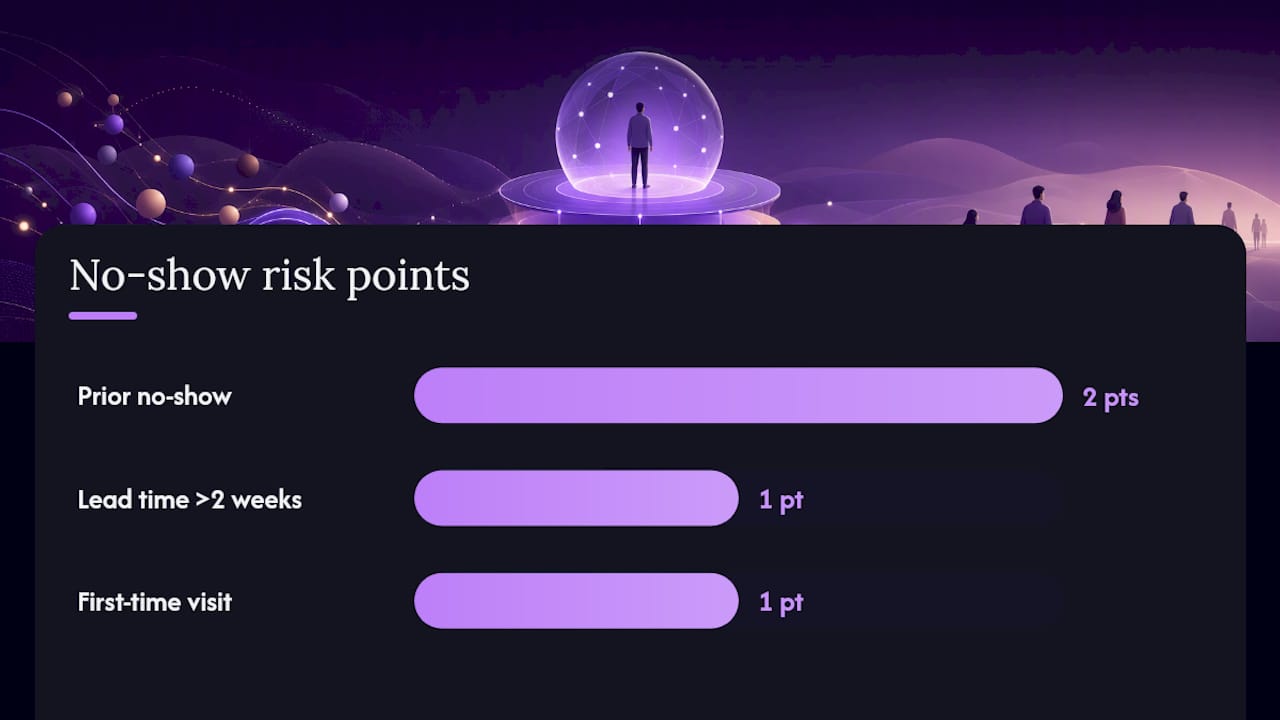
A simple scoring rubric doesn't need to be complicated to be useful. Assign points for each risk factor, say two points for a prior no-show, one point for a lead time over two weeks, one point for a first-time visit, and set a threshold above which an appointment gets flagged for extra attention.
The triage workflow that makes this work runs in three stages:
- An automated score runs at booking or the night before, based on history and appointment attributes
- Low and medium-risk appointments get the standard SMS confirmation sequence
- High-risk appointments escalate to a live call or an AI-handled call that can actually have a conversation, not just deliver a message
Predictive modelling research on no-show risk supports flagging appointments by history, lead time, insurance status, and distance to prioritize where limited staff time goes. That's the entire point of segmentation: your front desk has maybe an hour a day for outbound calls, and that hour should go to the ten appointments most likely to fall through, not spread thin across a hundred that were fine anyway.
One caveat worth stating plainly: any scoring system that uses patient history or demographic proxies needs a clear consent and privacy framework. Patients should know their appointment data feeds a risk model, and that model should never be used to deny care or apply a policy penalty. It's a scheduling tool, not a judgment tool.
Do deposits, telehealth, and flexible hours actually help?
Sometimes, and the answer depends heavily on why a specific patient tends to miss appointments. Telehealth removes travel and time barriers, so it helps most for follow-up visits, medication checks, and consultations that don't require a physical exam. Flexible hours, early morning or evening slots, help patients whose no-shows trace back to work conflicts rather than forgetting or disorganization.
Deposits and card-on-file policies work, but only when applied with care. A blanket deposit requirement on every booking creates friction for the majority of patients who were always going to show up, and it can push away new patients before they ever become loyal ones. Reserve deposits for a narrower set of cases: patients with two or more prior no-shows, high-value appointment slots (a two-hour procedure block, for instance), or specialties where a missed slot is genuinely hard to backfill.
A few practical guardrails:
- Keep deposit amounts modest, a fraction of the visit cost, not the full amount
- Refund automatically for cancellations made with reasonable notice (24 to 48 hours is common)
- State the policy clearly at booking, in plain language, not buried in fine print
- Never apply a deposit or penalty policy that isn't disclosed before the patient books
The way you present a policy matters as much as the policy itself. A deposit framed as "we hold this slot for you and refund it once you show up" reads very differently than "pay now or we won't book you." Same mechanism, very different trust impact.
How do you calculate and track your no-show rate?
The formula is simple: divide missed appointments by total scheduled appointments for a given period, then multiply by 100. Track it by appointment type, provider, and day of week separately, because a blended clinic-wide number hides where the actual problem lives.
To build a baseline and prove impact:
- Pull 90 days of historical no-show data, segmented by appointment type, before changing anything
- Roll out confirmations and one-tap rescheduling first, and hold policy changes for a second phase
- Run an A/B test where feasible, comparing a confirmation-only reminder group against a confirmation-plus-reschedule-link group
- Re-measure at 30, 60, and 90 days, comparing the same appointment types against your baseline
Statistic Callout: Organizations implementing structured reminder call systems saw an average 19% drop in no-shows, with some seeing declines of 20% or more once confirmations were added to the mix.
A realistic timeline runs about 90 days: the first few weeks are setup, the middle stretch shows initial improvement as patients adapt to the new confirmation flow, and the final weeks deliver additional gains once waitlists and targeted outreach are fully running, according to practitioner guidance on no-show reduction rollouts. Report the segmented numbers to leadership, not just the headline rate.
What does the research actually say about no-show prevention?
The evidence base here is more consistent than most operational topics in healthcare. A study on reminder calls published in PMC found an average 19% reduction in no-shows across the sample, with several participating organizations reporting swings of 20% or higher. Separately, a 2025 digital health analysis in Frontiers found that online appointment systems combined with SMS reminders reduced unused appointment rates and correlated with lower no-show risk across practice settings, not just in theory.
The behavioural side matters just as much as the technical side.
Stating the real cost of a missed appointment, paired with a genuinely easy way to act on that information, changes patient behaviour more than a neutral reminder does. It's not about guilting anyone. It's about giving them a reason and a path, in the same message.
That finding, drawn from behavioural-economics research on communication and appointment adherence, is why wording and one-tap action matter as much as the reminder itself.
A layered automation stack maps directly onto this research:
- AI-handled call answering catches the patients who would otherwise never respond to a text
- SMS confirmations with reply options operationalize the confirmation-versus-reminder distinction the studies point to
- Automated waitlist backfill turns the "make rescheduling easier than ghosting" principle into something that runs without staff intervention
- Integration with existing calendar and booking systems means the risk scoring and outreach triage happen without manual data entry
How DEXCORE Technologies helps you run this stack without adding staff
You don't need to hire a scheduling coordinator to run confirmations, one-tap rescheduling, and waitlist backfill at once. That's the practical gap Dexcoretechnologies is built to close for clinics, contractors, and other appointment-driven businesses: a 24/7 AI receptionist that answers every call, books directly into your calendar, sends SMS confirmations and reminders, and hands off to a live waitlist the moment a slot opens, without a person manually chasing any of it.

Onboarding typically starts with mapping your current booking flow and calendar system, connecting the integration, and setting confirmation cadence and message wording to match your patient or client base. Most businesses see the reminder and confirmation layer live within the first couple of weeks, with waitlist automation and risk-based routing following once there's a baseline no-show rate to work against.
If you're running a clinic, contractor business, or any appointment-driven operation and want the confirmation, rescheduling, and waitlist layers running without adding headcount, take a look at the AI receptionist built for service businesses and book a walkthrough of how the setup maps onto your current calendar.
A practitioner's closing note on what actually moves the number
Most clinics chase the wrong fix first. They tighten cancellation policies before they've made rescheduling easy, which punishes patients for a friction problem the practice created. The order matters: remove friction first, then add outreach for the cases friction alone won't solve, and save policy tools for the pattern that survives both. Practices that run it in reverse tend to see attendance numbers stall and patient trust erode at the same time.
Pilot the confirmation and reschedule layer for one appointment type before rolling it clinic-wide. Measure it against your actual baseline, not an industry average.
Frequently asked questions
What's the fastest way to reduce appointment no shows this week? Turn on two-way SMS confirmations with a built-in one-tap reschedule link. It's the single highest-leverage change because it acts on the patient instead of just informing them, and it needs no policy change to implement.
How much can reminders alone reduce no-shows? Centralized reminder call programs cut no-shows by roughly 19% on average. Reminders paired with confirmation actions and rescheduling tend to push that number higher, since reminders alone address forgetting but not friction.
Should every practice use deposits or card-on-file to prevent no-shows? No. Deposits work best applied selectively, for patients with a repeated no-show history or for high-value appointment slots, rather than as a blanket policy that adds friction for patients who were always going to show up.
What's the difference between a confirmation and a reminder? A reminder informs the patient about an upcoming appointment. A confirmation asks them to act, typically by replying to confirm or tapping a link to reschedule, which surfaces likely no-shows early enough to backfill the slot.
How do you calculate no-show rate correctly? Divide missed appointments by total scheduled appointments for a period, multiplied by 100, and calculate it separately by appointment type and provider rather than as one blended clinic-wide figure.