
Automated SMS appointment confirmations are the single most reliable way to cut no-shows in Canadian clinics, service businesses, and healthcare practices. Text messages boast a 98% open rate, making SMS one of the most effective channels for appointment confirmations compared to email or voice.
What is SMS appointment confirmation and why does it work?
An SMS appointment confirmation is an automated text sent to a client immediately after they book, verifying the details and prompting a response. It is not the same as a reminder. The confirmation fires once, right at booking. Reminders follow later, closer to the appointment date.
Every effective confirmation text needs seven elements to do its job:
- Client's first name — personalisation signals the message is not spam
- Your business or clinic name — clients need to know who is texting them
- Appointment date and time — stated clearly, no ambiguity
- Location or virtual meeting link — never make a client guess where to go
- Service or appointment type — especially useful in healthcare and multi-service businesses
- A clear call to action — "Reply YES to confirm" or "Reply RESCHEDULE to change your time"
- Cancellation policy or link — transparency here reduces last-minute no-shows
The benefits go beyond convenience. Confirmed appointments fill your schedule reliably, free your front desk from phone tag, and give clients an easy path to reschedule rather than simply not showing up.
How SMS confirmations and reminders work in practice

The standard sequence that reduces no-shows most effectively runs in two or three messages. First, an immediate confirmation fires the moment a booking is created. Second, a reminder goes out 24–48 hours before the appointment, giving clients enough time to reschedule without leaving you with an unfillable slot. A brief same-day nudge is optional but particularly useful for afternoon appointments.
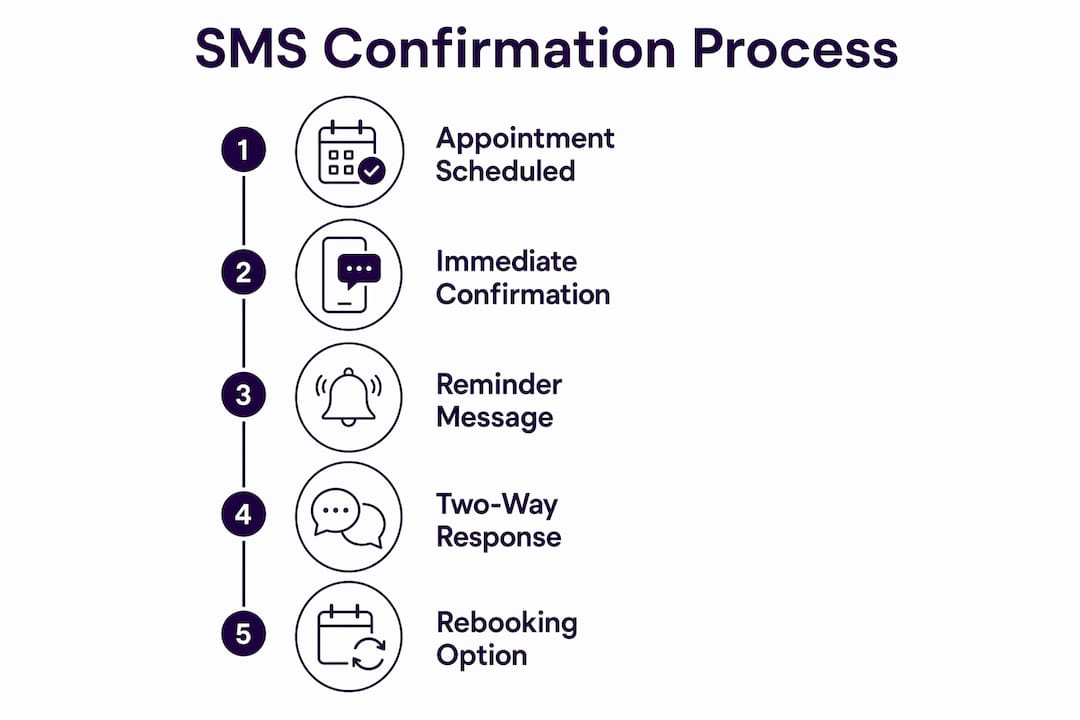
Two-way SMS turns a one-way notification into a conversation. When a client replies "YES," the calendar marks the appointment confirmed automatically. A reply of "RESCHEDULE" triggers a workflow that opens a new slot and notifies your team, all without a staff member picking up the phone.
Key operational benefits of this approach:
- Responses sync directly to your scheduling system, updating availability in real time
- Staff spend less time on outbound calls and manual calendar updates
- Clients who need to cancel do so early, giving you time to fill the slot
- Healthcare providers using platforms like Accuro EMR, Jane App, and Cliniconex can connect SMS workflows directly to patient records
Pro Tip: Set your two-way SMS to come from a dedicated, recognisable number rather than a shared short code. Clients are far more likely to reply when they recognise the sender, and calendar sync reliability depends on responses being captured consistently.
Best practices for writing and scheduling confirmation texts
Clear, personalised messages outperform generic ones every time. Address the client by first name, keep the body under 160 characters where possible, and give exactly one call to action per message. Stacking "Reply YES to confirm, or NO to cancel, or RESCHEDULE to change your time" in a single text overwhelms the reader and drops response rates.

Timing matters as much as wording. Send the first confirmation within seconds of booking, while the client's attention is still on the appointment. The 24-to-48-hour reminder window is the sweet spot: close enough to prompt action, far enough out for a rescheduling to be useful to both parties.
Additional practices worth building into your workflow:
- Use a consistent sender ID and brand voice so messages feel professional, not like spam. Consistent branding in SMS improves both professionalism and client response rates.
- Include opt-out language ("Reply STOP to unsubscribe") in every message thread
- Avoid sending outside business hours unless the client has explicitly opted in to after-hours texts
- For healthcare, keep messages focused on logistics only — never include clinical details in an SMS
Pro Tip: Pair your automated reminders with a cancellation confirmation that offers an immediate rebooking path. A cancelled appointment handled well is a retained client.
Privacy, compliance, and customisation in Canadian SMS confirmations
Canada's Anti-Spam Legislation (CASL) sets the rules for any commercial SMS communication, and the Canadian Radio-television and Telecommunications Commission enforces them. Non-compliance carries real financial consequences, so getting this right before your first message goes out is not optional.
CASL compliance essentials for SMS appointment confirmations:
- Express consent must be obtained before sending any text. A checkbox on your booking form is the standard method.
- Business identification is required in every message. Your clinic or business name must appear in the text itself.
- Opt-out mechanism must be present. "Reply STOP" is the accepted standard.
- Shared short codes are prohibited for critical workflows. Use a dedicated number.
- Healthcare providers must avoid including any protected health information in SMS content. Keep messages to date, time, provider name, and location only.
- Consent records must be documented and retained in case of a complaint.
On the customisation side, most Canadian SMS platforms let you set a branded sender name, adjust message templates by appointment type, and configure timing rules per service category. This flexibility means a physiotherapy clinic can send a different template than a hair salon, even on the same platform.
How to enable SMS confirmations on popular Canadian platforms
Setup varies by platform, but the core steps are consistent across Accuro EMR, Jane App, Cliniconex, and GoDaddy Canada's scheduling tools.
Accuro EMR integrates SMS appointment confirmations directly within its clinic management workflow. Providers configure message templates and timing rules inside the EMR, and patient responses feed back into the appointment record automatically.
Jane App offers built-in SMS and email reminders with customisable templates. Practitioners set the timing sequence, choose which appointment types trigger messages, and can personalise the sender name displayed to patients.
Cliniconex specialises in automated patient outreach for Canadian healthcare. Its platform connects to existing EMR systems and handles the full confirmation and reminder sequence, including two-way response handling and calendar updates.
GoDaddy Canada provides SMS confirmation and reminder tools for small and medium businesses through its appointment confirmation settings, accessible directly from the scheduling dashboard.
Across all platforms, the setup follows a similar path:
- Navigate to your scheduling or communications settings
- Enable SMS notifications and select delivery timing
- Customise your message template with the seven required elements
- Add opt-in consent to your booking form before activating
- Test with an internal booking before going live
Pro Tip: Avoid sending from a no-reply number. Clients who cannot respond to a confirmation text will either call your front desk or simply not show up. A two-way number removes that friction entirely.
For businesses that want SMS confirmations integrated with a broader workflow automation stack, connecting your scheduling platform to an AI receptionist layer handles the full cycle: booking, confirmation, reminder, and rescheduling, without manual intervention at any step.
How to measure whether your SMS confirmations are actually working
Sending texts is easy. Knowing whether they are doing anything is where most businesses fall short. Track these metrics from the start:
- Confirmation rate: the percentage of clients who reply to confirm. A low rate often points to a weak call to action or an unrecognised sender number.
- No-show rate before and after: the clearest indicator of whether your sequence is working. Compare month-over-month after implementing or changing your timing.
- Reschedule rate: a rising reschedule rate is a good sign. It means clients are engaging with your messages rather than ghosting.
- Response time: how quickly clients reply after receiving a confirmation. Faster responses mean your message timing and wording are landing well.
- Opt-out rate: a spike here signals that message frequency or content needs adjustment.
Most scheduling platforms surface these figures in a reporting dashboard. If yours does not, a simple spreadsheet tracking weekly no-shows against total appointments gives you enough signal to act on.
How Dexcoretechnologies handles SMS appointment confirmation for Canadian businesses

Dexcoretechnologies builds SMS appointment confirmations into a full AI receptionist service designed for Canadian businesses and healthcare providers. The system handles inbound calls, books appointments in real time, and fires confirmation and reminder texts automatically, without a human touching the workflow.
For clinics, contractors, and service businesses across British Columbia, that means no missed bookings after hours, no confirmation texts forgotten during a busy afternoon, and no staff time spent chasing responses. The integration connects to your existing calendar and CRM, so every confirmed appointment updates your schedule instantly.
Key takeaways
SMS appointment confirmations work because they reach clients where they already are, with a message they will almost certainly read.
| Point | Details |
|---|---|
| 98% open rate | SMS confirmations are read at a 98% rate, making them the most effective confirmation channel compared to email or voice. |
| Two-message sequence | Send an immediate confirmation at booking, then a reminder 24–48 hours before the appointment. |
| Seven required elements | Every confirmation must include client name, business name, date, time, location, a clear call to action, and cancellation policy. |
| CASL compliance | Obtain express consent, identify your business in every message, and include a STOP opt-out before sending any text. |
| Measure confirmation rate | Track reply rates, no-show rates, and reschedule rates to know whether your sequence is working. |