
If your clinic is still relying on manual phone calls to confirm appointments, you are losing recoverable revenue every week. The single most effective step you can take right now is to deploy an automated, multi-channel reminder system with two-way confirm/cancel that syncs directly with your EMR or calendar and meets both PIPEDA and CASL requirements. A UK randomised trial found that reminder wording stating the specific cost of a missed appointment reduced missed appointments by about 23% compared to a standard message, dropping the no-show rate from 11.1% to 8.4%. Canadian clinics can replicate that result with the right setup.
Here is what to do this week:
- Enable SMS and email reminders with a two-touch cadence: one message 3–7 days before the appointment and a second message 24 hours before.
- Turn on two-way confirmations so patients can confirm, reschedule, or cancel by reply, with status updates flowing automatically into your EMR or calendar.
- Keep message content strictly logistical: practice name, date, time, provider, and a cancellation link. No clinical details.
- Confirm your vendor holds a data processing agreement and stores data on Canadian servers or with equivalent protections.
- Review patient intake forms to capture and document preferred contact channel before go-live.
Dexcoretechnologies offers a Canadian-built AI receptionist with two-way SMS confirmations and calendar integration that covers these requirements out of the box.
Table of Contents
- What core features should you expect from any reminder system?
- How do PIPEDA and CASL apply to automated reminders?
- How do you write reminder messages that actually change behaviour?
- What does EMR and calendar integration actually look like?
- How do you measure no-show reduction and calculate ROI?
- Your vendor checklist and go-live action list
- Key takeaways
- Why the reminder conversation misses the bigger picture
- Dexcoretechnologies: built for Canadian clinic operations
What core features should you expect from any reminder system?
Not every platform marketed as a "reminder tool" delivers the same capabilities. Before you evaluate vendors, know which features are genuinely table-stakes and which are optional extras.
Multi-channel delivery means SMS, email, and optionally voice. SMS reaches patients fastest and has the highest open rate; email is better for longer messages with links. Voice calls remain useful for patients who prefer them or who have a history of no-shows, as the American Dental Association notes that some patients respond better to a personal touch. Avoid sending protected health information over any of these channels.
Two-way confirmations are where most basic tools fall short. A patient replying "C" to confirm or "R" to reschedule should automatically update the appointment status in your EMR or calendar, with no manual step required. This closed-loop workflow is what actually saves front-desk time. Without it, staff still have to log into the system and update records by hand.

Dynamic message templates let you personalise each message with the patient's name, provider, location, appointment type, and a cancellation link. The cancellation link is particularly valuable: it gives patients an easy, low-friction path to cancel in advance, which converts no-shows into advanced cancellations your team can fill.
Reporting and delivery logs should show you read receipts, delivery failures, opt-outs, and retry attempts. These logs are not just useful for performance tuning; they are part of your compliance audit trail.
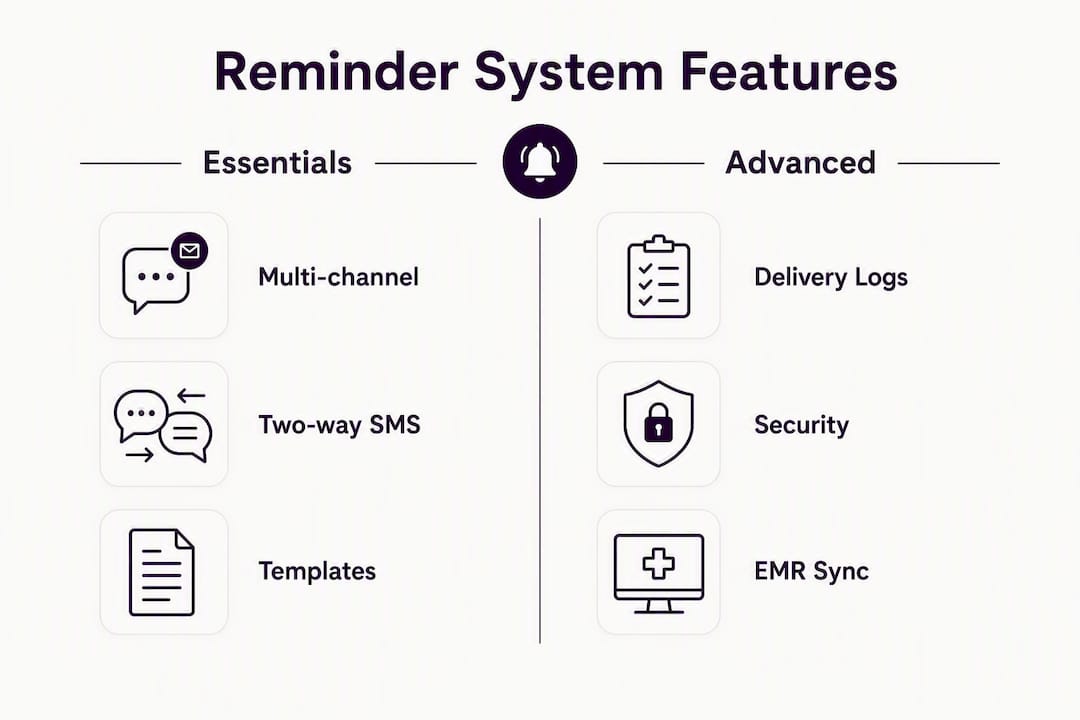
Security controls to look for include encryption in transit and at rest, role-based access, and a signed data processing agreement. Any vendor handling patient contact information on your behalf must be contractually bound to protect it.
Pro Tip: Ask vendors specifically whether two-way replies update your EMR automatically or whether they only notify staff by email. The difference between those two architectures is the difference between saving 30 minutes a day and saving none.
How do PIPEDA and CASL apply to automated reminders?
Canadian clinics operate under two overlapping frameworks when sending automated patient reminders, and conflating them is a common mistake.
PIPEDA governs how you collect, use, and disclose personal information, including a patient's phone number and email address. Sending a reminder is a use of personal information, so you need a lawful basis. For existing patients, implied consent generally covers appointment-related communications, but you still need to document that the patient provided their contact details for this purpose and that they have not opted out.
CASL applies to "commercial electronic messages," which includes appointment reminders sent to a patient's personal device. Under CASL, you need either express or implied consent, a clear sender identification, and an unsubscribe mechanism in every message. Implied consent under CASL exists when there is an existing business relationship, which covers most active patient relationships, but it expires two years after the last interaction.
Practical compliance steps before you switch on automated reminders:
- Update patient intake forms to capture preferred contact channel and record explicit consent for electronic reminders.
- Add an unsubscribe or opt-out instruction to every message (e.g., "Reply STOP to opt out").
- Document consent records in the patient chart, including the date and method of consent.
- Confirm your vendor provides a signed data processing agreement covering encryption, access controls, data retention limits, and audit logs.
- Limit message content to practice name, date, time, provider, and a cancellation or reschedule link. Never include diagnosis, medication, or treatment details.
- Establish a process to honour opt-outs within the timeframe CASL requires and to suppress opted-out patients from future sends.
The table below summarises the two frameworks side by side.
| Requirement | PIPEDA | CASL |
|---|---|---|
| Consent type | Implied (existing patient) or express | Express or implied (existing business relationship) |
| Consent expiry | No fixed expiry; must be current and documented | Implied consent expires 2 years after last interaction |
| Opt-out obligation | Honour withdrawal of consent promptly | Unsubscribe mechanism required in every message |
| Message content | Limit to minimum necessary personal information | Must identify sender and include contact information |
| Vendor obligation | Data processing agreement, encryption, access controls | Same; vendor acts as a service provider under your consent |
For a deeper look at SMS appointment confirmation compliance in British Columbia specifically, Dexcoretechnologies has published practical guidance for Canadian clinics.
How do you write reminder messages that actually change behaviour?
The wording of your reminders matters more than most clinic managers realise. A large-scale A/B testing study published in PLOS One found that several message frames produced statistically significant reductions in no-show rates compared to a generic control, with emotional and cost-framed messages consistently outperforming standard logistical text.
The UK government trial mentioned above is the clearest evidence: telling patients the specific cost of a missed appointment cut no-shows by about 23%. The mechanism is straightforward. A message that says "Your appointment costs the clinic $150 if missed" activates loss aversion in a way that "Please remember your appointment" simply does not.
Three frames worth testing:
- Logistical (control): "Hi [Name], your appointment with [Provider] at [Clinic] is on [Date] at [Time]. Reply C to confirm or call us to reschedule."
- Appointment-cost frame: "Hi [Name], a missed appointment costs our clinic approximately $150. Your appointment is [Date] at [Time]. Reply C to confirm or [link] to reschedule."
- Social-norm frame: "Hi [Name], most patients at [Clinic] confirm their appointments in advance. Yours is [Date] at [Time]. Reply C to confirm or [link] to reschedule."
For new patients, add a brief orientation line: "We look forward to meeting you. If you need to reschedule, please give us 24 hours' notice."
Cadence: send the first reminder 3–7 days out so patients have time to reschedule without a last-minute scramble. The 24-hour reminder is the attendance nudge. For high-value or long appointments, a same-day message is worth adding.
Accessibility and preference: honour the patient's preferred channel. Some patients, particularly older adults, prefer a phone call. Documenting that preference and routing them to a call rather than a text is both a compliance best practice and a courtesy.
Statistic callout: In the UK government randomised trial, the specific-cost message frame reduced missed appointments from 11.1% to 8.4%, a relative reduction of about 23% with no additional cost beyond changing the message text.
Pro Tip: Run your A/B test for at least four weeks and compare no-show rates and advanced cancellation rates separately. A message that increases cancellations is not a failure; it is giving you fillable slots instead of empty chairs.
What does EMR and calendar integration actually look like?
Integration is where many reminder projects stall. Understanding the three common patterns helps you ask the right questions during vendor demos.
- Direct EMR plugin: the reminder tool installs as a module inside your existing EMR (e.g., OSCAR Pro, PS Suite, Accuro). Appointment data flows natively, and status updates write back automatically. This is the cleanest architecture but depends on your EMR vendor supporting the integration.
- Calendar sync (Google Calendar or Microsoft Outlook): the reminder tool reads appointments from a shared calendar and sends reminders based on calendar events. Simpler to set up, but write-back is often limited; staff may still need to update the EMR manually after a patient reschedules.
- Middleware or API-based integration: a workflow automation layer sits between your EMR and the reminder tool, mapping fields and handling status updates. More flexible and works with EMRs that lack native integrations, but requires more configuration time upfront.
The data flow you want in all three cases is: appointment created in EMR → reminder scheduled automatically → patient replies → appointment status updated in EMR, with no manual step in the middle.
Implementation checklist before go-live:
- Map all appointment fields (patient name, phone, email, appointment type, provider, location) to the reminder tool's dynamic fields.
- Send test messages to internal staff numbers and confirm delivery, formatting, and two-way reply handling.
- Configure opt-out suppression so patients who have replied STOP do not receive further messages.
- Define escalation rules for delivery failures (e.g., if SMS fails, fall back to email; if both fail, flag for a manual call).
- Train front-desk staff on how to handle replies that arrive outside automated flows (e.g., a patient who texts a question rather than a keyword).
- Set a pilot period of 2–4 weeks before full go-live, monitoring delivery logs daily.
A typical timeline from vendor selection to full operation runs 4–8 weeks: two weeks for integration configuration and testing, one to two weeks for staff training, and a two-to-four-week pilot before you turn off manual call reminders entirely.
Pro Tip: During the pilot, run automated reminders in parallel with your existing manual process for the first two weeks. This lets you catch delivery failures and field-mapping errors without risking missed confirmations.
For a broader look at how AI appointment scheduling integrates with Canadian clinic workflows, Dexcoretechnologies has published a technical overview worth reading before your vendor calls.
How do you measure no-show reduction and calculate ROI?
You cannot manage what you do not measure. Before you launch reminders, pull four to twelve weeks of baseline data from your EMR appointment logs.

Core metrics to track:
| Metric | How to calculate | Why it matters |
|---|---|---|
| No-show rate | No-shows ÷ total scheduled appointments | Primary outcome; your baseline benchmark |
| Advanced cancellation rate | Cancellations with 24+ hours notice ÷ total scheduled | Higher is better; these slots can be refilled |
| Same-day cancellation rate | Cancellations under 24 hours ÷ total scheduled | Lower is better; hard to fill on short notice |
| Slot fill rate | Refilled cancelled slots ÷ total cancellations | Measures scheduling team's ability to recover revenue |
| Staff hours saved | Hours previously spent on manual reminder calls per week | Quantifies administrative ROI |
ROI calculation: estimate the average revenue per appointment, multiply by the number of no-shows prevented per month, and subtract your monthly reminder system cost (subscription plus SMS fees). Add the value of staff hours recovered. Most clinics find the system pays for itself within the first month of operation.
Statistic callout: The UK government trial's 23% reduction in missed appointments came from a message wording change alone, with no change to the reminder system's cost structure.
Evaluate results monthly for the first quarter, then shift to quarterly reviews once your cadence and templates are stable. Use your vendor's delivery and response logs alongside EMR appointment data; the two sources together give you the full picture of what was sent, what was received, and what patients did next.
Pro Tip: Track advanced cancellations separately from no-shows. A reminder system that converts no-shows into 48-hour cancellations is generating real value even if your raw no-show rate only drops modestly, because those slots become fillable.
Your vendor checklist and go-live action list
Use this list during demos and procurement calls, then again during your first week of operation.
Vendor questions to ask:
- Which Canadian EMRs do you integrate with natively, and how does write-back work?
- Does two-way reply handling update appointment status automatically or notify staff by email?
- What retry logic applies when an SMS fails to deliver?
- How do you handle opt-outs, and how quickly are opted-out patients suppressed?
- Where is patient data stored, and do you provide a signed data processing agreement?
- What encryption standards apply in transit and at rest?
- What are your support hours and SLA for delivery failures?
Configuration items before go-live:
- Set default cadence: 3–7 days out plus 24 hours before, with an optional same-day message for high-value appointments.
- Configure sender ID so patients recognise your clinic name, not a random short code.
- Map dynamic fields: patient name, provider, date, time, location, cancellation link.
- Set fallback protocol: SMS failure triggers email; both failures flag for a manual call.
- Test cancellation link format on iOS and Android before launch.
Staff actions:
- Update intake forms to capture preferred contact channel and document consent.
- Brief front-desk staff on how automated replies appear in the EMR and what requires manual follow-up.
- Set escalation rules for patients who do not respond to either reminder touch.
- Identify patients with repeated no-show history for targeted phone outreach rather than automated messages only.
Pricing considerations: most platforms charge either per message (typically per SMS sent) or a flat monthly subscription with a message bundle. Per-message pricing is predictable for small clinics; bundled plans become more cost-effective above a certain volume. Factor in onboarding fees, integration setup costs, and any per-seat charges. The Canadian buyer's guide to appointment booking software covers pricing structures in more detail.
Go/no-go at pilot end: if delivery rates are above 95%, no-show rate has dropped, and staff report fewer manual confirmation calls, proceed to full launch. If delivery rates are low or opt-outs are high, review message content and sender ID before scaling.
Key takeaways
Automated patient appointment reminders with two-way confirm/cancel, EMR sync, and PIPEDA/CASL-compliant messaging are the single highest-return scheduling change a Canadian clinic can make.
| Point | Details |
|---|---|
| Two-touch cadence | Send one reminder 3–7 days out and a second 24 hours before to give patients time to reschedule. |
| Message framing matters | Cost-framed messages reduced missed appointments by about 23% in a randomised trial; test frames monthly. |
| Compliance before go-live | Confirm PIPEDA consent documentation, CASL opt-out mechanism, and a signed vendor data processing agreement. |
| Measure baseline first | Pull several weeks of no-show, cancellation, and fill-rate data before launch so ROI is calculable. |
| Dexcoretechnologies for Canadian clinics | Dexcoretechnologies provides two-way SMS confirmations, EMR/calendar integration, and Canadian compliance support as part of its AI receptionist platform. |
Why the reminder conversation misses the bigger picture
Most articles about patient appointment reminders stop at the message. Pick a cadence, write a template, watch no-shows drop. That is not wrong, but it is incomplete.
The real problem in most clinics is not that patients forget. It is that when a patient does want to cancel or reschedule, the path to doing so is inconvenient enough that they just do not show up instead. A reminder with a cancellation link does not just remind; it removes the friction from a decision the patient was already going to make. That is why advanced cancellation rates are a more honest signal of reminder system health than raw no-show rates. A clinic that sees no-shows hold steady but advanced cancellations double has actually improved its scheduling position significantly, because those slots are now fillable.
The second thing most guides underweight is the compliance layer. PIPEDA and CASL are not bureaucratic formalities. They exist because patient contact information is sensitive, and a breach or a CASL complaint can cost a clinic far more than a year of no-show revenue. Choosing a vendor without a signed data processing agreement is not a calculated risk; it is an unexamined one.
The third gap is measurement. Clinics that implement reminders without a baseline period cannot tell whether the system is working or whether seasonal variation is doing the work for them. Four weeks of pre-launch data is the minimum. Twelve weeks gives you a number you can actually defend to a practice owner or board.
None of this is complicated. It just requires treating the reminder system as a clinical workflow rather than a marketing tool.
Dexcoretechnologies: built for Canadian clinic operations
Clinics that have worked through the checklist above often find the bottleneck is not the reminder logic itself but the integration and compliance layer. That is where Dexcoretechnologies is a practical fit. The platform's AI receptionist for service businesses handles 24/7 call answering, two-way SMS confirmations, and real-time calendar and EMR sync, with Canadian data handling and onboarding support included in every plan.

The onboarding process covers field mapping, test message validation, staff training, and data processing agreement execution before your first live reminder goes out. You are not handed a login and a help centre link. For clinics evaluating whether automated reminders are worth the setup effort, Dexcoretechnologies offers a pilot so you can measure no-show reduction against your own baseline before committing to a full subscription. Book a demo at dexcoretechnologies.ca to see the integration and compliance setup in practice.
Useful sources and further reading
Compliance and privacy (Canada):
- Personal Information Protection and Electronic Documents Act (PIPEDA) — Office of the Privacy Commissioner of Canada: primary reference for consent obligations, minimum data use, and vendor safeguards. Consult this for compliance audits and intake form design.
- Canada's Anti-Spam Legislation (CASL) is administered by the Canadian Radio-television and Telecommunications Commission (CRTC); consult the CRTC's official CASL guidance for current consent and unsubscribe requirements.
Evidence on message framing and no-show reduction:
- A zero-cost way to reduce missed hospital appointments — GOV.UK: the randomised trial showing a 23% reduction from cost-framed SMS messages. Use this to justify A/B testing investment to practice owners.
- Systematic A/B testing of digital messaging — PLOS One: large-scale study on message frame effects across emotional, social-norm, and cost frames. Use this when designing your testing methodology.
- SMS appointment reminders in a safety-net health system — PMC: pragmatic before-after study on SMS reminder adoption and attendance outcomes at scale.
Practice management guidance:
- Appointment confirmations — American Dental Association: guidance on hybrid approaches and patient preference documentation for dental appointment reminders. Applicable to other clinic types.
Statistic callout: The GOV.UK randomised trial found that cost-framed SMS messages reduced missed appointments by about 23% compared to a standard reminder, with no change to the underlying system cost.