
For most appointment-driven small and mid-size businesses, the best setup isn't a straight pick between a virtual receptionist and AI: it's an AI receptionist handling after-hours, overflow, and routine bookings, with humans stepping in for anything genuinely complex during core hours. That mix tends to deliver the strongest combination of coverage, cost control, and return on investment. High call volume or heavy after-hours demand pushes you toward AI; frequent emotionally sensitive or judgement-heavy calls push you toward keeping people on the line. The rest of this comes down to your call mix, your budget, and what you need each call to do once it's answered.
TL;DR:
- High call volume and after-hours demand favor AI solutions, while complex, emotionally sensitive calls require human intervention for better outcomes.
- Hybrid models, which use AI for routine and after-hours calls and humans for high-empathy or complex situations, provide the most flexible and cost-effective setup.
- Integration costs and timelines for AI systems are generally manageable, with basic setups completing in four to six weeks and costs starting around $99.25 per week per location.
- AI systems can automatically transcribe calls, extract key customer data, and update CRM and calendars, reducing manual re-entry and minimizing missed bookings.
- Most service businesses show better ROI with AI for routine calls and a human backup for high-complexity situations, especially when after-hours coverage and automated workflows are prioritized.
Table of Contents
- Virtual receptionist vs AI: where each model actually wins
- How do you choose between human, AI, and hybrid?
- What does implementation actually cost, and how long does it take?
- Why the ROI conversation misses the point
- How to actually evaluate Dexcoretechnologies for your business
- Sources
- FAQ
Virtual receptionist vs AI: where each model actually wins
The term "virtual receptionist" covers a wide spectrum, from remote human answering services to fully autonomous AI voice agents, and the deciding factor isn't the label, it's what happens to the call after pickup — does it just get a message taken, or does it write a booking straight into your calendar? That distinction, laid out well in Aloware's breakdown of the virtual receptionist spectrum, is the one most comparison articles skip past.
Humans still win on empathy. A distressed patient calling a clinic, a customer disputing a charge, a caller who needs to explain a messy, non-standard situation before they'll trust you with their business, these calls go better with a person who can read tone and improvise. AI wins on availability, consistency, and cost per call. It never gets tired, never puts a caller on hold because three other lines rang at once, and it follows the same script every single time.
Here's what each model actually handles well:
- Human strengths: emotionally complex calls, novel situations with no script, building a trusted relationship with repeat clients, exercising judgement when a caller's request doesn't fit a template.
- AI strengths: 24/7 coverage with zero staffing gaps, unlimited simultaneous calls during a rush, consistent scripting on every interaction, and structured data capture that writes directly into a CRM or calendar.
- Hybrid routing: AI answers after-hours and overflow calls, transfers anything flagged as high-empathy or high-complexity to a human during business hours.
One misunderstanding trips up a lot of buyers: they think of AI reception as a smarter voicemail. It's not. A CRM-native AI agent transcribes the call, extracts names, dates, and intent, and pushes that data into the contact record automatically, something a message-pad answering service was never built to do.
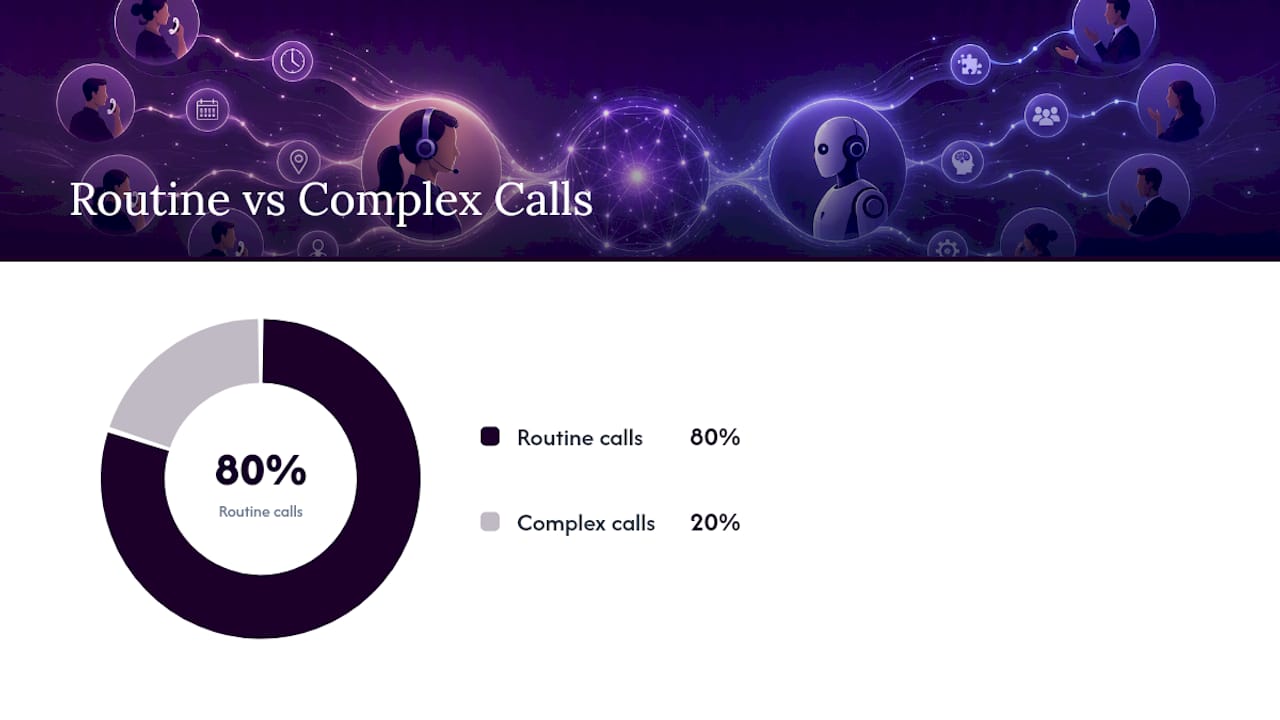
Pro Tip: Before you commit to either model, pull your last three months of call logs and tag each one as "routine" or "complex." If routine calls outnumber complex ones 4 to 1, you're likely paying human wages for work an AI answers just as well.
Bookings, appointment confirmations, and lead capture skew heavily toward the "routine" bucket for most service businesses. Warm transfers, escalations, and anything requiring on-the-spot judgement skew toward the human side, no matter how good the AI gets.
How do you choose between human, AI, and hybrid?
Score your business across five axes before you sign anything. Rate each one Low, Medium, or High, and let the pattern guide your decision rather than your gut.
- Average daily call volume. High volume with predictable patterns (bookings, confirmations, order status) favours AI. Low volume with high stakes per call favours human coverage.
- After-hours proportion. If a meaningful share of your calls come in evenings, weekends, or overnight, AI closes that gap without overtime pay. Many callers won't leave a voicemail at all, which means after-hours calls that go unanswered are often just lost business, not deferred business.
- Call complexity and empathy needs. Legal intake, clinical triage, and high-emotion customer service situations score High here, and that score should pull you toward keeping a human in the loop.
- Need for direct CRM or calendar writes. If your current process involves someone manually re-typing a message-pad note into your booking system, that's friction an integrated AI workflow removes outright.
- Budget and scalability needs. A seasonal spike in call volume is expensive to staff for and cheap to scale with software.
Total up your scores. Mostly High on volume, after-hours share, and CRM needs, with Low on complexity? AI-first, with a human backup for edge cases. Mostly High on complexity and empathy, with Low call volume? Keep your human receptionist and don't force automation where it doesn't fit. Mixed results, which is most businesses, point straight at hybrid.
Take a small physiotherapy clinic: 40 calls a day, a third after hours, mostly booking and rescheduling, with the occasional insurance question that needs a human. That's a textbook hybrid case, AI for the volume and off-hours load, a front-desk person for the insurance calls and anything that sounds urgent. A contractor fielding emergency service calls at 2 a.m. scores similarly, except the "complex" bucket there is smaller than owners usually assume, since most emergency calls just need a booked slot and a dispatched technician.
What does implementation actually cost, and how long does it take?
Before comparing dollar figures, map out what needs to connect. A reception system that doesn't talk to your other tools just creates a second inbox to check.
- CRM integration, so call details land in the same record your sales or front-desk team already uses.
- Calendar sync, so bookings go straight into available slots instead of a callback queue.
- SMS confirmations and reminders, which cut down no-shows without extra staff time.
- Booking workflows, and for logistics or delivery businesses, dispatch or POS connections.
A sensible rollout looks like a pilot during quiet hours first, then escalation rules (what gets transferred to a human, and when), then the full CRM and calendar connection, a short staff training session on the handoff process, and a review at the 30 to 90 day mark once real call data has accumulated. Basic integration for a single-location business typically fits inside a 4 to 6 week window.
On cost, the two models are billed differently. Human virtual receptionist services usually run per-minute or as a monthly retainer, while AI receptionist subscriptions carry a flat monthly fee plus a setup charge, with add-ons like extra call volume or premium integrations often inflating the sticker price. Comparisons run over a multi-year horizon frequently show AI setups costing less than staffed alternatives, largely because the after-hours coverage and booking automation recover revenue that would otherwise walk away silently. On the operational side, keep quality monitoring in place regardless of which model you pick, set clear escalation rules in writing, and confirm how call data is captured and stored before you sign anything.
Why the ROI conversation misses the point
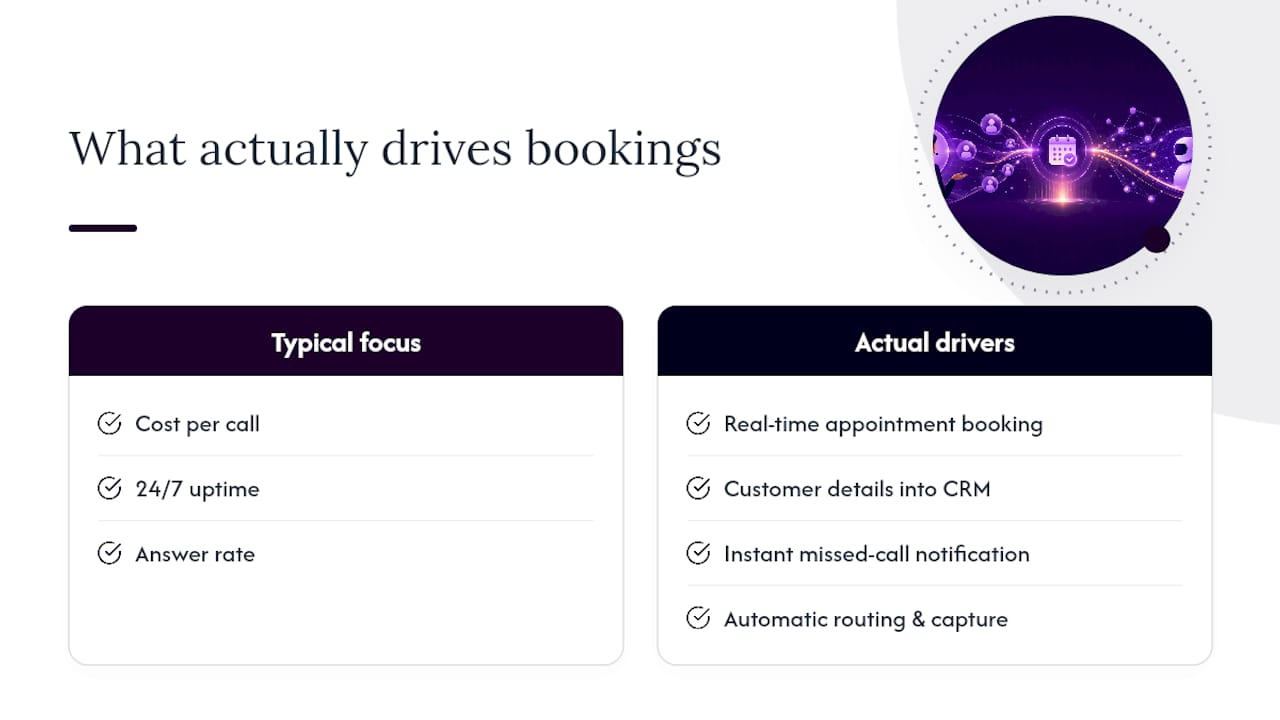
Most coverage of this topic fixates on cost per call and 24/7 uptime as the headline ROI numbers. Those matter, but they're not what actually determines whether a captured call turns into revenue. That comes down to what happens after the call ends, whether the booking lands in the calendar without a human retyping it, whether the lead's details land in the CRM warm and ready for a follow-up call, whether a missed-call notification reaches the right person in seconds instead of the next morning.
Dexcoretechnologies builds around that distinction. The platform offers 24/7 call answering with real-time appointment booking, and it goes further than a voice assistant that just picks up and takes a message: it captures customer details, routes requests, and sends notifications automatically, so a call at midnight results in a confirmed appointment on the calendar by morning, not a voicemail nobody returns.
— James
How to actually evaluate Dexcoretechnologies for your business
If your business is appointment-driven, whether that's a clinic, a contractor, a restaurant, or a transport company juggling dispatch calls, AI receptionist systems give you a way to stop losing bookings to missed calls without hiring another front-desk staffer. Unlike a bare voice assistant, these systems configure the full workflow around your business: calendar sync, CRM connection, and automated notifications, so a booked call actually becomes a booked appointment.

Pricing runs on a subscription model rather than a per-minute meter that punishes busy weeks. Service businesses can start with the Flexible Setup plan at $124.25 per week, or the Value Plan at $99.25 per week for a leaner setup, with a setup fee starting from $500. Multiple-location operators pay $99.25 per week per location under the Multiple Location plan, and businesses that prefer to pay only for what they use can start with Pay Per Use at $31.25 per week. Transport and delivery operators managing dispatch calls can look at the Transport Dispatch Automation option built specifically for that workflow. Visit the service businesses page, compare the plans against your call volume from the scoring rubric above, and book a walkthrough to see how the setup fits your existing calendar and CRM.
Sources
The comparison and cost figures above draw on Aloware's guide to virtual receptionist models for the human/AI spectrum, Invenix's multi-year cost comparison for ROI data, SaveYa Tech's case for hybrid routing, and Voxtent's pricing breakdown for sample cost bands. For a deeper look at evaluating AI features beyond a sales demo, see this practical evaluation guide.
- What Is a Virtual Receptionist? AI vs. Human (2026 Guide)
- AI Receptionist vs Virtual Receptionist: Complete Comparison for 2026 | Invenix
- How Much Does a Virtual Receptionist Cost? 2026 Full Breakdown | Voxtent
FAQ
Is an AI receptionist better than a human virtual receptionist?
Neither is universally better. AI wins on 24/7 coverage, consistency, and cost per call, while humans win on empathy and handling complex, non-standard situations, so most businesses do best with a hybrid of the two.
How much does a virtual receptionist cost compared to AI?
Human virtual receptionist services typically bill per-minute or as a monthly retainer, while AI subscriptions run as a flat monthly fee plus setup costs; Dexcoretechnologies plans for service businesses start at $99.25 per week for the Value Plan, plus a setup fee from $500.
Can AI receptionists handle appointment booking and CRM updates?
Yes. CRM-native AI receptionists write call details, extracted intent, and booking confirmations directly into your calendar and customer records, removing the manual re-entry step a message-pad service requires.
What business types benefit most from a hybrid receptionist model?
Appointment-driven businesses with mixed call complexity, clinics, contractors, restaurants, and transport companies, tend to benefit most, since AI handles routine bookings and after-hours calls while humans manage complex or high-empathy situations.
How long does it take to set up an AI receptionist system?
Basic integration with a calendar and CRM for a single location typically takes 4 to 6 weeks, including a pilot period, escalation rule setup, and staff training before a full review.