
For AI receptionist and customer interaction use cases, start with workflow automation. It solves the immediate problem, costs less to implement, and delivers measurable results in weeks rather than months. Process automation is the right next step once you have proven ROI and documented your workflows. Dexcoretechnologies is built precisely for this starting point: 24/7 AI call answering, automated booking, and CRM capture that work within your existing stack from day one.
- Workflow automation handles a single, repeatable task: a trigger fires, rules run, an action completes.
- Process automation (BPM) coordinates multiple workflows end-to-end across teams, systems, and approval chains.
- For missed calls, appointment booking, and lead capture, workflow automation delivers faster time-to-value with far lower complexity and cost than a full BPM programme.
Canadian businesses handling customer interactions are also subject to PIPEDA and provincial privacy laws, so any automation touching personal data needs documented consent and data-handling policies from the start.
Faster follow-up increases conversion significantly: lead qualification drops sharply when response time for inbound leads climbs from five minutes to ten minutes.
Table of Contents
- How do workflow automation and process automation compare?
- What is workflow automation, and what does it look like for a receptionist?
- What is process automation (BPM), and when does it matter?
- Key differences through lenses Canadian SMBs actually care about
- How do you decide: workflow or process automation first?
- How to implement AI-driven workflow automation for receptionist tasks in Canada
- How workflow automation grows into process automation
- Common pitfalls and how to avoid automating chaos
- How Dexcoretechnologies delivered measurable results with an AI receptionist workflow
- Key takeaways
- Why workflow automation should come first: a practical perspective
- Ready to run an AI receptionist pilot? Here's what Dexcoretechnologies offers
- Further reading and Canadian resources
How do workflow automation and process automation compare?
| Dimension | Workflow automation | Process automation (BPM) |
|---|---|---|
| Scope | Single task or handoff (e.g., missed call → SMS → CRM entry) | End-to-end operation across teams and systems |
| Complexity & governance | Low; rule-based logic, minimal oversight | High; SLA tracking, owners, compliance reviews |
| Time-to-value | Days to weeks for a pilot | Months; requires mapping, governance, and change management |
| Cost & resources | Low subscription cost; minimal IT involvement | Higher; dedicated process owners and tooling |
| Typical tooling & integrations | CRM, calendar, POS, SMS, AI receptionist | iPaaS, BPM platforms, ERP, cross-functional APIs |
| Scalability & maintainability | Replicate task-level flows across teams | Scales entire operations; handles enterprise volume |
| Ownership | Operations team or vendor-managed | Process team, IT, and executive sponsors |
| ROI potential | Fast and measurable (response time, lead capture) | High long-term; slower to realize |
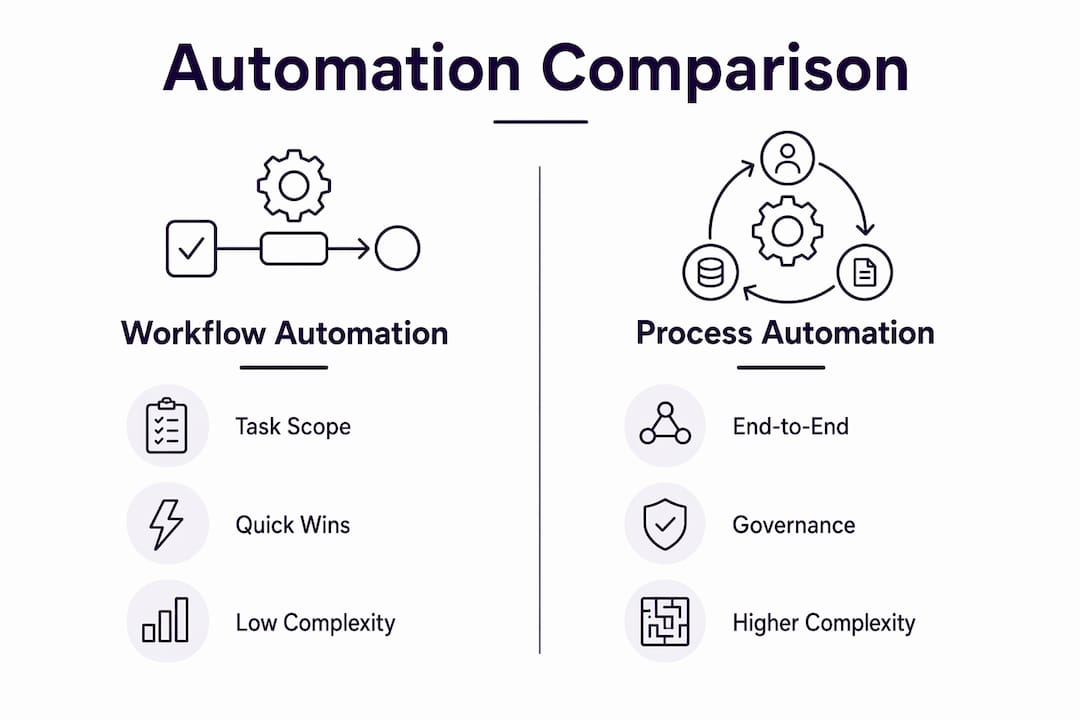
Choose workflow automation when your pain is task-specific (missed calls, no-show rates, manual booking). Choose process automation when multiple departments share a broken end-to-end operation and you need governance, SLA monitoring, and continuous improvement baked in.

What is workflow automation, and what does it look like for a receptionist?
Workflow automation is a trigger, action, and rule set that moves a task from start to finish without a human touching it. A call comes in after hours, the system logs it, fires an SMS to the caller, creates a lead record in the CRM, and notifies the on-call staff member. No one had to watch a phone.
Common receptionist and customer interaction workflows for Alberta SMBs:
- Missed-call handling: AI answers, captures caller intent, sends an SMS confirmation, and creates a CRM record.
- Appointment booking: Caller selects a time slot; calendar blocks, confirmation SMS fires, and a reminder goes out 24 hours before.
- Lead capture: Web form or inbound call triggers a CRM entry and assigns a follow-up task to a sales rep.
- No-show recovery: Missed appointment triggers a rebooking SMS within minutes.
| Trigger | Typical automated actions |
|---|---|
| Missed call | Log caller ID, send SMS, create CRM lead |
| Appointment booked | Block calendar, send confirmation, schedule reminder |
| Form submitted | Create CRM record, assign rep, send acknowledgement email |
| SMS received | Parse intent, route to correct team, log interaction |
The payoff is immediate: staff stop fielding routine calls and start focusing on work that actually needs a person.
What is process automation (BPM), and when does it matter?
Think of a process as the strategic map and a workflow as one road on that map. Process automation coordinates every road simultaneously, tracks traffic, and reroutes when something breaks.
A full BPM programme goes well beyond the front desk. Examples include:
- Patient or client onboarding: intake form → identity verification → insurance check → appointment scheduling → welcome package, all linked across three or four departments.
- Invoicing and collections: quote accepted → invoice generated → payment tracked → overdue notice triggered → finance team alerted.
- Cross-team approval flows: a service request that needs sign-off from operations, finance, and compliance before it moves forward.
Process automation needs governance, monitoring, and continuous improvement because a failure in one step can cascade across the entire operation. That means designated process owners, SLA dashboards, exception handling, and regular audits.
Pro Tip: Don't invest in process automation until you have at least three or four documented, stable workflows running reliably. The governance overhead is real, and it will crush a team that hasn't yet proven the basics.
Key differences through lenses Canadian SMBs actually care about
| Dimension | Workflow automation | Process automation |
|---|---|---|
| Scope | One task, one team | Multiple tasks, multiple teams |
| Complexity | Low; if-then logic | High; interdependent decision trees |
| Governance | Minimal | Owners, SLAs, compliance reviews |
| Time-to-value | Weeks | Months |
| Cost & resources | Low subscription; ops-managed | Higher; IT and process team required |
| Tooling & integrations | CRM, calendar, SMS, AI receptionist | iPaaS, BPM, ERP |
| Scalability | Replicate flows across teams | Enterprise-wide volume |
| Ownership | Ops or vendor | Process team, IT, exec |
| ROI potential | Fast, measurable | High long-term |
Three practical decision rules for Alberta SMBs:
- Start small. Automate one high-volume, well-understood task first. Missed-call handling is the lowest-risk entry point.
- Prove ROI before scaling. Measure response time, lead capture rate, and no-show reduction for four to six weeks before adding complexity.
- Bundle into process automation only when justified. Once three or more stable workflows share data and hand off between teams, that's the signal to introduce governance.
A receptionist workflow handles the first touchpoint. Process automation is what you build when that touchpoint connects to billing, scheduling, and service delivery in one governed flow.
How do you decide: workflow or process automation first?
Work through this checklist before committing to either path.
- Is the pain task-specific? If yes, start with workflow automation.
- Is the task high-volume and repetitive? Missed calls, booking requests, and lead capture all qualify.
- Does it cross three or more departments? If yes, you likely need process automation eventually, but still start with a workflow pilot.
- Is there regulatory sensitivity? Document consent and data flows before automating anything that touches personal information under PIPEDA.
- Is the current process documented and stable? If no, stop. Automating a broken workflow accelerates errors, not efficiency.
- Do you have a clear owner? Assign one person in operations or use a managed vendor like Dexcoretechnologies before launch.
Red flags that mean "don't automate yet": undocumented edge cases, high error rates in the manual process, no agreement on what "done" looks like, and no fallback plan when automation fails.
The path forward: pilot one workflow → measure KPIs for four to six weeks → iterate → once stable, stitch it into a broader process automation programme if the volume and cross-team scope justify it.
Pro Tip: Involve your front-desk staff or whoever currently handles the task manually. They know every edge case. Skip that conversation and you'll spend weeks debugging scenarios they could have described in ten minutes.
How to implement AI-driven workflow automation for receptionist tasks in Canada
- Define scope. Pick one workflow: missed-call handling is the standard starting point.
- Map the current process. Write down every step, every exception, and every handoff. Use sticky notes if that helps — mark each step as process-level or workflow-level to clarify what you're actually automating.
- Choose integrations. Identify your CRM, calendar, and POS systems. The automation moves data between them; it does not replace them.
- Configure rules and logic. Set triggers (missed call, after-hours call, SMS received), define actions, and build in fallback escalation to a human for edge cases.
- Test with staff. Run the workflow in parallel with the manual process for one week. Log every exception.
- Launch and measure. Track response time, lead capture rate, booking conversion, and no-show reduction from day one.
- Review at week four and week twelve. Adjust rules, add triggers, and document what you learned.
| Phase | Weeks | Activities |
|---|---|---|
| Scoping & mapping | 2 | Document workflow, confirm integrations, assign owner |
| Configuration & testing | 2–4 | Build rules, test with staff, fix edge cases |
| Soft launch | 4–6 | Run live with monitoring; measure baseline KPIs |
| Optimise & iterate | 6 | Adjust rules, add triggers, prepare scale-up plan |
Typical subscription-based AI receptionist pilots for Canadian SMBs run on weekly or monthly plans with professional onboarding included. Costs vary by provider and plan tier; Dexcoretechnologies publishes plan options at dexcoretechnologies.ca.
Privacy and compliance callout: Under PIPEDA and Alberta's Personal Information Protection Act (PIPA), any automated system collecting caller names, phone numbers, or appointment details must have a documented purpose, obtain consent, and store data securely. Log what data is collected, where it goes, and how long it is retained. Review this with a privacy professional before going live if you handle sensitive information such as health or financial data. For medical office workflows, see AI receptionist guidance for medical offices for sector-specific considerations.
KPIs to track: average response time, lead capture rate, booking conversion rate, no-show rate, and staff time saved per week.
How workflow automation grows into process automation
The scaling path is predictable once you know what to watch for.
- Pilot one workflow. Missed-call handling or appointment booking.
- Standardise. Document the rules, exceptions, and integrations so anyone can maintain it.
- Catalogue. List every workflow running in the business. Patterns emerge quickly.
- Stitch workflows together. When two or three workflows share data and hand off between teams, you have the foundation of a process.
- Introduce governance. Assign a process owner, set SLAs, and build monitoring dashboards.
For broader process design strategy, a Canadian workflow consultancy can help map cross-functional flows before you invest in BPM tooling.
| Phase | Ops team | IT | Vendor (e.g., Dexcoretechnologies) | Exec |
|---|---|---|---|---|
| Pilot | Owns workflow design | Confirms integrations | Configures and supports | Approves budget |
| Standardise | Documents rules | Maintains API connections | Provides reporting | Reviews KPIs |
| Catalogue | Audits all workflows | Flags system conflicts | Advises on scale | Sets priorities |
| Govern | Monitors SLAs | Manages infrastructure | Escalates exceptions | Owns roadmap |
Pause and formalise governance when: error rates climb above your baseline, volume doubles, a regulatory trigger appears (health data, financial records), or a workflow now touches more than two departments.
Common pitfalls and how to avoid automating chaos
The single most expensive mistake is automating a process that is already broken. Automation scales whatever is underneath it, good or bad.
Common pitfalls:
- Skipping workflow documentation. If you can't describe every step and exception on paper, you're not ready to automate.
- Ignoring staff input. Front-desk staff and call handlers know the edge cases. Exclude them and you'll find out the hard way.
- Over-customising at launch. Start with the simplest version of the workflow. Add complexity only after the baseline runs cleanly.
- No logging or monitoring. If you can't see what the automation did, you can't fix it when it fails.
- No fallback to human review. Every automated workflow needs an escalation path for cases the rules don't cover.
Pro Tip: Build your fallback first. Decide what happens when the automation can't handle a call or request before you go live. A missed escalation is worse than no automation at all.
Integration testing matters more than most teams expect. Test every connected system (CRM, calendar, SMS gateway) independently before running an end-to-end test. When something breaks in production, you need to know which system failed.
How Dexcoretechnologies delivered measurable results with an AI receptionist workflow
A Canadian service business running on manual call handling was losing leads after hours and during peak periods. Staff were spending significant time on routine booking calls that pulled them away from in-person customers.
The pilot scope: missed-call handling, automated appointment booking, and CRM lead capture, integrated with the business's existing calendar and CRM systems. Dexcoretechnologies configured the workflow, handled onboarding, and set up SMS confirmations and team notifications.
Implementation details: the pilot ran over a six-week period. Integrations covered the calendar, CRM, and SMS gateway. Staff were trained on the escalation path and exception handling. KPIs were set at baseline before launch.
Dexcoretechnologies reports a significant potential ROI for businesses implementing AI receptionist and workflow automation, based on recovered leads, reduced staff time on routine calls, and improved booking conversion rates.
The result: no-show rates dropped, after-hours leads were captured automatically, and staff time on routine call handling fell substantially.
Lessons learned that apply directly to your pilot:
- Map every exception before you configure rules, not after.
- Measure baseline KPIs for two weeks before launch so you have a real comparison.
- Keep the first workflow simple; add triggers and actions only after the core flow is stable.
- Use the vendor's onboarding support fully. Dexcoretechnologies includes setup and ongoing support in its service packages.
Key takeaways
Workflow automation is the right starting point for Canadian SMBs automating receptionist and customer interactions: lower cost, faster ROI, and far less governance overhead than a full process automation programme.
| Point | Details |
|---|---|
| Start with workflow automation | Task-level automation (missed calls, booking, lead capture) delivers ROI in weeks, not months. |
| Prove ROI before scaling | Measure response time, lead capture rate, and no-show reduction for four to six weeks before adding complexity. |
| Protect privacy from day one | Document consent and data flows under PIPEDA and Alberta's PIPA before any customer data is automated. |
| Workflows feed process automation | Stable, documented workflows become the building blocks of a governed BPM programme when volume justifies it. |
| Dexcoretechnologies as your pilot partner | Dexcoretechnologies provides 24/7 AI answering, booking automation, and CRM integrations with onboarding included. |
Why workflow automation should come first: a practical perspective
The debate between workflow and process automation often gets framed as a technology choice. It isn't. It's a sequencing choice. Most Alberta businesses that struggle with automation do so because they tried to govern a process before they understood their own workflows. They bought the map before they'd driven the roads.
The smarter path is to automate one painful, high-volume task, measure it honestly, and let the data tell you what to build next. Missed-call handling is almost always the right first workflow because the cost of inaction is visible and immediate: a lead that called and got no answer is a lead that called someone else.
Dexcoretechnologies is built for exactly this entry point. The platform handles the AI answering, the booking logic, and the CRM handoff without requiring a rip-and-replace of your existing systems. Once that workflow is running and measured, the path to broader workflow automation for small business becomes much clearer.
Ready to run an AI receptionist pilot? Here's what Dexcoretechnologies offers
Missed calls cost Alberta service businesses real revenue every week. Dexcoretechnologies gives you 24/7 AI call answering, real-time appointment booking, and automatic CRM capture without adding headcount or replacing your existing systems.

What an initial engagement looks like:
- Readiness assessment: Dexcoretechnologies reviews your current call handling, booking process, and integrations.
- Pilot configuration: AI receptionist rules, SMS confirmations, and CRM/calendar integrations are set up with your team.
- Measurement: KPIs are tracked from week one so you have clear ROI data within the first month.
- Scale-up: Once the pilot is stable, additional workflows and integrations are added on your timeline.
Dexcoretechnologies serves restaurants, clinics, contractors, and service businesses across Canada. Book a readiness assessment or explore the AI receptionist for service businesses page to see how the platform fits your operation.
Further reading and Canadian resources
- Workflow automation benefits (Workato) — evidence on faster follow-up and lead qualification; used in the BLUF and implementation sections.
- Workflow vs process automation (ScaleLabs) — the map vs execution metaphor and practical mapping exercises; used in definitions and the scaling path.
- Workflow vs process (Kissflow) — governance requirements for process automation; used in the BPM definition section.
- Workflow automation components (Paycor) — triggers, actions, rules, and logic; used in the workflow definition and triggers table.
- Avoid automating broken workflows (Netsuite) — the core pitfall warning; used in the decision checklist and pitfalls section.
- Workflow vs process (Zapier) — design process first, then automate workflows; supports the scaling path narrative.
- Office of the Privacy Commissioner of Canada — PIPEDA guidance: priv.gc.ca — the federal privacy framework for any business automating customer data.
- Alberta's Personal Information Protection Act (PIPA): servicealberta.gov.ab.ca — Alberta-specific privacy requirements for businesses collecting personal information.
- Dexcoretechnologies AI receptionist — the recommended vendor for AI receptionist workflow pilots in Canada.