
Workflow automation for small business is the practice of using software to automatically execute routine, repeatable tasks so owners and staff can focus on growth and customer engagement. 94% of organisations perform repetitive tasks suitable for automation, typically reducing manual effort by 60–90% and recovering up to 77% of previously spent time. That figure means most Alberta small businesses are leaving significant capacity on the table every single week. Consolidating apps and automating key processes can save at least $15,000 annually, making this one of the highest-return operational decisions a small business owner can make.
What does workflow automation for small business actually require?
Before touching any software, you need a clear picture of what your business actually does repeatedly. Automating a broken or redundant process does not fix it. It compounds the problem at machine speed.
Start with a process inventory
A process inventory is a written list of every recurring task your team performs. Group tasks by frequency: daily, weekly, and monthly. Common targets include lead routing, internal handoffs, invoice processing, customer onboarding, and follow-up email sequences. Once listed, mark which tasks are stable and well-defined. Unstable or inconsistent processes need fixing before automation.

Choose the right type of platform
Two broad categories of automation tools exist for small businesses. Rule-based platforms execute fixed trigger-action sequences. AI-enhanced platforms add a judgment layer that handles variable inputs and edge cases. No-code AI automation platforms let non-technical founders build and deploy multi-step workflows without developers or consultants. A unified platform that consolidates your tools also creates more powerful workflows than a patchwork of separate apps connected by workarounds.
Before selecting any tool, confirm you meet these prerequisites:
- Stable processes: The workflow runs the same way at least 80% of the time.
- Clear goals: You know what success looks like (time saved, errors reduced, response speed).
- Defined team roles: Someone owns each automated workflow and monitors it.
- Data access: The systems involved can share data or connect via an API or integration layer.
- Compliance awareness: Alberta businesses handling personal data must align with PIPEDA and provincial privacy rules before automating customer-facing workflows.
Pro Tip: Map your three highest-volume daily tasks first. If you can automate just those three, you will likely recover more time than automating a dozen low-frequency tasks.
How to implement workflow automation step by step
A phased approach prevents the most common failure mode: trying to automate everything at once and abandoning the project when it breaks. A recommended adoption path for small businesses without dedicated automation teams follows four clear phases.
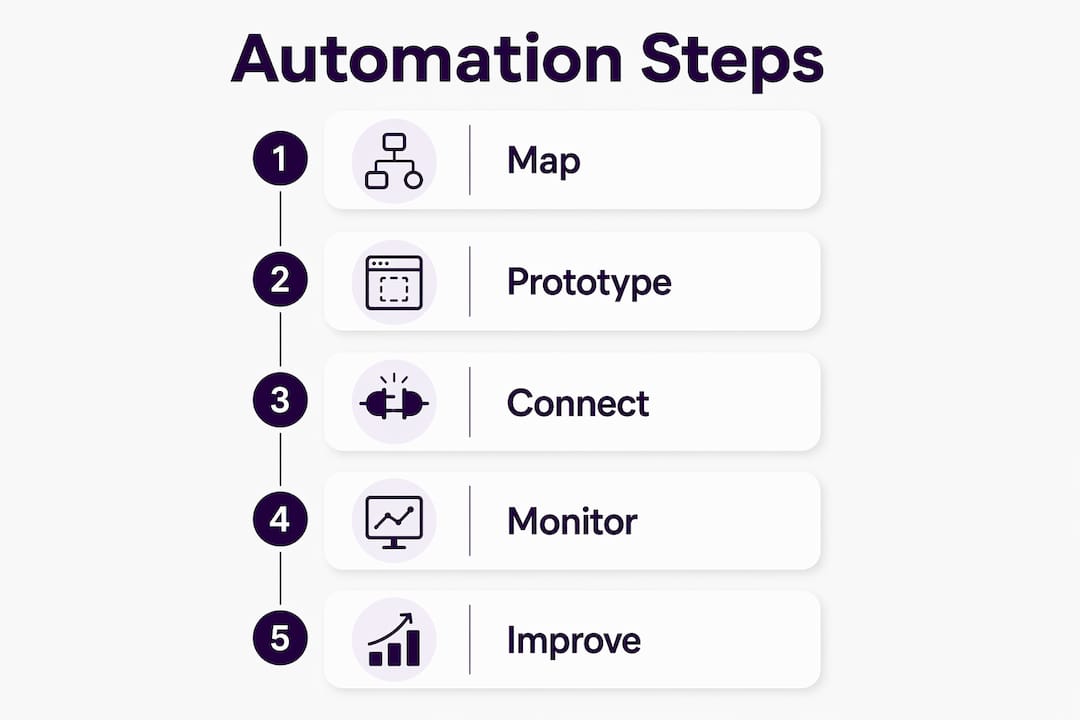
Phase 1: Map and document (week 1)
Pick one workflow. Write down every step, every decision point, and every person involved. Note where data enters and exits. A documented workflow is the only kind you can automate reliably.
Phase 2: Prototype a pilot (weeks 2–3)
Build the automation for that single workflow in your chosen platform. Run it in parallel with the manual process for one to two weeks. Compare outputs. Fix errors before expanding.
Phase 3: Connect systems (months 1–2)
Once the pilot works, integrate it with adjacent systems. A lead capture form might connect to your CRM, which triggers a follow-up email sequence, which notifies your sales contact. Each connection adds value but also adds a potential failure point. Test each integration separately.
Phase 4: Monitor and improve (ongoing)
Automation is not a one-time project. Treat it as ongoing operational infrastructure that requires active monitoring. Set up error alerts so failures surface immediately rather than silently corrupting data.
| Phase | Timeline | Key action |
|---|---|---|
| Map and document | Week 1 | Write every step of one workflow |
| Prototype pilot | Weeks 2–3 | Build and test in parallel with manual process |
| Connect systems | Months 1–2 | Integrate adjacent tools and test each connection |
| Monitor and improve | Ongoing | Review error logs, update workflows as processes change |
Assign workflow ownership to a role, not a person. If the person leaves, the workflow must not become an orphan. Version control matters too: keep a record of every change made to an automated workflow and why.
Pro Tip: Never automate a task you have not done manually at least 20 times. If you cannot describe every step from memory, the process is not ready.
How does AI take SME workflow automation further?
Traditional rule-based automation handles predictable inputs well. It fails the moment something unexpected appears. AI automation adds a judgment layer that handles edge cases and operational decisions like a junior employee would, without requiring a hire.
This distinction matters practically. A rule-based system routes every inbound lead to the same sales rep. An AI-enhanced system reads the lead's industry, budget range, and request type, then routes it to the right person with a priority score attached. The difference in conversion rate can be significant.
AI-enhanced automation delivers measurable capacity gains for small teams:
- Lead qualification: AI reads form submissions and scores leads before any human sees them.
- Customer support: AI handles tier-one questions around the clock, escalating only complex cases.
- Appointment scheduling: AI books, confirms, and reschedules without staff involvement.
- Review and follow-up management: AI monitors review platforms and triggers personalised follow-up sequences.
AI automation can recover 10–20 hours per week per person on small teams. That is the equivalent of adding a part-time employee without the payroll cost. For Alberta businesses managing seasonal demand spikes, that capacity buffer is particularly valuable.
Moving from basic trigger-action automation to AI-based judgment layers represents a genuine breakthrough for small businesses. It allows owners to automate complex, variable tasks that previously required human attention, without sacrificing quality or consistency.
The 2026 generation of no-code AI platforms makes this accessible to operators with no technical background. You configure logic in plain language, and the platform handles the underlying connections. The barrier to entry for ai workflow automation for SMEs has dropped considerably in the past two years.
What mistakes do small businesses make when automating workflows?
The most expensive automation mistake is automating a bad process. Speed and scale amplify every flaw in your workflow design. Fix the process first, then automate it.
Beyond that, these are the most common pitfalls Alberta small business owners encounter:
- Skipping human review points: Not every decision should be automated. Complex customer complaints, refund disputes, and contract negotiations need a human in the loop.
- Ignoring error logging: A silent failure in an automated workflow can go undetected for days. Every workflow needs active error logging and alerting to surface problems immediately.
- Poor credential management: Automated workflows often hold API keys and login credentials. Storing these insecurely creates a serious security risk.
- Over-automation: Automating customer-facing interactions too aggressively can damage relationships. Customers in Alberta, like anywhere, notice when they are talking to a machine at the wrong moment.
- No version control: Changing an automated workflow without documenting the change makes troubleshooting nearly impossible.
Pro Tip: Build a simple "automation health" check into your weekly routine. Spend 10 minutes reviewing error logs and confirming key workflows ran as expected. Catching a failure early costs minutes. Catching it late can cost customers.
Sustainable automation also means keeping a human owner accountable for each workflow. Effective automation assigns ownership to a role, uses version control, and monitors errors continuously. That discipline separates businesses that get lasting value from automation from those that abandon it after the first major failure.
Key takeaways
Workflow automation for small business delivers the greatest return when owners fix their processes first, automate high-volume tasks second, and treat the system as ongoing infrastructure rather than a one-time project.
| Point | Details |
|---|---|
| Fix before automating | Map and simplify every process before building any automation. |
| Start with high-volume tasks | Automate the tasks your team performs most often for the fastest time recovery. |
| Use AI for variable inputs | AI-enhanced platforms handle edge cases that rule-based tools cannot. |
| Assign workflow ownership | Every automated workflow needs a role-based owner and version control. |
| Monitor continuously | Active error logging prevents silent failures from compounding over time. |
What I have learned after watching small businesses automate
The businesses that get the most from automation are not the ones with the most sophisticated tools. They are the ones that started with the most boring, high-volume task they could find and automated that first.
A plumbing contractor in Red Deer does not need a complex AI system on day one. They need their inbound call details captured, their appointment booked, and a confirmation sent to the customer without anyone touching a keyboard. That single workflow, done well, recovers hours every week and eliminates the missed-call problem that costs them jobs.
The mistake I see repeatedly is owners treating automation as a technology project rather than an operations project. The technology is the easy part. The hard part is deciding which tasks are truly repeatable, who owns the outcome, and what happens when something goes wrong. Businesses that answer those questions before touching a platform succeed. Businesses that start with the platform and work backwards rarely do.
Automation also does not replace the need for human judgement in customer relationships. The best-performing small businesses I have observed use automation to handle the mechanical parts of customer interaction, then route the relationship-building moments to a real person. That balance is what keeps customers loyal in a market like Alberta, where word-of-mouth still drives a large share of new business.
Treat automation as infrastructure, not a project. A project has an end date. Infrastructure gets maintained, improved, and expanded as your business grows. The businesses winning with automation in 2026 started two years ago with one workflow and kept building.
— James
How Dexcoretechnologies supports your automation goals
Alberta small businesses that automate internal workflows often discover a gap: customer-facing communication still requires someone to answer the phone. Dexcoretechnologies closes that gap with an AI receptionist for service businesses that answers calls, books appointments, and captures customer details 24 hours a day without human intervention.

Dexcoretechnologies integrates call answering directly into your existing workflows. Customer details captured on a call route automatically to your CRM. Appointment confirmations send without staff involvement. The system handles the communication layer so your team focuses on delivering the actual service. Dexcoretechnologies reports a potential ROI of up to 942% for businesses that replace manual call handling with its AI receptionist. For trade contractors, service businesses, and any Alberta operation that loses leads to missed calls, that number reflects a real and recoverable cost.
FAQ
What is workflow automation for small business?
Workflow automation for small business is the use of software to execute routine, repeatable tasks automatically. It reduces manual effort, cuts errors, and frees staff to focus on higher-value work.
Where should a small business start with automation?
Start by mapping your three highest-volume daily tasks and automating the most stable one first. A phased approach, beginning with a single pilot workflow, produces better results than automating multiple processes at once.
How is AI automation different from standard automation?
Standard automation follows fixed rules and fails when inputs vary. AI automation adds a judgment layer that handles edge cases and variable inputs, similar to how a junior employee would reason through an unexpected situation.
How many hours can automation recover for a small team?
AI-enhanced workflow automation tools can recover 10–20 hours per week per person on small teams, effectively adding part-time capacity without additional payroll.
What is the biggest mistake small businesses make with automation?
The most common mistake is automating a poorly designed or redundant process. Automation amplifies existing flaws, so every workflow should be mapped, simplified, and tested manually before any software touches it.