
Voicemail to SMS, in a business automation context, means an AI receptionist detects a missed call and immediately texts the caller instead of routing them to a voicemail box. The caller gets a reply within roughly a minute, the response gets logged, and a qualified lead moves into your booking or CRM workflow automatically. The result: fewer callers hang up and call a competitor. Certain companies build this exact class of workflow for service businesses.
TL;DR:
- Implementing voicemail-to-SMS requires webhook support, real-time CRM integration, and careful trigger rule setup, typically within a week.
- Sending personalized, direct questions within 30 to 60 seconds of a missed call significantly improves reply and booking rates.
- Effective workflows automatically log leads, qualify callers, and route urgent responses, with AI callback attempts if responded-to texts go unanswered.
- Response quality hinges on simple, human-sounding messages ending with a direct question; generic templates decrease reply rates.
- The greatest improvement comes from rapid, human-like replies, not the technology, and pilots should measure reply and booking rates against baseline to validate ROI.
Table of Contents
- What is voicemail to SMS and how does the workflow flow end to end?
- How do you set up voicemail-to-SMS in under a week?
- What should the SMS message actually say?
- How does a text reply become a booked appointment?
- How do you measure whether it's actually working?
- What mistakes actually kill your reply rate?
- Where does voicemail-to-SMS still fall short?
- How do voicemail-to-SMS providers actually differ?
- What actually moves the needle, in James's view
- Stop losing callers to a voicemail box
- Sources
What is voicemail to SMS and how does the workflow flow end to end?
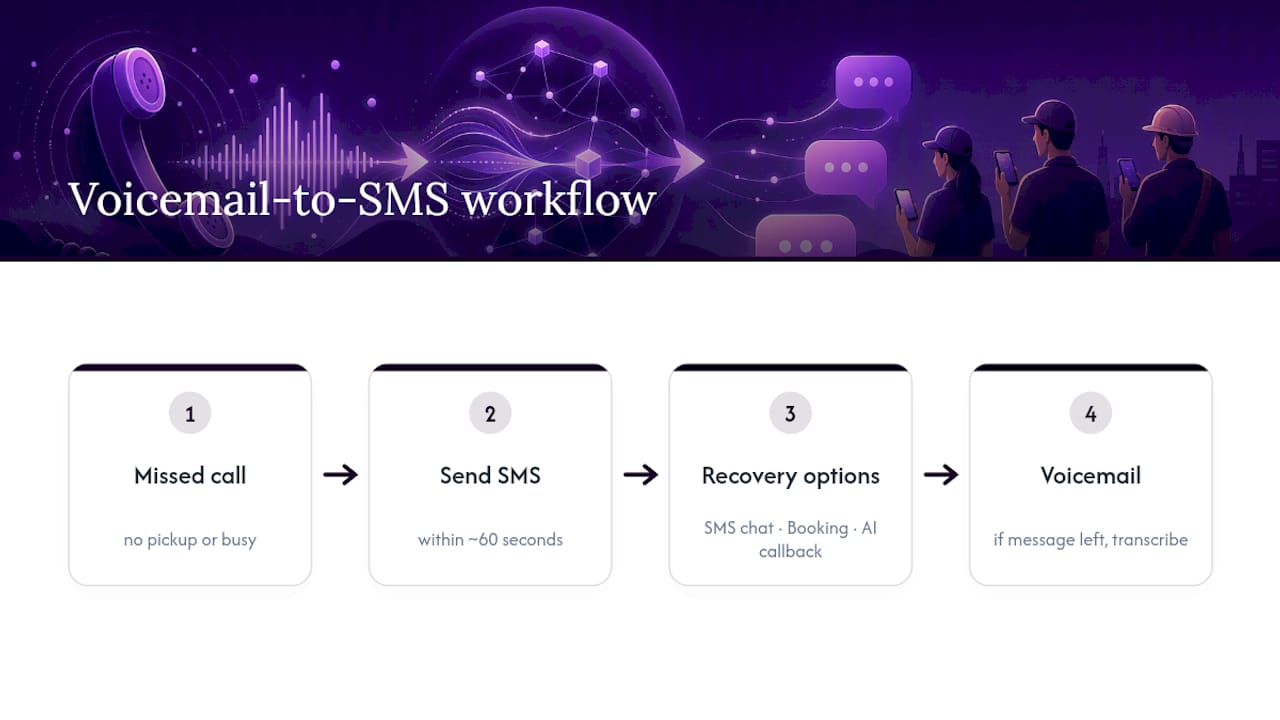
Most phone systems still default to the same broken sequence: ring four or five times, drop to voicemail, hope the caller leaves a message and waits for a callback. Voicemail-to-SMS automation intercepts the usual voicemail process by sending a text shortly after a call goes unanswered, whether due to no pickup, a busy line, or after-hours closure, rather than routing to voicemail.
The reason SMS-first recovery beats voicemail-only handling comes down to caller behaviour. Most people who hit voicemail simply hang up and try the next business on their list rather than leaving a message. A text sent within roughly 60 seconds of a missed call recovers callers who would otherwise never leave voicemail at all, because it signals someone noticed the call and is already responding.
Routing from there branches three ways: a direct SMS conversation, a booking link the caller taps to self-schedule, or an AI callback attempt if the intent looks urgent. Voicemail transcription still has a place, but as a secondary escalation for the callers who do leave a message, not the primary recovery tactic. AI callback systems can extract intent from a transcribed voicemail and follow up with a personalised text, layering a second recovery attempt on top of the first.
How do you set up voicemail-to-SMS in under a week?
Getting this live is mostly an integration exercise, not a software build. Here's the order that avoids rework:
- Audit your phone system for webhook support. Most modern VoIP and SIP providers support webhooks that fire when a call goes unanswered; legacy landlines typically don't, and porting to a VoIP line that supports triggers is usually the first real project.
- Define the trigger rule. Decide whether the text fires on no answer, on voicemail entry, or on call abandonment past a set ring count, then connect that trigger to an SMS gateway that delivers from a local number so replies feel like a real conversation.
- Connect your calendar and CRM. Booking confirmations and lead records need to sync in real time, not batch overnight, or your staff will double-book slots the system already filled.
- Test the edge cases. Run through a full call outside business hours, a call during a busy line, and a call where the caller replies with something unexpected. Document what happens when a step fails, not just when it succeeds.
- Roll out in stages and brief your staff. Tell your front desk or on-call team the workflow exists before a customer mentions getting a text they didn't expect.
Pro Tip: Run the after-hours scenario first during testing. It's the case most businesses forget, and it's where the highest share of genuinely lost leads happens.
What should the SMS message actually say?
Message design matters more than most operators expect. A text under 160 characters that ends with one direct question gets meaningfully higher reply rates than a longer, more formal message. Corporate-sounding templates read as automated and get ignored; a message that sounds like it came from a person gets a reply.
Timing has a sweet spot too. Instant replies under 10 seconds can feel robotic and spook the caller into thinking they never actually reached a human business. A 30 to 60 second delay tends to read as a real person glancing at their phone and typing back.
- In-hours: "Hi, sorry we missed you at [Business Name]! What can we help with today?"
- After-hours: "Thanks for calling [Business Name] in [suburb] — we're closed but can text now. What do you need?"
- Emergency triage: "Got your call. Is this urgent? Reply YES and we'll call you back right away."
Pro Tip: Add the suburb or neighbourhood name where the caller reached you. It's a small detail, but it tells a caller with three browser tabs open exactly which location they contacted.
How does a text reply become a booked appointment?
The SMS reply is only useful if it lands somewhere your team can act on without retyping anything. A well-built workflow does the following automatically:
- Creates a CRM lead record the moment the call is missed, tagged with the call time, the caller's number, and the SMS transcript as it develops.
- Runs a one-question qualification flow (urgent vs. routine, new customer vs. returning) and routes urgent replies to a faster escalation path.
- Syncs a tapped booking link straight to the calendar, blocking the slot the second the caller confirms.
- Falls back to an AI callback attempt or a queued human callback if the caller doesn't respond to the text within a set window, with the outcome logged for reporting.
AI receptionist platforms handle this kind of routing and confirmation natively, which is the difference between a missed call becoming a scheduled job and becoming a dead entry in a call log. Tools built around tracking client meeting history and scheduling reinforce the same principle: the value is in the record, not just the reply.
How do you measure whether it's actually working?
Five numbers tell you almost everything: recovery rate (missed calls that get a reply), reply rate (texts that get answered), conversion to booking, time to first response, and the change in no-show rate once confirmations go out by SMS.
A sensible way to validate this without betting the whole operation on it is a 30-day pilot. Marathon Insights' recommended rollout breaks down cleanly:
- Week 1: measure your baseline missed-call volume with no automation running.
- Week 2: enable the SMS workflow for a controlled subset of calls, such as one location or after-hours only.
- Weeks 3 to 4: monitor reply and booking rates daily, then compare against baseline and tune the message templates.
Statistic Callout: Businesses that pair immediate SMS follow-up with a booking link report meaningfully reduced friction compared with voicemail-only handling, because customers increasingly prefer texting over waiting on hold or leaving a message. Attribute recovered revenue in your CRM by tagging bookings that originated from a missed-call text, not just from a completed call.
What mistakes actually kill your reply rate?
The single biggest failure mode is the dead-end text: a confirmation that says "we got your message" with nothing for the caller to respond to. Every text needs one direct question, because a message that reads like a person asking something specific consistently outperforms a corporate-sounding template.
- Escalate anything that sounds complex or emotional to a human quickly rather than looping the caller through more automated questions.
- Test your tone against your actual customer base. A dental clinic and a towing company should not sound the same.
- Watch your logs during rollout for misroutes and false positives, especially calls that were actually answered but got flagged as missed.
Pro Tip: Review your first two weeks of SMS transcripts manually. Patterns in what callers ask back tell you more about your template's weak spots than any dashboard.
Where does voicemail-to-SMS still fall short?
No automated text workflow replaces a skilled staff member on a genuinely complicated call, and it's worth being honest about where the limits sit.
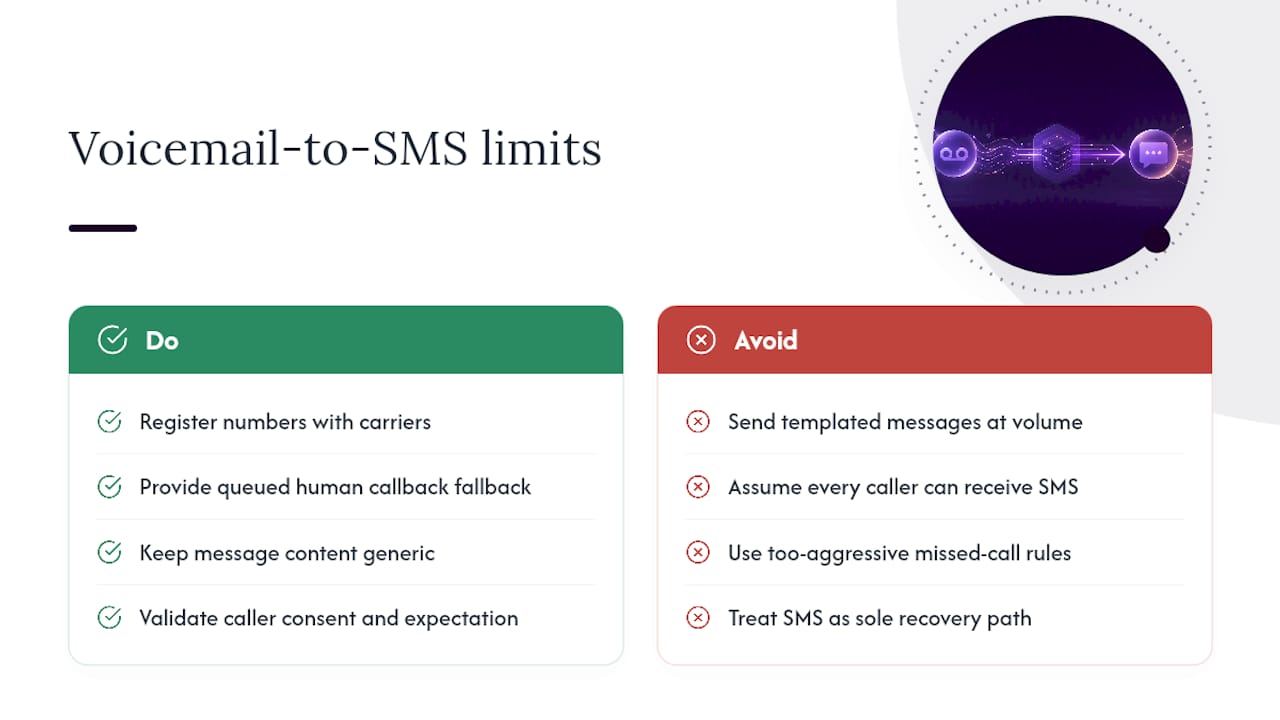
Carrier filtering is the quiet risk most operators don't anticipate. SMS gateways and mobile carriers apply spam filters, and a message that looks templated or gets sent at volume without proper number registration can get throttled or blocked entirely. That's a real technical failure mode, not just a design choice.
Caller consent and expectation also matter. Someone calling a business doesn't automatically expect a text back, and in some contexts that surprise reads as intrusive rather than helpful, particularly for callers who dialled from a shared or work phone. Message content has to stay generic enough not to disclose anything sensitive to whoever else might see that phone.
The system also depends entirely on accurate trigger logic. A missed-call detection rule that's too aggressive fires texts on calls that were actually picked up late, which annoys customers and erodes trust in the workflow fast. And SMS-first recovery assumes the caller has a mobile number capable of receiving texts, which isn't universal, particularly for landline-heavy demographics or older customer bases in some service categories.
Finally, the workflow only recovers callers who can be reached by text. Anyone calling from a blocked or restricted number, or a shared office line, may never see the reply at all, so a queued human callback still needs to exist as a fallback path rather than an afterthought.
How do voicemail-to-SMS providers actually differ?
Providers in this space split roughly into three tiers, and the differences matter more than the marketing copy suggests.
At the entry level are simple text-back tools: a missed call fires a single templated SMS with no CRM sync, no booking link, and no escalation logic. They're inexpensive and easy to set up, but the lead still has to be manually entered into whatever system your team actually works from, which reintroduces the exact rekeying problem the workflow was supposed to eliminate.
The middle tier adds calendar and CRM integration, so a tapped booking link blocks a calendar slot automatically. This is where most growing service businesses land, because it closes the loop between "caller replied" and "appointment exists" without a staff member touching either side.
The top tier, where AI receptionist platforms operate, adds AI-driven call handling on top: the system can attempt a live callback, qualify intent with a follow-up question, and route based on urgency before a human ever sees the lead. Platforms combining webhooks, SMS delivery, and calendar sync in one workflow make missed-call recovery operationally scalable across multiple locations rather than a one-off text tool bolted onto a phone line. Some platforms operate in this top tier, pairing 24/7 call answering with SMS and CRM logic described throughout this guide.
What actually moves the needle, in James's view
The uplift from voicemail-to-SMS rarely comes from the technology itself. It comes from removing the seconds between "caller hangs up frustrated" and "caller gets a reply that feels human." Dexcoretechnologies has seen this pattern across deployments in service businesses and clinics: the ROI shows up first in lead capture, not in call volume. Run a scoped pilot, measure the reply and booking rates against your baseline, and let the numbers make the case.
— James
Stop losing callers to a voicemail box
Some providers replace the missed call and voicemail box entirely with a 24/7 AI receptionist that answers, texts back within seconds when a call can't be picked up, and syncs booking information directly into calendars and CRM systems without manual data entry. Unlike a bolted-on text tool, the missed-call SMS, qualification, and scheduling all run inside one workflow, so a recovered caller becomes a calendar entry, not a loose thread in a call log.

If you run a restaurant, clinic, or service business and want to see what this looks like against your own call volume, start with a scoped pilot. Check out the AI receptionist built for service businesses or, for hospitality operations specifically, the restaurant-focused receptionist workflow, and book a free assessment to see your own missed-call recovery numbers before you commit to anything.
Sources
For deeper implementation detail, Marathon Insights covers mobile-first engagement setup, and Gibson breaks down SMS text-back mechanics and timing. On the Dexcoretechnologies blog, two-way SMS reminders and call triage automation walk through routing rules in more technical depth.
- SMS Text-Back for Missed Calls: How It Works | Gibson
- Mobile-First Customer Engagement: Converting Missed Calls into Revenue | Marathon Insights
- AI Receptionist for Business | Handle Every Call, 24/7