
Call triage automation is an AI receptionist that answers every inbound call 24/7, qualifies the caller's need, books or reschedules appointments, and routes anything complex to the right staff member. The bottom line: fewer missed calls, more booked appointments, faster lead capture, and a front desk that stops drowning in repetitive phone work.
Two numbers show what's at stake. Roughly 60% of booking requests happen outside regular business hours, and businesses running AI appointment systems commonly see no-show rates drop by around 40% once automated confirmations and reminders kick in.
What this actually delivers for an appointment-driven business:
- After-hours calls converted into booked appointments instead of voicemail
- Confirmation and reminder texts that cut same-day cancellations
- Lead details captured and routed before a competitor picks up the phone
- Front-desk staff freed from repetitive scheduling calls to handle in-person service
Platforms like DEXCORE Technologies build this as a complete workflow rather than a standalone voice bot, which is the distinction that determines whether automation actually saves you money.
Key Takeaways
Call triage automation succeeds when after-hours capture and calendar integration launch first, and success is measured by resolved interactions rather than raw call deflection.
| Point | Details |
|---|---|
| Start with after-hours capture | Roughly 60% of booking requests happen outside business hours, making this the fastest win. |
| Integrate calendar and CRM first | Calendar sync, booking writes, and CRM updates prevent double bookings and lost context. |
| Measure resolution, not deflection | Track recontact rate within seven days to catch calls the bot only appeared to resolve. |
| Expect a phased timeline | Basic setups go live in days; full multichannel integration typically takes a few weeks. |
| DEXCORE fits appointment-driven rollouts | Dexcoretechnologies combines 24/7 answering with booking and CRM workflows tailored to restaurants, clinics, contractors, and delivery firms. |
Table of Contents
- What does call triage automation actually do?
- Which front-desk tasks should you automate first?
- What integrations does call triage automation need?
- How do you implement call triage automation step by step?
- How do you measure success and what ROI is realistic?
- Why Dexcoretechnologies fits this rollout
- What does call triage automation cost, and where do fees hide?
- What can go wrong with call triage automation?
- How do you train and maintain an AI call triage system?
- How do call triage automation platforms compare?
- The gap between the automation pitch and the operational reality
- Get 24/7 call coverage built for your business type
- Sources
What does call triage automation actually do?
At its core, an AI receptionist answers the phone with a natural-sounding voice, understands what the caller wants, and takes action. That action might be booking a new appointment, rescheduling an existing one, cancelling a visit, answering a question about hours or pricing, or gathering enough information to qualify a lead before a human ever gets involved.
The scope typically spans more than the phone line. AI receptionists can answer calls, book and modify appointments, route requests, and handle FAQs across phone, web chat, email, and SMS, which means a single automated workflow can catch a caller during business hours and a web chat visitor at midnight with the same booking logic.
Automation has real limits, and a well-built system knows where they are:
- Emotionally sensitive calls (a distressed patient, a customer with a complaint) escalate to a human immediately
- Complex or ambiguous requests that don't map to a clear workflow get handed off rather than guessed at
- Anything touching compliance, legal exposure, or payment disputes routes to staff by default
A system that tries to handle everything itself instead of escalating gracefully is usually the one that damages customer trust.
Which front-desk tasks should you automate first?
Not every task carries the same risk if automation gets it wrong. Start with the ones that are high-volume, low-ambiguity, and easy to verify.
- After-hours booking capture. This is the single highest-value automation because it recovers business you're currently losing outright.
- Appointment confirmations and reminders. Automated texts reduce no-shows without needing any judgment calls.
- FAQ answers. Hours, pricing, location, parking, policies. These are static answers a bot delivers perfectly every time.
- Basic lead qualification. Name, contact info, service needed, urgency. Enough for staff to follow up intelligently.
Once those are running cleanly, move to medium-priority tasks: reschedules, cancellations, waitlist management, and deposits or basic payments where your business allows them.
Hold off on insurance eligibility checks, clinical or medical triage decisions, and complex billing disputes. These require judgment and liability awareness that automation isn't built to carry yet.
Pro Tip: Launch with just two or three workflows. A narrow, well-tuned automation beats a broad one that mishandles edge cases and erodes staff confidence in the system.
What integrations does call triage automation need?
An AI receptionist is only as useful as the systems it talks to. Without real backend connections, you get a smart-sounding voicebot that can't actually check availability or write a booking, which creates more problems than it solves.
The must-haves:
- Calendar sync with Google Calendar or Outlook, so the system checks real-time availability before promising a slot
- Booking or practice management systems that receive the actual appointment write, not just a notification
- CRM integration to pull customer history and push new lead records automatically
- SMS/email gateways for confirmations, reminders, and staff notifications
- Dispatch or POS connections for transport, delivery, and contractor businesses where the call needs to trigger a physical job assignment
Calendar sync, booking system writes, and CRM updates are the three integrations that prevent double bookings and preserve context during handoffs to a live staff member. Skip one of these and you end up with phantom bookings, a caller who gave their details twice, or a technician dispatched to the wrong address.
On data handling: keep customer information encrypted in transit and at rest, limit which staff accounts can view raw call transcripts, and loop in legal counsel before automating anything touching health records or payment data.
How do you implement call triage automation step by step?
Rolling this out doesn't require a massive IT project. Most basic AI receptionist setups go live within days, with fuller integrations taking a few weeks depending on how many systems need to connect.
- Phase 0, day one: scope and metrics. Pick your top two or three KPIs (after-hours capture rate, no-show reduction, resolved interaction rate) and choose the first tasks to automate.
- Phase 1, first few days: calendar and after-hours capture. Connect your calendar, set availability rules, and turn on after-hours call answering first since it's the fastest win with zero disruption to daytime operations.
- Phase 2, following weeks: booking flows and CRM. Build out confirmations, reminders, and basic lead qualification questions. Integrate the CRM and test every handoff scenario before going live.
- Phase 3, ongoing weeks: multichannel and tuning. Add SMS and web chat, refine escalation rules based on real call transcripts, and track recontact rates and satisfaction before declaring full rollout complete.
People to involve:
- An operations lead who owns the KPIs and workflow decisions
- IT staff or an integrator handling calendar, CRM, and dispatch connections
- A front-desk team member who knows the actual call patterns and edge cases
- A vendor onboarding specialist who configures the system against your specific workflows
How do you measure success and what ROI is realistic?
Track outcomes, not activity. The metrics that actually tell you whether the system is working: after-hours capture rate, appointments booked directly through automation, no-show rate, resolved interaction rate, recontact rate within seven days, and staff hours saved.
| Metric | What it tells you |
|---|---|
| After-hours capture rate | Share of off-hours calls converted into bookings instead of lost |
| No-show rate | Whether automated reminders are reducing cancellations |
| Resolved interaction rate | Calls fully handled without a callback or staff follow-up |
| Recontact rate (7 days) | Hidden failures where the bot "resolved" a call that wasn't actually fixed |
| Staff hours saved | Front-desk time reclaimed for higher-value work |
Vendor benchmarks report 15 to 25 hours of staff time saved weekly for scheduling-heavy operations, and some cite first-year ROI in the 10x to 15x range. Treat these as directional, not guaranteed. They vary heavily with call volume and how well the integrations were built.
The biggest measurement mistake: tracking deflection instead of resolution. A call the bot handled but the customer called back about the next day isn't a win, it's a hidden cost. Integration gaps that create phantom double bookings will also quietly inflate your "failure" count if you're not watching for them.
Why Dexcoretechnologies fits this rollout
Dexcoretechnologies builds AI receptionist and workflow automation specifically for appointment-driven businesses, with 24/7 answering, real-time booking, and integrations that write directly into your calendar, CRM, dispatch, or POS system.

Industry mapping matters here. A restaurant needs reservation and waitlist logic. A service business needs lead qualification and quoting workflows. A contractor or dispatch operation needs job routing tied to technician availability, not just calendar slots.
When you're evaluating any vendor for this, including DEXCORE, ask for:
- A list of native integrations (which CRMs, calendars, and POS systems connect without custom work)
- Uptime figures and escalation logs showing how handoffs to humans actually perform
- Case studies from businesses in your specific industry, not generic testimonials
Pro Tip: Ask any vendor to show you a real transcript of an escalated call, not just a demo of a successful booking. That's where you learn how the system actually behaves under pressure.
What does call triage automation cost, and where do fees hide?
Pricing generally falls into three shapes: flat monthly subscriptions, tiered plans based on call volume, and pay-per-use billing where you're charged per resolved call or per minute of talk time. Weekly or monthly SaaS subscriptions are the most common structure for small and mid-sized appointment-driven businesses, often bundled with onboarding and setup support rather than billed as a separate project fee.
The advertised price rarely tells the whole story. Watch for these:
- Setup and integration fees charged separately from the monthly subscription, especially for CRM or POS connections that require custom configuration
- Overage charges once you exceed a plan's included call volume, which can spike unpredictably during a busy season
- Per-channel add-ons where SMS, web chat, or email automation cost extra beyond phone answering
- Long-term contract lock-in that penalizes you for switching or scaling down after a slow quarter
A restaurant handling seasonal reservation spikes has very different volume needs than a contractor firm with steady weekly call patterns, so a plan that looks cheap on paper can become expensive fast if it's priced per call and your volume swings. Ask for a written breakdown of what's included in the base price versus what triggers an extra charge, and get a straight answer on what happens to your rate if call volume doubles during a promotion or busy season. Vendors who hesitate on that question are usually the ones with the messiest fee structure.
What can go wrong with call triage automation?
The most common failure isn't a bot that sounds robotic. It's a workflow that quietly breaks in the background. Partial integrations create ghost bookings, poorly configured escalation rules loop callers in circles, and measurement that credits containment without checking recontact rates hides the real failure rate.
Complex queries are the second-biggest risk. A caller with a multi-part question, an unusual scheduling conflict, or an emotionally charged complaint can push a poorly scoped bot outside its training, and the result is a frustrating loop where the caller repeats themselves without resolution. Bot failures like this cost more than a missed call would have, because the customer's frustration compounds.
Watch for these specific risk points:
- Escalation dead ends, where a caller asks for a human and the system doesn't have a clear handoff path
- Stale FAQ data, where pricing or hours change but the bot keeps quoting old information
- Overconfident booking, where the system confirms a slot before actually checking real-time calendar availability
- Silent integration failures, where a CRM sync breaks and nobody notices until a lead is lost
None of these are reasons to avoid automation. They're reasons to test escalation paths deliberately before full rollout, and to review call transcripts weekly during the first month rather than assuming the system is working because call volume looks handled.
How do you train and maintain an AI call triage system?
Treat the system like a new staff member, not a one-time software install. It needs onboarding, feedback, and periodic retraining as your business changes.
Start by feeding it your actual FAQ content: hours, pricing, policies, and the specific phrasing customers use when they call. Generic scripts fail because real callers don't ask questions the way a manual describes them. Review a sample of call transcripts weekly for the first month, then monthly afterward, looking specifically for questions the bot mishandled or escalated unnecessarily.
Update the system whenever your business changes: new pricing, new hours, a new service line, or a seasonal policy shift. A bot quoting last month's prices is worse than no bot at all, because it actively misinforms callers.
Assign clear ownership. One person, usually the operations lead or front-desk supervisor, should own the escalation rules and FAQ content, so updates don't fall through the cracks between departments. Test escalation paths quarterly by deliberately calling in with an edge-case scenario and confirming the handoff to a human actually works the way it's configured. Systems that go untouched for months after launch are the ones operations managers eventually abandon, not because the technology failed, but because nobody kept it current.
How do call triage automation platforms compare?
Platforms in this space generally split into three categories, and the right fit depends on how much of your operation you want automated end-to-end.
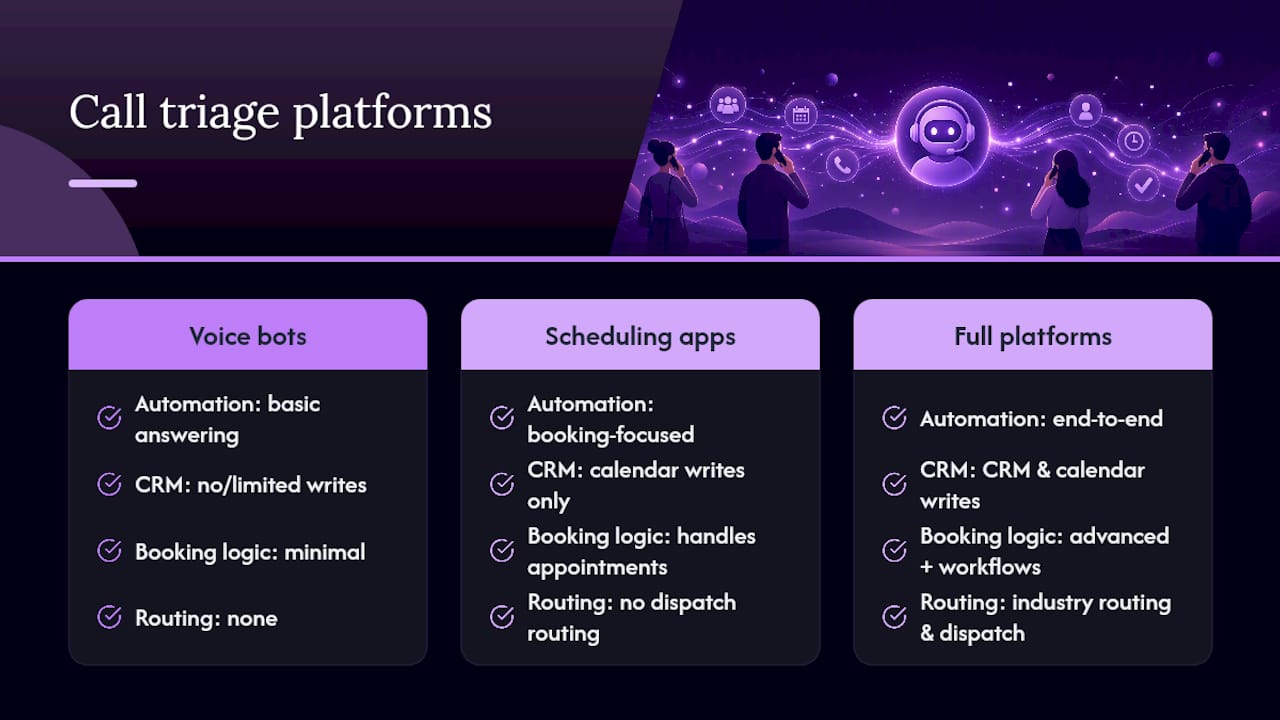
Entry-level voice bots handle basic call answering and simple FAQ responses but often lack deep calendar or CRM writes. They're cheaper but tend to function as an answering service rather than a true booking system, which limits how much staff time they actually save.
Booking-focused scheduling apps integrate well with calendars and handle appointment logic capably, but many stop there. They don't route dispatch jobs, manage lead qualification, or trigger downstream workflow notifications, which matters if you're running a contractor or delivery operation rather than a straightforward appointment business.
Full workflow automation platforms, the category DEXCORE Technologies operates in, combine voice answering, booking, CRM updates, and industry-specific routing into a single system. Integrations are what separate a scheduling tool from a genuine AI receptionist: the CRM and calendar writes are what make the agent useful rather than merely informative.
For call routing logic specifically, resources like Call Time's guidance on call handling practices offer useful groundwork on structuring routing rules before you configure any platform. When comparing options, weigh the integration list and industry fit more heavily than the sticker price. A cheap tool that can't write to your booking system will cost you more in manual reconciliation than a pricier one that does the job end-to-end.
The gap between the automation pitch and the operational reality
Most advice on this topic treats call triage automation as a switch you flip: install the bot, watch missed calls disappear. That's not what the evidence actually supports. The businesses that get real value are the ones that treat it as a phased operational change, not a software purchase.
The conventional wisdom oversells breadth and undersells integration depth. A system that answers calls fluently but can't write to your calendar or CRM is a glorified voicemail with better manners. The unglamorous work, connecting booking systems, testing escalation paths, reviewing transcripts weekly, is what actually determines whether the ROI numbers vendors quote show up in your own numbers.
If you take one thing from this, prioritize after-hours capture and calendar sync before anything else, and track recontact rates from week one. Deflection numbers flatter everyone. Resolved interactions tell you the truth. Businesses that skip that discipline usually discover the gap six months in, when phantom bookings and looped callers erode the trust they were trying to build.
— James
Get 24/7 call coverage built for your business type
Dexcoretechnologies gives appointment-driven businesses something a standalone voice bot can't: a complete workflow that answers calls, books the appointment, updates your CRM, and notifies your team, all without a human touching the phone. Where entry-level tools stop at answering, Dexcoretechnologies writes directly into your calendar and booking systems, which is what actually prevents the double bookings and lost leads that generic call answering leaves behind.

Whether you run a restaurant managing reservation spikes, a clinic juggling appointment rescheduling, or a contractor business dispatching technicians on tight windows, the workflow gets built around how your business actually operates, not a generic script. Explore the restaurant AI receptionist solution or the service business platform to see which setup matches your call volume, and request a demo to see exactly how the booking and CRM integration works before you commit to a plan.
Sources
- Assist Your Front Desk Team With an AI Receptionist
- AI Appointment Booking for Small Business (2026 Guide)
- Customer Service Automation: Definition, Use Cases & ROI ...
- What Is an AI Receptionist and Can It Really Help a Small Business?