Two-way SMS reminders let customers text back "YES," "NO," or "RESCHEDULE" to confirm, cancel, or change an appointment, and that reply updates your calendar or reaches staff automatically. The fastest way to get running is turning on reply capability inside your existing scheduling or messaging tool, writing a short reply prompt into your reminder text, and setting up a workflow that reacts to the common replies you expect. Do that and you cut phone tag, catch cancellations early enough to refill the slot, and stop guessing whether someone is actually showing up.
TL;DR:
- Turning on two-way SMS requires a capable number that can receive texts and explicit customer opt-in with recorded consent.
- System setup includes parsing replies with keywords or natural language, mapping responses to actions, and testing full workflows before going live.
- Automating reply handling covers 80% of responses, with an exception inbox for ambiguous or reschedule messages, ensuring quick staff follow-up.
- Using integrated or API-based solutions, businesses should prioritize calendar linkage, client record access, and shared inboxes for efficient management.
- Pairing SMS with call-answering AI reduces missed confirmations, streamlines appointment updates, and frees staff from manual follow-up tasks.
Table of Contents
- How two-way SMS works
- What two-way SMS actually fixes for your business
- How do you turn on two-way SMS in your system?
- Message templates that actually get replies
- Privacy, consent, and the compliance basics
- Handling replies without drowning in them
- Choosing the right integration approach
- Publisher perspective: where two-way SMS fits in a bigger automation picture
- How Dexcoretechnologies builds two-way SMS into a full receptionist workflow
- Sources
How two-way SMS works
Standard appointment texts are one-way: your system sends a message (technically an MT, or "mobile terminated" message) and the conversation ends there. Two-way SMS adds the other half. When a customer replies, that's an MO message ("mobile originated"), and your system has to be built to receive it, not just send.
Three things typically handle that incoming reply. The simplest is keyword parsing, where the system watches for exact words like "YES" or "2" and matches them to an action. More flexible setups use a dedicated business number or short code that routes every reply back to the specific appointment it belongs to, which matters once you're sending hundreds of reminders a week and can't rely on guesswork. The most capable systems layer in natural language parsing, so a reply like "can't make it, sorry" gets read as a cancellation instead of falling through as an unrecognized message.
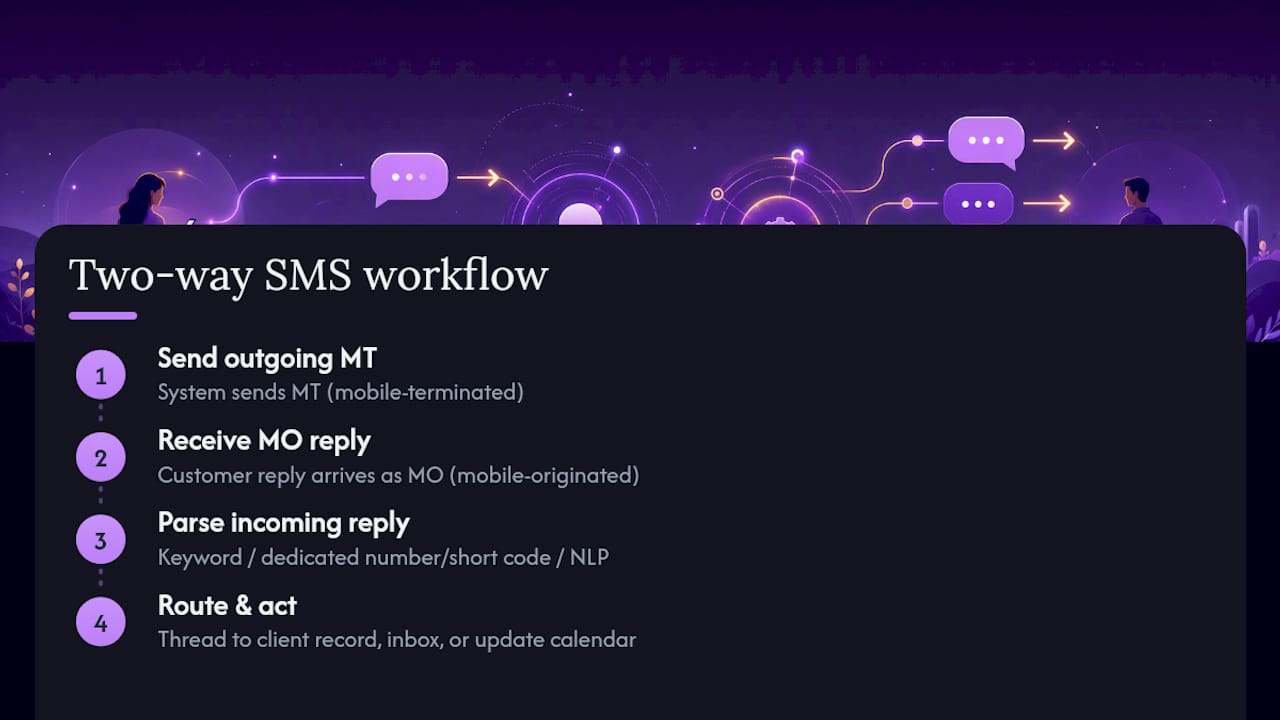
Where replies land depends on your setup. Some route into a shared team inbox, some update the calendar entry directly, and some do both by threading the SMS conversation against the client's record so any staff member can see the full history without needing that customer's personal number on their own phone, a structure common in two-way SMS features built for clinics. At minimum, you need a number capable of receiving texts (not every "SMS blast" number can) and a system on the other end that actually parses and acts on what comes back, rather than just logging it as unread.
What two-way SMS actually fixes for your business
The core benefit is simple: a one-way reminder tells someone about an appointment, but a two-way reminder gets an answer. That answer is what lets you act, whether that means releasing a slot to someone on a waitlist or having a technician call ahead before knocking on a door that won't open.

Businesses that switch on two-way replies typically see faster responses and measurable drops in no-shows compared to reminder-only texts, particularly when reminders go out on a 24-hour and 2 to 4 hour schedule rather than a single blast the night before.
The use cases stack up quickly once you look past the obvious one:
- Appointment confirmations and reschedules — the anchor use case, and the one with the clearest ROI.
- Dispatch and arrival updates — a technician or driver texts "on my way," a customer replies "gate code is 4521."
- Payment and event reminders — a reply of "PAID" or "1" can trigger a receipt or update a billing status.
- Short surveys — a single-question follow-up ("Reply 1-5") captures feedback while the visit is still fresh.
Reply-driven systems like these are increasingly common in queue management and customer engagement setups outside of scheduling too, which tells you the pattern generalizes well beyond appointments. If you're running a Canadian clinic or service business and want a deeper look at the confirmation use case specifically, this piece on SMS appointment confirmation and no-show reduction walks through the metrics in more detail.
How do you turn on two-way SMS in your system?
Most platforms hide two-way SMS behind a single toggle, but the toggle only works if the setup around it is right. Here's the order that actually holds up in practice.
- Confirm your number can receive texts. Some bulk SMS numbers are send-only. Check with your provider before building anything on top of it.
- Log consent before you text anyone. You need a record of opt-in for every number you're messaging, not just a general policy.
- Turn on the two-way response setting. Vendor support documentation usually frames this literally as a "two-way response" toggle you switch on inside account settings, then test end to end, a pattern confirmed in Halaxy's own setup guide.
- Choose your reply parsing method. Decide between a short fixed list of keywords (YES, NO, 1, 2) or a natural-language option that reads full sentences. Keyword lists are easier to test and support; NLP options handle sloppier replies without failing.
- Map each accepted reply to a calendar action. "YES" or "1" confirms. "NO" or "2" cancels. "RESCHEDULE" or "3" should route to either an automated rebooking link or a staff task, not a dead end.
- Connect a shared inbox or automation layer so anything that doesn't match a known keyword gets logged against the right client record instead of vanishing into an unread queue.
- Run test appointments through the full flow before going live. Send yourself a reminder, reply with each accepted keyword, and confirm the calendar or CRM updates correctly every time.
- Watch your reply logs for the first two weeks. This is where you catch the phrasing customers actually use that your keyword list didn't anticipate.
Pro Tip: Roll two-way replies out on one appointment type first, new-patient visits or first-time bookings work well, and watch parsing accuracy and staff response time before switching it on for your whole calendar. It's a lot easier to fix a keyword list for 20 bookings than for 2,000.
Message templates that actually get replies
A reminder text only works if the reply instruction is obvious in the first five words someone reads on a lock screen. Lead with who you are, state the appointment detail, then give one explicit action.
- Clinic appointment: "Riverside Dental: reminder for your appointment Tues March 17 at 2:00 PM. Reply YES to confirm or CALL to reschedule."
- Restaurant reservation: "Thanks for booking with [restaurant name], table for 4 tonight at 7:30 PM. Reply Y to confirm or N to cancel."
- Service visit: "Your technician is scheduled tomorrow between 9 and 11 AM. Reply 1 to confirm, 2 to reschedule, or CALL for urgent changes."
- NLP-friendly variant: "Hi Sarah, this is a reminder for your 2:00 PM appointment Thursday. Just reply to let us know if you're still coming or need to change it." This works only if your system actually parses free text; test it before relying on it.
Keep every message under roughly 160 characters where you can, since that's the standard single-segment limit, and never bury the reply instruction in a second sentence. If your customer base isn't uniformly English-speaking, a bilingual line ("Reply YES / Répondez OUI") costs almost nothing and meaningfully improves response rates. For more wording examples built around timing and tone, see this guide on SMS appointment reminders for small businesses.
Privacy, consent, and the compliance basics
Two-way SMS is still SMS, which means the same consent rules apply whether the customer replies or not. Get explicit opt-in before you text anyone, and keep a record of when and how they gave it, not just a checkbox buried in an intake form you can't produce later.
Every message needs a clear opt-out path, and STOP or UNSUBSCRIBE replies need to be honoured immediately and automatically, not manually reviewed once a week. Treat those keywords as non-negotiable triggers.
Don't send anything genuinely sensitive over SMS: test results, diagnoses, balances, account numbers. Route those conversations to a secure portal or a phone call instead, and use the text only to prompt that next step. If you're running a clinic specifically, the consent and record-keeping side gets more detailed, and this rundown on patient appointment reminders for Canadian clinics covers what to check before you go live. For anything jurisdiction-specific, your carrier's messaging policies and your provincial privacy regulator are the two sources worth checking directly, not a competitor's blog post.
Handling replies without drowning in them
Simple keyword replies should update the booking in real time, no human touch needed. That's the entire point of automating the easy 80% of replies.
Build an exception inbox for anything that doesn't parse cleanly, reschedule requests, half-sentence replies, anything ambiguous, and make sure each item carries the original appointment context so whoever picks it up isn't starting from zero. Set an internal service standard for how fast staff respond to that queue (same business day is a reasonable floor for most service businesses), and flag anything time-sensitive, like a same-day cancellation, above routine reschedule requests. Systems built for this kind of threading, like ClinicSoftware's two-way SMS feature, route replies into a shared inbox tied to the client record so nobody's digging through a personal phone to find context.
Track three numbers monthly: reply rate, average time-to-action on exceptions, and how many items sit unresolved past your SLA. If unresolved items are climbing, your keyword list probably needs updating, not your staff.
Choosing the right integration approach
Built-in scheduler SMS is the fastest to set up but usually the least flexible. A messaging API paired with your own automation gives you full control over reply logic but takes longer to build and maintain. A managed third-party service sits in between, more flexible than built-in, less work than a raw API.
Whichever route you pick, prioritize three integration points: a live link to your calendar or booking system, connection to the client record so replies aren't orphaned data, and shared inbox access for staff. Weigh setup time, how well it handles ambiguous replies, pricing structure, and whether it has consent and opt-out handling built in, rather than bolted on. A partner platform like ServlyPro's appointment reminder features is worth a look if you want to see how a dedicated reminder tool structures these integration points.
Publisher perspective: where two-way SMS fits in a bigger automation picture
Two-way SMS solves one problem well: getting a yes or no without a phone call. What we've seen across Dexcoretechnologies deployments is that it works best paired with something answering the phone when texting isn't enough, since some customers will always call instead of reply. Start with one appointment type, watch the reply logs closely, then expand.
— James
How Dexcoretechnologies builds two-way SMS into a full receptionist workflow
Texting customers is only half the job. Someone still has to answer the phone when a reply doesn't come, or when a customer just calls instead of replying, and that's the gap Dexcoretechnologies was built to close. Our AI receptionist runs 24/7 call answering alongside SMS confirmations, so a "YES" reply and a phone confirmation both land in the same booking system without a staff member touching either one.

For restaurants and service businesses, that means fewer missed calls, reservations and appointments that update automatically the moment a customer replies or calls back, and staff time freed up from chasing confirmations manually. It's not a bolt-on text blaster. It's one workflow that captures the reply, the callback, and the reschedule request in the same place. If you're running a restaurant or a service business and want to see how this fits your booking volume, request a demo through Dexcoretechnologies and we'll walk through a pilot built around your actual appointment types.
Sources
- SMS Appointment Reminder Software | Reduce No-Shows
- Switch from one-way to two-way SMS reminders — Halaxy support