
The fastest way to reduce no-shows is to run a layered prevention stack: measure your baseline, deliver a 72/24 (±2 hour) reminder cadence, make rescheduling effortless, add selective commitment at booking, and automate waitlist recovery. No single tactic fixes a chronic no-show problem. Clinics and service businesses that solve it treat attendance as an operational system with five moving parts, not a single fix like "send more texts."
Here's the checklist to start today:
- Measure first. Pull 90 days of bookings and calculate your true no-show and late-cancellation rate by service type.
- Fix the reminder cadence. Send a booking confirmation, a 72-hour decision reminder, and a 24-hour logistics reminder.
- Kill rescheduling friction. Put a one-tap reschedule link in every message.
- Add selective commitment. Require card-on-file or a deposit only for high-risk bookings, not every client.
- Automate recovery. Text your waitlist the instant a slot opens.
Statistic callout: Practitioner rollouts that implement the full stack, from measurement through recovery automation and PMS integration, typically see 30 to 50% no-show reductions within 90 days. The gains compound as each layer supports the next.
Key Takeaways
Reducing no-shows requires a layered system of measurement, reminders, easy rescheduling, selective commitment, and automated recovery working together, not any single tactic alone.
| Point | Details |
|---|---|
| Measure before acting | Calculate no-show, late-cancellation, and slot-recovery rates by segment before choosing fixes. |
| Use a 72/24-hour cadence | Send a decision reminder 72 hours out and a logistics reminder 24 hours out, via SMS first. |
| Make rescheduling effortless | Put a reschedule link in every reminder to convert would-be no-shows into on-time changes. |
| Apply deposits selectively | Reserve card-on-file and deposits for new clients and high-risk segments, not every booking. |
| Automate waitlist recovery | Text waitlisted clients within minutes of a cancellation to refill the slot same-day. |
| Automate the full stack | Dexcoretechnologies runs 24/7 booking, multi-channel reminders, and waitlist automation so the playbook operates without manual staff coverage. |
Table of Contents
- How to reduce no shows: measure your baseline and segment the risk
- What reminder cadence actually reduces no shows?
- Does easier rescheduling reduce no-shows?
- Should you require a deposit or card-on-file to reduce no-shows?
- How automated waitlists recover revenue after a no-show
- How an AI receptionist operationalises the no-show prevention stack
- A 30-60-90 day rollout plan for reducing no-shows
- Can incentives reduce no-shows the way penalties do?
- What client feedback reveals about missed appointments
- Why calendar syncing and time zone handling matter
- Does appointment timing affect no-show rates?
- Author's practical view: what to try first when you have limited time or staff
- Put the no-show playbook on autopilot
- Sources
How to reduce no shows: measure your baseline and segment the risk
You can't fix what you haven't measured, and most practices are working off a gut feeling instead of a number. Start by defining three metrics precisely, because teams that blur them end up solving the wrong problem.
No-show rate counts appointments where the client simply didn't show and didn't cancel. Late-cancellation rate counts cancellations inside a window you define, typically under 24 hours, that couldn't be refilled. Slot-recovery rate tracks what percentage of those lost slots got rebooked before end of day.
Here's the process:
- Export 90 days of appointment data, including status (completed, no-show, cancelled, rescheduled).
- Tag each outcome by client, not just by booking, since a small number of repeat offenders often drive a disproportionate share of losses.
- Segment by service type, day of week, time of day, and appointment length.
- Calculate rates for each segment and rank them from worst to best.
- Identify your top three highest-risk segments. That's where you deploy commitment mechanisms first.
A simple segmentation table makes the pattern obvious:
New clients on Monday mornings and same-week bookings are your problem, not the practice as a whole. That's where deposits and extra reminders belong first.
What reminder cadence actually reduces no shows?
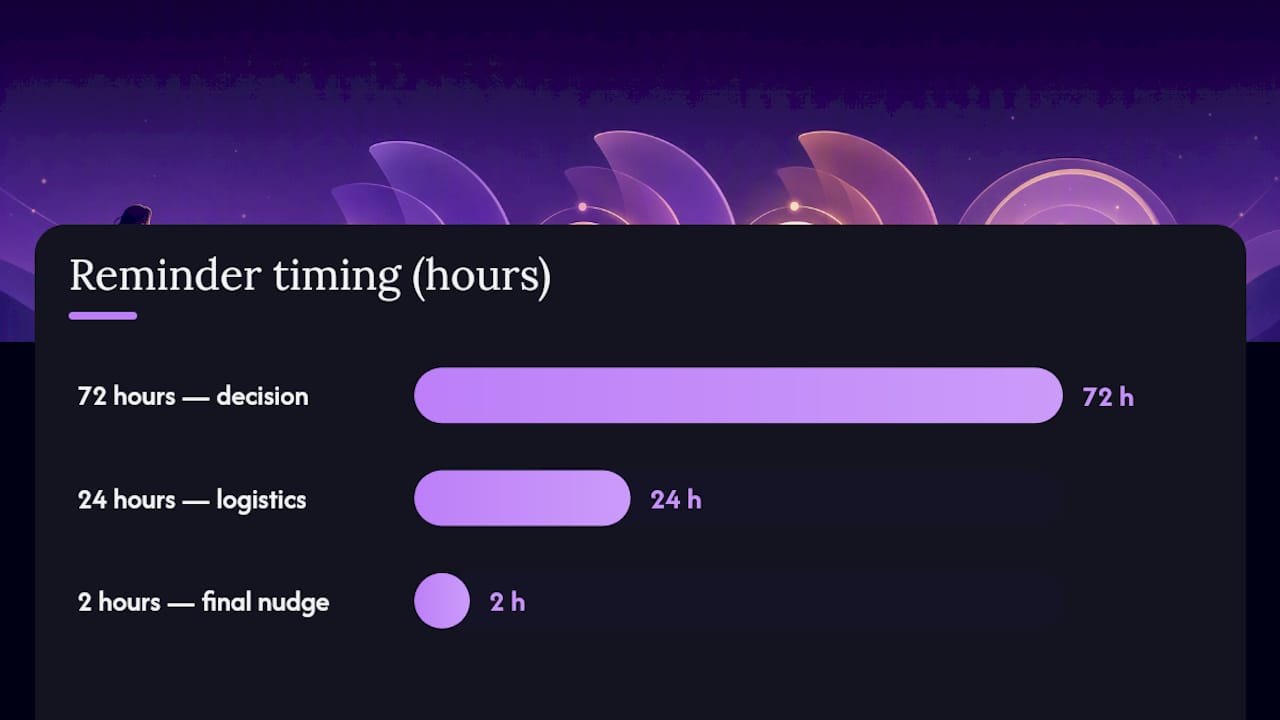
Multi-touch reminders beat a single generic text, and the timing matters more than most schedulers assume. Reminder cadences that combine a decision point roughly 72 hours out with a logistics reminder at 24 hours consistently outperform single-touch reminders across the practitioner and academic literature.
The logic is straightforward. The 72-hour reminder catches people while they still have time to genuinely decide whether to keep, move, or cancel the appointment. The 24-hour reminder is a different job: it's a logistics check, confirming the address, prep instructions, or what to bring. For high-value or high-cost appointments, such as specialist consults or long service calls, a two-hour reminder adds a final nudge without feeling like nagging.
Channel choice matters just as much as timing. SMS should be your primary channel because open and response rates for text consistently beat email, and clients read a text within minutes far more often than they open an email. Email still earns a place for detailed pre-appointment instructions or receipts. Voice reminders work best as a fallback for clients who haven't responded to two prior messages, or for older client bases less comfortable with texting.
Build in a confirmation request that requires a reply or a tap, not a passive notification. A message that says "See you Thursday at 2pm" gets ignored. A message that asks "Reply C to confirm or click to reschedule" forces a decision and gives you a clean signal for who's actually planning to show.
Here's what each touchpoint should actually do:
- At booking: Confirm the details and set expectations for what happens if they need to cancel.
- 72 hours before: Prompt a real decision, with a reschedule link front and centre.
- 24 hours before: Cover logistics: location, parking, documents, prep.
- 2 hours before (high-value only): A short, low-pressure final nudge.
Pro Tip: Test your 72-hour message copy against your 24-hour copy separately. Practices often see their biggest lift by fixing the 72-hour message, since that's the one that actually catches would-be no-shows before they've mentally checked out.
If you're building this out for a clinic, a patient appointment reminder system tuned to this cadence tends to outperform a generic one-size-fits-all blast.
Does easier rescheduling reduce no-shows?
Yes, and the evidence runs counter to the instinct many managers have to tighten policy when no-shows climb. Online self-scheduling is linked to significantly lower no-show rates compared with phone-only booking, largely because clients who can reschedule in ten seconds do exactly that instead of just not showing up.
Strict cancellation policies feel protective, but they often push clients toward silent ghosting rather than compliance. If rescheduling means calling during business hours and sitting on hold, plenty of people just skip the call and skip the appointment. Remove that friction and a chunk of your "no-shows" convert into on-time reschedules instead, which is a far better outcome for both revenue and staff time.
Practical implementation comes down to three habits:
- Put a working reschedule link in every single reminder message, not just the initial confirmation.
- Route reschedules directly into your practice management or EHR calendar in real time, so staff aren't manually re-entering changes.
- Show live availability rather than "call to reschedule," since a visible open slot converts far better than a vague promise of a callback.
You still need guardrails. Set a cutoff, commonly two to four hours before an appointment, after which self-service rescheduling switches to a staff-assisted flow. That prevents same-minute churn from destabilizing the day's schedule. Cap the number of free reschedules per booking (two is a common limit) before a client needs to speak with staff directly. And build in accessibility: not every client has a smartphone or reliable data, so a phone-based reschedule option needs to stay live alongside the digital one.
Pro Tip: Track how many "no-shows" you're preventing purely through rescheduling links. If that number is climbing month over month, you've found your highest-ROI fix before you even touch deposits or fees.
Should you require a deposit or card-on-file to reduce no-shows?
Card-on-file and deposits work, but only when they're applied surgically rather than as a blanket policy. A layered prevention system that includes card-on-file, selective deposits, and clear cancellation policies alongside reminders and waitlists is the framework practitioner guides converge on as most effective, not any single commitment mechanism in isolation.
Card-on-file is the foundation: it makes your cancellation policy enforceable. Without a card on file, a "24-hour cancellation fee" is a suggestion nobody follows. With one, it's a real consequence that changes behaviour before the appointment, not after.
Deposits tend to outperform flat cancellation fees for high-cost or high-demand services, since a deposit is paid upfront and psychologically feels like a commitment already made, whereas a fee is a future threat that's easy to discount.
Here's how to structure it:
- Require deposits only for new clients, long appointments, and historically high-risk segments identified in your baseline data, not your entire client base.
- Make deposits fully refundable up to a clear window (24 to 48 hours is standard) so clients don't feel trapped.
- Set the deposit amount at roughly 20 to 50% of the service cost, enough to matter, not so much it kills conversion.
- Apply cancellation fees only after a documented pattern, such as two or more no-shows in a rolling 12-month period, rather than on a first offence.
- Communicate the policy at booking, in writing, before payment is collected, never as a surprise at check-in.
Pro Tip: Frame deposit policies around fairness to other clients, not punishment. "This holds your spot so we don't have to turn away someone else" lands very differently than "you'll be charged if you don't come."
How automated waitlists recover revenue after a no-show
A cancellation isn't a loss yet. It's an open slot with a clock running, and what happens in the next few minutes decides whether that clock runs out. An automated waitlist that texts eligible clients the instant a slot frees up fills cancellations far faster and more reliably than a staff member manually calling down a list, because speed is the entire game: most waitlisted clients grab the first offer, not the third.

The mechanics matter. Segment your waitlist by service type and flexibility (some clients only want mornings, others take anything), then fire the automated text to the top-matched group first, expanding outward if nobody bites within a set window, often five to ten minutes.
For actual no-shows rather than advance cancellations, the recovery sequence looks different. Prompt, empathetic outreach significantly increases the chance of rebooking the missed appointment, and leading with a fee notice instead of a human check-in tends to backfire.
The most effective follow-up isn't a penalty notice. It's a short, warm message sent within hours, not days, asking simply whether everything's okay and offering the next available slot. That single choice, tone over enforcement, is often what separates a recovered client from a lost one.
Build this sequence:
- Trigger an automated, friendly "we missed you" message within one to two hours of a no-show.
- Offer the next available slot directly in that message, not a request to call back.
- Escalate to a personal call if there's no response within 24 hours, especially for high-value clients.
- Log every no-show against the client record, and flag anyone hitting three or more in a rolling window for a policy conversation, including a deposit requirement going forward.
How an AI receptionist operationalises the no-show prevention stack
Running five prevention layers by hand, reminders, rescheduling, deposits, waitlists, and follow-up, is a full-time job on top of everyone's existing full-time job. That's the practical reason most practices that read about this stack never fully implement it: there's nobody to run the waitlist texts at 4:45pm on a Friday.
Automation is what makes the stack sustainable rather than aspirational. Each layer maps cleanly onto a specific workflow feature:
- Confirmations and reminders become scheduled, multi-channel sequences that fire automatically at 72 and 24 hours without a staff member touching a keyboard.
- Reschedule links route straight into the calendar system, updating availability in real time.
- Card-on-file capture happens at the moment of booking, built into the confirmation flow rather than a separate awkward ask.
- Waitlist texts fire the second a cancellation lands in the system, with no lag for someone to notice the gap.
- Missed calls, which are often where the first no-show risk starts (a client who can't get through simply doesn't book, or books elsewhere), get answered around the clock instead of going to voicemail.
Dexcoretechnologies builds this kind of workflow for Canadian clinics, contractors, and service businesses specifically because manual coverage of all five layers rarely survives a busy week.
Before switching anything on, confirm your booking software can sync bidirectionally with your existing PMS or EHR, and set aside a short training session so front-desk staff know how to override or escalate an automated message when a client needs a human.
A 30-60-90 day rollout plan for reducing no-shows
Trying to launch all five layers in week one is the single most common reason these rollouts stall. Sequencing them protects your staff from chaos and gives you clean before-and-after data at each stage.
- Days 0 to 30: measure and fix reminders. Pull your baseline data, segment by risk, and launch the 72/24-hour reminder cadence on your highest-risk segments only. Track no-show rate weekly against your baseline.
- Days 31 to 60: remove friction and add commitment. Turn on one-tap rescheduling and real-time availability. Introduce card-on-file and targeted deposits for new clients and high-risk time slots identified in phase one. Track late-cancellation rate and slot-recovery rate alongside no-show rate.
- Days 61 to 90: automate recovery. Launch the automated waitlist and the post-no-show follow-up sequence. Review repeat-offender data and formalize your enforcement policy. Benchmark your full-stack no-show rate against day zero.
A realistic success marker by day 90 is a no-show rate reduction in the 30 to 50% range, consistent with what full-stack rollouts report when every layer is integrated end to end.
Common pitfalls: launching deposits before fixing reminders (this alienates clients without addressing the root cause); reminder cadences that don't sync with your actual calendar system, causing double-messages or missed sends; and inconsistent enforcement, where staff waive fees informally, which quietly trains clients that the policy doesn't apply to them.
Pro Tip: Assign one person to own the no-show metrics dashboard through all 90 days. Rollouts that get passed between three different staff members almost always lose momentum by day 45.
Can incentives reduce no-shows the way penalties do?
Penalties get most of the attention in no-show discussions, but positive reinforcement plays a real role too, particularly for practices worried that a heavy deposit policy will scare off new clients. Loyalty-style incentives, such as a small discount or priority booking window for clients with a perfect attendance streak, work by making attendance feel rewarding rather than merely mandatory.
Simple mechanisms tend to work best. A "three visits, no no-shows" reward, a small credit toward a future service, or early access to preferred appointment slots all cost little to administer and reinforce the behaviour you actually want. For service businesses where repeat bookings drive revenue, a modest referral or loyalty incentive tied to consistent attendance often does more for long-term retention than a strict penalty ever will.
The key is proportionality. An incentive should be small enough that it doesn't distort your margins, but visible enough that clients notice it and mention it. Pairing incentives with your reminder messages, for example, noting a streak or a reward milestone inside a confirmation text, keeps the positive reinforcement in front of clients without needing a separate campaign. Incentives work best as a complement to your reminder and rescheduling systems, not a replacement for them. They reward the clients already inclined to show up; they rarely convert a chronic no-show into a reliable one on their own.
What client feedback reveals about missed appointments
Every no-show has a reason, and most practices never ask what it was. A short, low-friction feedback prompt after a missed or rescheduled appointment, a single text asking "what got in the way?", surfaces patterns that reminder data alone can't show: a bus route that doesn't align with your open hours, a booking form that's confusing on mobile, or a location that's hard to find after dark.
Treat this feedback as a diagnostic layer, not a courtesy gesture. If multiple clients cite the same barrier, whether it's parking, wait times at check-in, or an inconvenient time slot, that's a structural fix hiding inside your no-show data, not an attendance problem. A practice that discovers its Tuesday evening slots have a disproportionately high no-show rate might learn, through direct feedback, that it's a daycare pickup conflict rather than general apathy.
Keep the feedback loop short: one question, sent within 24 hours of the missed appointment, with an option to reply in a few words or skip entirely. Review responses monthly alongside your segmentation data from earlier in the rollout, and look specifically for barriers that repeat across multiple clients rather than one-off complaints. That pattern recognition is what turns a no-show reduction program from reactive enforcement into a genuine fix of the underlying scheduling problem.
Why calendar syncing and time zone handling matter
A surprising share of no-shows trace back to a scheduling error nobody notices until the client doesn't show: a double-booked slot, a stale calendar that still shows an old opening, or a time zone mismatch that has the client showing up an hour off from the actual appointment. These aren't attendance failures. They're system failures wearing an attendance problem's clothes.
Real-time, bidirectional calendar syncing between your booking system and your practice management or EHR platform closes most of this gap. When a booking, cancellation, or reschedule updates instantly across every system, staff stop working from outdated printouts and clients stop booking into slots that are technically already taken.
Time zone handling matters more than most single-location practices assume, particularly for phone-based service businesses or multi-location operations. A client booking online at 9pm their time needs to see the appointment confirmed in their own time zone, not the clinic's, or you'll get a client showing up at the wrong hour convinced they did everything right. Automated systems that detect the booking device's time zone and display appointment times accordingly eliminate this entire category of avoidable no-show, one that's particularly easy to miss until you specifically dig for it in your baseline segmentation.
Does appointment timing affect no-show rates?
Yes, and the segmentation work covered earlier usually proves it directly: certain days, times, and appointment lengths carry meaningfully higher no-show risk than others, independent of reminders or policy. Monday mornings and the first slot after a lunch break are frequent offenders, often because they follow a gap where a client's plans shift overnight or over a meal break.
Appointment duration plays a role too. Very short slots (fifteen minutes or less) tend to feel disposable to clients, easy to blow off because "it's just a quick thing," while appointments bundled into longer, less frequent visits often see better attendance because clients have planned their day around them.
The fix isn't necessarily eliminating risky time slots. It's treating them as a segment that needs a heavier reminder touch, and in some cases, a deposit requirement, rather than applying identical treatment across every hour of the week. A practice that shifts its highest-risk slots (say, first-thing Monday) to a client base with historically strong attendance, while reserving flexible late-week openings for higher-risk segments, can shave points off its no-show rate without changing a single reminder or policy.
Author's practical view: what to try first when you have limited time or staff
If you can only do two things this month, fix your reminder cadence and make rescheduling effortless. Those two moves address the largest share of preventable no-shows and require no policy fights with clients.
Save deposits for your actual highest-risk segments, identified from real data, not a blanket rule applied to everyone. Automation is what lets a two-person front desk run all five layers without burning out. Skipping the measurement step to jump straight to penalties is the most common and most costly mistake I see teams make.
— James
Put the no-show playbook on autopilot
Everything in this playbook, the reminder cadence, the reschedule links, the waitlist texts, the card-on-file capture, works better when it runs automatically instead of depending on a front-desk employee remembering to send it during a busy shift. Dexcoretechnologies builds exactly that: an AI receptionist that answers calls 24/7, books appointments in real time, sends multi-channel SMS reminders on the 72/24-hour cadence, offers one-tap rescheduling, and fires automated waitlist texts the moment a slot opens up, all without a staff member touching the phone.

For restaurants juggling reservation no-shows alongside walk-in traffic, the restaurant-specific AI receptionist handles booking confirmations and last-minute changes without pulling staff off the floor. Service businesses managing appointment-heavy schedules across contractors, clinics, and field teams can see how the AI receptionist for service businesses maps onto their existing workflow. Start with a trial and measure your own baseline no-show rate against it after 30 days.
Sources
- How online self-scheduling reduces no-shows in 2026: A 7-step rollout plan — NextPatient
- How to Reduce No-Shows: The Complete Guide | NoShowCalc
- Follow-up with no-shows — NIATx