
The fastest way to stop losing callers today is to combine a Ring All or hunt-group configuration on your main number with an always-on automated answering workflow that captures caller details and books or queues a follow-up. No new hires required.
TL;DR: Most missed calls are a setup problem. Fix the ring strategy and add a fallback automation, and you recover the majority of lost calls within days.
Three things you can do in the next 24 hours:
- Switch your main line to Ring All or a hunt group so any available team member can pick up
- Enable missed-call SMS so callers get an immediate text acknowledgement
- Turn on voicemail-to-email with transcription so no message dies in an unchecked inbox
Table of Contents
- Why does every missed call cost more than the immediate sale?
- How do you run a quick call-performance audit this week?
- Seven proven ways to reduce missed calls and when to implement each
- How do you choose the right tech or answering service in Canada?
- How does Dexcoretechnologies reduce missed calls for Canadian businesses?
- Your 30-day plan to cut missed calls now
- Key takeaways
- Why answer rate matters more than chasing more leads
- Dexcoretechnologies: 24/7 AI answering built for Canadian businesses
- Further reading and audit resources for Canadian managers
Why does every missed call cost more than the immediate sale?
Missed calls are invisible to standard accounting, which is exactly why most owners underestimate them. You never see the invoice you didn't send. You never track the client who called twice, got voicemail both times, and booked with someone else.
The real damage compounds in three directions. First, there is the immediate lost sale. Second, there is the lifetime value of that customer: a plumber in Kelowna who loses a first-time caller loses not just one service call but every job that customer would have booked over five years, plus the referrals they would have sent. Third, there is the reputational hit. A majority of callers whose calls go unanswered will not call back. They move on, and they remember.
For appointment-driven businesses in British Columbia — clinics, contractors, restaurants, trades — the stakes are higher than average. A significant share of inbound calls arrive outside standard office hours, when staff are unavailable. Local presence expectations are also high: B.C. customers calling a neighbourhood business expect a person or at least an immediate response, not a voicemail from three days ago. In bilingual markets, a missed call to a French-speaking customer compounds the friction further.
Stat worth knowing: Small businesses frequently underreport losses tied to missed calls because the loss never appears on a P&L. The cost is real; it just hides in the gap between calls received and revenue booked.
Improving answer rates yields disproportionately large returns because it converts the same lead volume into more live conversations. You are not spending more on marketing. You are just stopping the leak.
How do you run a quick call-performance audit this week?
Before you fix anything, you need a number. Most managers guess at their missed-call rate; the actual figure is almost always worse than the guess.

The five baseline metrics to capture
| Metric | Where to find it | What to look for |
|---|---|---|
| Total inbound calls | Phone system call log or VoIP dashboard | Your raw volume baseline |
| Answered by a live person | Call log, filter by "answered" | Divide by total to get live-answer rate |
| Voicemail | Call log, filter by "voicemail" | High voicemail % signals routing or staffing gaps |
| Missed (no answer) | Call log, filter by "missed" or "abandoned" | The number you are trying to shrink |
| Peak miss windows | Sort missed calls by hour and day | Identifies when the problem is worst |
Pull 30 days of call log data. If your phone system does not export logs, your VoIP provider's admin portal almost certainly does. Sort the missed column by time of day and day of week. You will likely find two or three windows where the miss rate spikes — typically the lunch hour, early morning, and after 5 PM.
Step-by-step audit checklist:
- Log into your phone system admin portal and export the last 30 days of call records as a CSV.
- Calculate your live-answer rate: answered calls divided by total inbound calls.
- Sort missed calls by hour. Highlight any window where misses exceed 20% of that hour's volume.
- Check voicemail response time: how many hours between message received and callback? Anything over two hours is a problem.
- Identify which number or queue has the highest miss rate. Multi-location businesses often find one line carrying a disproportionate load.
Pro Tip: Check the noon–2 PM window specifically. Lunch gaps are the single most common source of avoidable missed calls in small service businesses, and they are almost always fixable with a simple schedule adjustment or a call-forwarding rule.
Seven proven ways to reduce missed calls and when to implement each
Most missed calls are a setup problem, not a staffing problem. The fixes below are ranked by speed of implementation and impact.
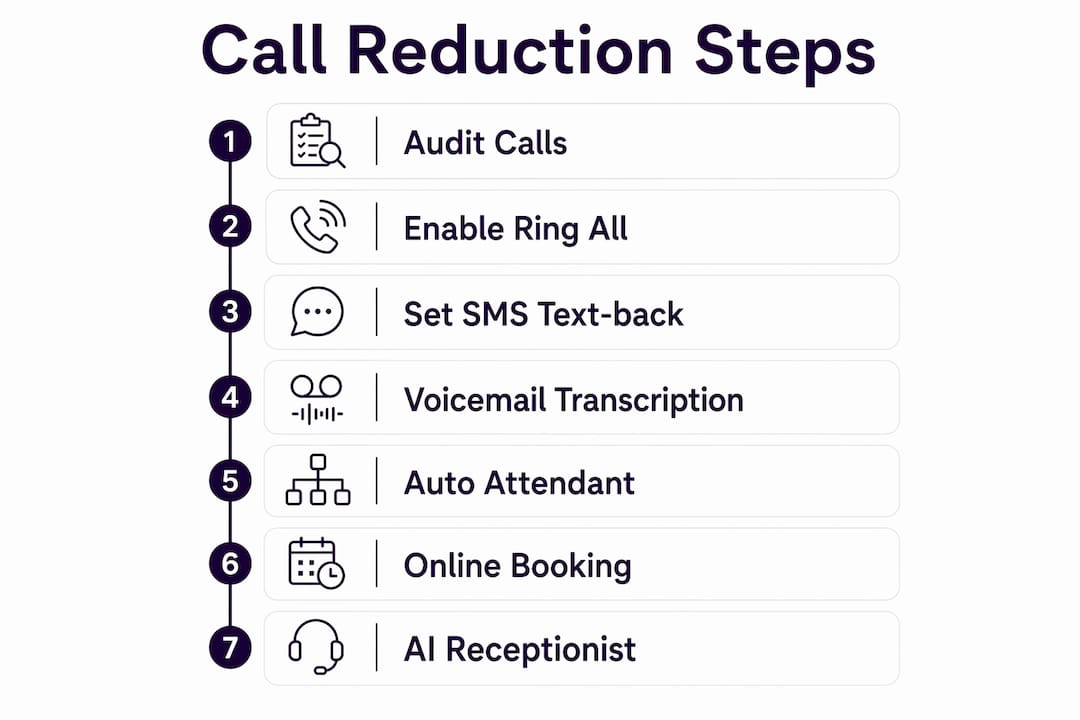
1. Switch to Ring All or a hunt group (do today) Ring All sends an inbound call to every team member's device simultaneously. A hunt group rings them in sequence. Either configuration means a single unanswered desk phone no longer equals a missed call. This is the fastest, lowest-cost change you can make. Implementation time: under an hour. Cost: usually included in your existing VoIP plan.

2. Enable missed-call SMS text-back (do today) When a call goes unanswered, an automatic text fires to the caller within seconds: "We missed your call — we'll be back to you shortly. Reply here to let us know how we can help." This keeps the lead warm and buys time for a callback. Automated reminders and two-way messaging are among the highest-impact low-effort additions for any service business.
3. Voicemail-to-email with transcription (do today) Voicemails that land in an unchecked inbox are functionally the same as missed calls. Routing voicemails to email with a text transcription creates a trackable follow-up task and means any team member can act on it from any device. Implementation time: 15 minutes. Cost: included in most VoIP plans.
4. Auto attendant and intelligent call routing (this week) An auto attendant answers every call on the first ring and routes it to the right person or queue. For multi-service businesses, this prevents the wrong person from picking up and fumbling a booking. Pair it with overflow routing so calls that go unanswered after a set number of rings forward to a mobile or a backup queue. Integration with your CRM means the caller's record pulls up before anyone says hello.
5. Click-to-call and online booking (this week) Every call you deflect to a self-serve booking page is a call that cannot be missed. Adding a click-to-call button to your Google Business Profile and a booking widget to your website captures intent at the moment it peaks. Online scheduling reduces inbound call pressure on staff and captures leads outside business hours without any manual effort.
6. After-hours AI receptionist or automated agent (this month) After-hours coverage is where the highest-value calls are most often lost in service industries. An AI receptionist answers at 11 PM the same way it answers at 11 AM: it qualifies the caller, books the appointment, updates the CRM, and sends an SMS confirmation. For small teams with no overnight staff, this is the only scalable way to cover off-hours without hiring. Integration with your calendar and dispatch system means the booking is live before anyone arrives in the morning.
7. Staff training and call accountability (this month) Technology handles the overflow; people handle the relationship. Train staff to answer within three rings, use a consistent greeting, and log every call outcome. Pair this with a weekly review of the missed-call report so the team sees the numbers. Accountability changes behaviour faster than policy documents.
Implementation timing at a glance:
- Today: Ring All, missed-call SMS, voicemail-to-email
- This week: Auto attendant, routing rules, click-to-call, online booking
- This month: After-hours AI answering, CRM integration, staff training programme
When automated booking pairs with SMS reminders, no-show rates drop alongside missed calls. The two problems share a root cause: a lack of confirmation and follow-through in the booking workflow.
How do you choose the right tech or answering service in Canada?
The Canadian market has specific requirements that generic vendor comparisons miss. Data residency, bilingual support, and integrations with Canadian scheduling and POS platforms matter here in ways they do not in U.S.-focused reviews.
Core vendor checklist:
- CRM and calendar integration: Does the system update your CRM in real time when a call is answered or a booking is made? Native integrations with tools like Jane App, Jobber, or Square matter more than a long list of generic Zapier connections.
- Native booking support: Can the system book an appointment during the call, without a human? A system that only takes messages is a voicemail with a nicer interface.
- SMS and voicemail workflows: Missed-call text-back and voicemail-to-email should be standard, not add-ons.
- Reporting and SLA metrics: You need a dashboard that shows answer rate, missed-call %, and time-to-answer by day and hour. If the vendor cannot show you these numbers, you cannot measure improvement.
- Bilingual support: If your business serves French-speaking customers in B.C. or operates across provincial lines, the system needs to handle French-language calls without routing them to a dead end.
- Data handling and privacy: Canadian businesses are subject to PIPEDA and B.C.'s PIPA. Ask vendors explicitly where call recordings and customer data are stored. "Cloud" is not an answer; "Canadian data centres" is.
Pricing model trade-offs:
Subscription plans suit businesses with predictable call volume. Pay-per-use works for seasonal businesses or those testing a new channel. For most small and mid-size B.C. businesses, a flat monthly subscription with unlimited call answering is easier to budget and scales without surprise invoices.
Questions to ask during a vendor demo:
- Show me a live booking from an inbound call, end to end, including the CRM update and SMS confirmation.
- What happens when the AI cannot answer a question? How does the fallback routing work?
- Where is my call data stored, and who can access it?
- What is the typical time from contract signing to live answering?
Red flags to walk away from:
- No real-time CRM update on call completion
- No fallback routing when the AI or auto attendant cannot handle a call
- Opaque per-minute pricing with no cap
- Support hours that end at 5 PM Eastern, leaving B.C. businesses without help during their own business day
Pro Tip: Ask the vendor to show you the CRM and messaging workflow live during the demo, not in a recorded video. A vendor confident in their integration will show it in real time. One who pivots to a slide deck probably has a reason.
How does Dexcoretechnologies reduce missed calls for Canadian businesses?
Dexcoretechnologies built its platform specifically for the Canadian market, with 24/7 AI receptionist coverage, real-time appointment booking, and workflow automation that connects to the tools B.C. businesses already use.
The typical Dexcoretechnologies workflow looks like this:
- Inbound call answered on the first ring, 24 hours a day, seven days a week, by the AI receptionist.
- Caller qualification: the AI identifies the caller's need, captures their name, contact details, and service request.
- Live booking or transfer: the system books the appointment directly into the business's calendar, or routes an urgent call to the right team member with a full context handoff.
- CRM update + SMS confirmation: the customer record is updated automatically, and the caller receives an SMS confirmation within seconds.
- Team notification: the relevant staff member gets an alert with the booking details before they even check their calendar.
This workflow replaces the three most common failure points: the unanswered call, the voicemail that never gets returned, and the booking that falls through because no one followed up.
Illustrative ROI example
| Scenario | Before Dexcoretechnologies | After Dexcoretechnologies |
|---|---|---|
| Weekly inbound calls | 80 | 80 |
| Live-answer rate | 55% | — |
| Calls converted to bookings | 30 | — |
These figures are illustrative, based on the platform's stated potential ROI of up to 942%. Actual results depend on call volume, average booking value, and industry.
Onboarding with Dexcoretechnologies is structured: most businesses are live within days, not weeks. The setup process covers call flow design, integration with your existing calendar and CRM, and industry-specific workflow configuration for restaurants, clinics, contractors, and service businesses. For service businesses and trade contractors, the platform includes dispatch-ready workflows and POS integrations built for the Canadian market.
Your 30-day plan to cut missed calls now
This plan assumes you are starting from a basic phone setup with no automation in place. Adjust the timeline if some steps are already done.
Week 1: Audit and quick fixes
- Export 30 days of call logs and calculate your baseline answer rate and missed-call %.
- Switch your main number to Ring All or a hunt group.
- Enable voicemail-to-email with transcription.
- Set up missed-call SMS text-back.
- Identify your two highest-miss windows and flag them for the team.
Week 2: Routing and automation
- Configure an auto attendant with overflow routing to a mobile or backup queue.
- Add a click-to-call button to your Google Business Profile and website.
- Enable an online booking widget for your top two service types.
- Set a target: achieve a high answer rate by end of week.
Week 3: Integrations and staff training
- Connect your phone system to your CRM so call outcomes log automatically.
- Train staff on the three-ring answer standard and consistent call greeting.
- Run a 30-minute team session reviewing the missed-call report from week one.
- Activate after-hours AI answering or an automated agent for evenings and weekends.
Week 4: Refine, measure, and formalise
- Pull a fresh 30-day call log and compare answer rate, missed-call %, and voicemail volume to your week-one baseline.
- Identify any remaining miss windows and adjust routing rules.
- Formalise the call-handling workflow in a one-page team reference document.
- Set a monthly review date for call metrics so the improvement holds.
Measurement targets:
- Answer rate: from baseline to 85%+ by day 30
- Missed-call %: reduce by at least half from baseline
- Voicemail response time: under two hours for every message
Communicate changes to staff before they go live, not after. A routing change that surprises the team creates confusion on live calls. A five-minute heads-up prevents it.
Key takeaways
Fixing your ring strategy and adding automated fallback workflows recovers the majority of missed calls without adding headcount, and every recovered call is revenue that was already on its way to you.
| Point | Details |
|---|---|
| Audit first | Pull 30 days of call logs and calculate your live-answer rate before changing anything. |
| Ring strategy is the fastest fix | Switching to Ring All or a hunt group recovers missed calls immediately, at no extra cost. |
| Automate the fallback | Missed-call SMS and voicemail-to-email prevent leads from going cold when calls are not answered live. |
| After-hours coverage matters most | The highest-value calls often arrive outside business hours; automated answering is the only scalable solution for small teams. |
| Dexcoretechnologies closes the gap | Dexcoretechnologies's 24/7 AI receptionist answers, qualifies, books, and notifies — from first ring to confirmed appointment. |
Why answer rate matters more than chasing more leads
The conventional advice for a slow pipeline is to generate more leads. Run more ads, post more content, send more emails. What that advice ignores is the conversion rate on the leads you already have.
If your business receives 80 calls a week and answers just over half, you are having fewer than 50 conversations. Improve the answer rate and you increase opportunities from the same 80 calls, at zero additional marketing spend. The math is straightforward, but most owners never run it because missed calls are invisible on a P&L.
There is also a staff burnout angle that rarely gets discussed. When calls pile up in voicemail and the team spends the afternoon returning calls from the morning, the workday stretches, the quality of each callback drops, and the team starts to feel like they are always behind. Improving answer rates through automation does not just recover revenue. It removes the reactive scramble that grinds teams down over time.
The businesses that see the fastest ROI from AI receptionist and workflow automation are not the ones with the most sophisticated setups. They are the ones that stopped trying to hire their way out of a routing problem and fixed the system instead.
Dexcoretechnologies: 24/7 AI answering built for Canadian businesses
Every missed call you recovered in the audit above represents revenue that was already on its way to you. Dexcoretechnologies captures it automatically, from the first ring to the confirmed booking, without adding a single person to your payroll.

The platform answers every inbound call around the clock, qualifies the caller, books the appointment into your existing calendar, updates your CRM, and sends the customer an SMS confirmation. For B.C. businesses in trades, clinics, restaurants, and service industries, the workflows are pre-built for your sector and ready to go live within days of onboarding. Setup includes call flow design, integration support, and ongoing assistance. No long-term lock-in, no per-minute surprises.
If you want to see exactly how many calls you are currently losing and what recovering them would mean for your revenue, book a demo with Dexcoretechnologies and bring your call log. The numbers will do the convincing.
Further reading and audit resources for Canadian managers
Use the audit table in the "How do you run a quick call-performance audit" section above as your day-one template. Copy the five-column structure into a spreadsheet, populate it from your phone system's export, and you have a working baseline in under an hour.
Useful sources for deeper reading:
- The true cost of missed business calls — a practical breakdown of how missed calls translate to lost revenue, useful for building an internal business case.
- How to reduce missed calls for small business — covers ring strategy and setup fixes in detail; good for the technical configuration steps.
- Call answer rate benchmarks and improvement guide — industry benchmarks by sector; use this to assess whether your current answer rate is a minor gap or a major problem.
- 7 ways to reduce missed calls without overloading staff — scheduling, reminders, and messaging tactics that reduce inbound call pressure.
- Silent killer of small business: missed business calls — covers the reputational and operational damage in plain language; useful for sharing with a sceptical partner or manager.
- Workflow automation software alternatives — if you are evaluating automation tools beyond call answering, this comparison covers the broader category.
For vendor selection specifically, the call answer rate benchmarks guide and the AI answering service comparisons are the most useful starting points. For the strategic case to bring to a business partner, the cost-of-missed-calls sources make the argument clearly and without technical jargon.