
If you are losing bookings because no one answered the phone at 7 PM on a Tuesday, front desk automation is the fix. The short verdict: deploy an AI receptionist to handle inbound calls, book appointments, and send confirmations around the clock, then run a focused pilot with Dexcoretechnologies to measure missed-call reduction and bookings gained before committing to a full rollout. Dexcoretechnologies reports a high potential ROI for Canadian service businesses, and the platform is built to align with PIPEDA obligations from the Office of the Privacy Commissioner of Canada.
Before you go further, here is what to confirm on day one of any pilot:
- Are inbound calls being answered 24/7 without a human on shift?
- Is the system booking appointments directly into your calendar or CRM?
- Are SMS confirmations going out automatically after every booking?
- Has the vendor confirmed data residency and PIPEDA-compliant consent handling?
- Do you have a baseline missed-call rate to measure against?
If you cannot answer yes to all five after a two-week trial, the solution is not ready for your business.
Key takeaways
Front desk automation pays back fastest when it captures missed calls that would have converted to bookings, and Dexcoretechnologies is built specifically for that outcome in the Canadian market.
| Point | Details |
|---|---|
| Pilot before full rollout | Run a 1–4 week pilot to measure missed-call reduction and bookings gained before committing. |
| Verify integrations first | Confirm native connections to your calendar, CRM, and POS before signing any contract. |
| PIPEDA compliance is non-negotiable | Ask every vendor for data residency confirmation and a data processing agreement before go-live. |
| Track three KPIs during the pilot | Missed-call rate, bookings gained, and staff hours reclaimed are the numbers that tell the real story. |
| Dexcoretechnologies for Canadian businesses | Dexcoretechnologies offers 24/7 AI receptionist automation with fast onboarding and a reported potential ROI of up to 942% for Canadian service businesses. |
Table of Contents
- What does front desk automation actually cover?
- What are the real benefits of automating your front desk?
- Which features should you insist on before signing anything?
- How does front desk automation run day to day?
- Which industries get the most out of front desk automation?
- How do you implement front desk automation in Canada?
- What do Canadian businesses need to know about privacy and security?
- What does front desk automation cost, and what ROI should you expect?
- How do you choose the right front desk automation partner?
- What results can Canadian businesses expect from Dexcoretechnologies?
- What most people get wrong about front desk automation
- Dexcoretechnologies: start your front desk automation pilot today
- Sources
What does front desk automation actually cover?
Front desk automation is the use of software, AI, and connected hardware to handle the tasks a human receptionist would normally perform, without requiring a person to be present. That covers a wider range of systems than most buyers expect when they first start shopping.
The core components you will encounter:
- AI receptionist: Answers inbound calls 24/7, qualifies callers with natural-language conversation, books appointments, and routes complex requests to staff.
- Visitor management: Digital check-in kiosks replace paper sign-in sheets, issue badges, and notify the right team member when a guest arrives.
- Appointment scheduling: Automated booking tied directly to a live calendar, with real-time availability checks and instant confirmation.
- CRM and calendar sync: Every interaction creates or updates a contact record and pushes the appointment to your scheduling system without manual entry.
- SMS and email confirmations: Outbound messages sent automatically after booking, with reminder sequences to reduce no-shows.
- Analytics dashboard: Call volume, booking conversion, missed-call rate, and handle-time data in one view so you can see what the system is doing.
Front-office automation tools improve customer-facing workflows and cut repetitive manual work, which translates to faster service and fewer errors at the point of contact. The term "front desk automation" is widely used in practice; the recognized industry framing is front-office automation, and the two are interchangeable in most vendor conversations.
What are the real benefits of automating your front desk?
The most direct benefit is simple: calls that used to go to voicemail now get answered, qualified, and booked. For any appointment-driven business, that is revenue that was previously walking out the door.
Beyond the obvious, the operational gains compound quickly. Staff who spent two hours a day fielding routine booking calls can redirect that time to in-person service, follow-up, or higher-value work. Check-in queues shrink when a kiosk handles arrival confirmation. No-show rates drop when automated reminders go out 24 and 2 hours before an appointment.
The KPIs worth tracking from week one:
- Missed-call rate: Percentage of inbound calls that go unanswered. This is your baseline before automation and your primary success metric after.
- Bookings per 100 handled calls: How many calls convert to confirmed appointments. Automation typically lifts this by removing friction and hold times.
- Average handle time saved: Minutes per call that staff no longer spend on routine booking tasks.
- Conversion uplift: New bookings attributed to calls that would previously have gone to voicemail after hours.
Businesses that automate common front-office tasks like intake, check-in, and follow-up appointments consistently report faster service cycles and reduced administrative load on front-line staff.
Consistent service quality is an underrated gain. A human receptionist has good days and bad ones. An AI receptionist delivers the same greeting, the same qualification questions, and the same booking flow at 9 AM on a Monday and 11 PM on a Saturday.
Which features should you insist on before signing anything?
Not all front desk software solutions are built to the same standard. Some handle calls well but have no real CRM integration. Others book appointments but cannot send an SMS confirmation. Here is the feature checklist that separates production-ready systems from demo-ware.
Must-have features:
- Natural-language 24/7 call answering (not a rigid IVR menu)
- Real-time appointment booking with live calendar availability
- Two-way calendar sync (Google Calendar, Outlook, or your booking platform)
- CRM record creation or update on every interaction
- POS or payment gateway prompts where relevant (restaurants, clinics)
- Dispatch handoff for contractors (job details pushed to field teams)
- SMS and email confirmations and reminder sequences
- Self-service check-in kiosk support
- Analytics dashboard with call volume, booking rate, and missed-call data
- Escalation path to a live human or callback queue when the AI cannot resolve the request
Integration examples that matter in practice:
A new booking triggers a calendar event, creates a CRM contact, and sends an SMS confirmation in one automated sequence. A missed call after hours triggers a follow-up text within minutes, capturing the lead before they call someone else. For a contractor, a qualified inbound call pushes job details directly to a dispatch tool. For a clinic, a confirmed appointment triggers an intake form and insurance verification request.
AI sales and front-office tools are evolving fast, and vendors are increasingly surfacing agentic capabilities. Agentic AI can handle multi-step conversations without a script, which makes 24/7 booking more realistic, but maturity varies significantly between vendors. Test edge-case dialogues during any pilot: a caller who wants to reschedule, a caller with an unusual request, a caller who asks a question the system was not trained on.
How does front desk automation run day to day?
Concrete workflows make the difference between a concept and something you can actually map to your operation.
Inbound call: qualify → book → confirm
- Call arrives outside business hours (or during a busy period).
- AI receptionist answers within two rings, greets the caller by business name.
- Natural-language conversation qualifies the request: service type, preferred date and time, contact details.
- System checks live calendar availability and offers two or three options.
- Caller confirms a slot; booking is created in the calendar and CRM simultaneously.
- SMS confirmation sent to the caller within 30 seconds.
- Staff notification pushed to the relevant team member or dispatch queue.
Visitor kiosk check-in
- Guest arrives and taps the kiosk screen.
- Enters name or scans a QR code from their confirmation SMS.
- System verifies the appointment, issues a digital badge or check-in confirmation.
- Automatic notification sent to the host or front-desk team.
- Waitlist or queue position updated in real time.
Missed-call capture and follow-up
- Call arrives when all lines are busy or after hours and the AI cannot answer in time.
- System logs the missed call and triggers an outbound SMS within minutes: "Hi, we missed your call — reply to book or call us back at [number]."
- If the caller replies, the automated booking flow resumes via SMS.
- If no reply within 24 hours, a second follow-up is sent.
Appointment reminder sequence
- 48 hours before: SMS and email reminder with appointment details and a one-tap confirm/reschedule link.
- 2 hours before: final SMS reminder.
- No-show trigger: if the appointment is not confirmed, a staff alert fires for manual follow-up.
Diagrams or screenshots of these flows are worth adding to your internal training materials once you have configured the system. The workflows above map directly to the steps your staff currently handle manually.
Which industries get the most out of front desk automation?
The businesses that benefit most share one trait: high call volume relative to staff capacity, with bookings or appointments at the centre of their revenue model.
- Restaurants: Automated reservation handling, no-show reduction via reminder sequences, and waitlist management. A missed reservation call at 6 PM on a Friday is a lost table, and a lost table is immediate revenue gone.
- Medical and dental clinics: Intake form automation, insurance eligibility checks, appointment reminders, and recall campaigns. Automation in dental and medical billing speeds collections and reduces accounts receivable through automated reminders and online payment prompts.
- Contractors and trades: Inbound call qualification, dispatch handoff, and estimate scheduling. A plumber or HVAC technician cannot answer the phone mid-job; an AI receptionist captures the lead and routes it to the right crew.
- Property managers: Visitor screening, maintenance request intake, and showing scheduling. High call volume with repetitive request types is exactly where automation pays off fastest.
- Service businesses (salons, spas, fitness studios): Booking, rescheduling, and reminder automation reduce no-shows and free front-desk staff for in-person service.
Two edge cases where automation should be blended with live staff: high-touch luxury hospitality, where the personal greeting is part of the product, and complex medical triage, where clinical judgment is required before booking. In both cases, the AI handles the intake and routing, and a human takes over for the nuanced part.
How do you implement front desk automation in Canada?
A phased rollout reduces risk and gives you real data before you commit the full operation to an automated system.
- Scope your needs (Week 1): Document current call volume, missed-call rate, booking conversion, and the specific tasks you want to automate. Identify which calendar, CRM, and POS systems need to integrate.
- Select a vendor and start a pilot (Weeks 1–4): Run a live pilot on a subset of your inbound calls or one location. Measure missed-call rate, bookings generated, and any escalations to human staff.
- Integration and testing (Weeks 2–6): Connect the AI receptionist to your calendar, CRM, and any dispatch or POS tools. Test every integration with real scenarios, including edge cases.
- Staff training (Weeks 3–5): Train your team on the escalation process, how to review call logs, and how to tune the system's scripts based on real call data.
- Phased go-live (Weeks 4–12): Expand from the pilot to full call volume or all locations. Keep a human failover option active for the first 30 days.
- Measurement and iteration (Ongoing): Review KPIs weekly for the first month, then monthly. Tune scripts, adjust escalation triggers, and add integrations as the business grows.
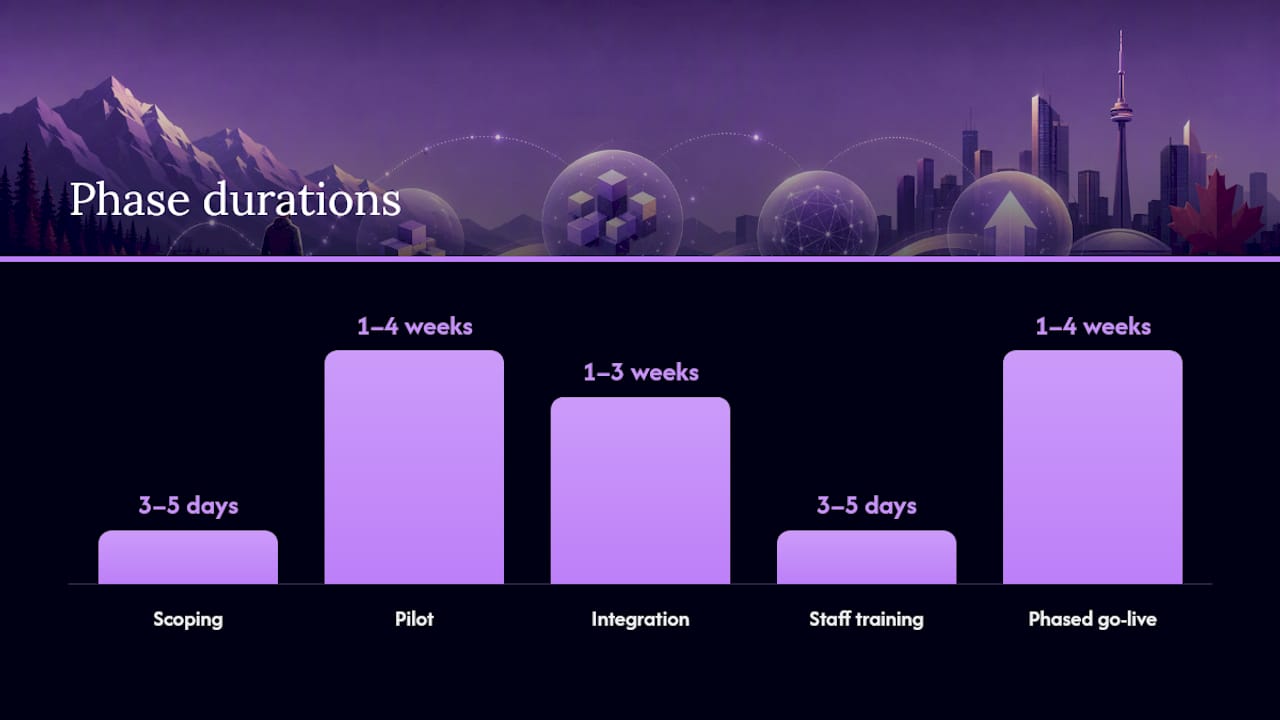
| Phase | Key activity | Responsible | Typical duration |
|---|---|---|---|
| Scoping | Document workflows and integration requirements | Owner / ops manager | 3–5 days |
| Pilot | Live call handling on subset of volume | Vendor + owner | 1–4 weeks |
| Integration | Calendar, CRM, POS connections and testing | Vendor + IT | 1–3 weeks |
| Staff training | Escalation process and script review | Vendor + team lead | 3–5 days |
| Phased go-live | Full volume with human failover active | Owner | 1–4 weeks |
| Measurement | KPI review and script iteration | Owner / ops manager | Ongoing |
Small-business stacks benefit most when automation integrates with existing CRM and booking tools rather than replacing them. Prioritise integration fidelity over feature count when evaluating vendors.
What do Canadian businesses need to know about privacy and security?
Confirm vendor compliance and clear data residency commitments before signing any contract. This is not optional in Canada.
The Personal Information Protection and Electronic Documents Act (PIPEDA), administered by the Office of the Privacy Commissioner of Canada, governs how private-sector businesses collect, use, and disclose personal information in commercial activity. An AI receptionist collects caller names, phone numbers, appointment details, and sometimes health or payment information. Every one of those data points falls under PIPEDA.
Practical PIPEDA alignment points to verify:
- Consent: Callers must be informed that their call is being handled by an automated system and that their information is being collected. A brief disclosure at the start of the call satisfies this.
- Purpose limitation: Data collected during a booking call should be used only for that booking and related service delivery, not for secondary marketing without explicit consent.
- Secure storage: Ask where call recordings and contact data are stored. Canadian data residency (servers in Canada) reduces cross-border transfer risk under PIPEDA.
- Breach notification: Under PIPEDA, businesses must report breaches that pose a real risk of significant harm to the OPC and notify affected individuals. Confirm the vendor's breach response SLA.
- Access controls: Who at the vendor can access your call recordings and customer data? Insist on role-based access and audit logs.
Questions to ask every vendor:
- Where are call recordings and customer data stored, and in which country?
- What encryption standard is used for data in transit and at rest?
- How long is data retained, and can you delete it on request?
- What is your breach notification process and SLA?
- Do you provide audit logs of data access?
Pro Tip: Request a sample data processing agreement before the pilot starts. A vendor that cannot produce one quickly is a vendor that has not thought carefully about their obligations under Canadian privacy law.
What does front desk automation cost, and what ROI should you expect?
Pricing models vary, and the total cost of ownership is rarely just the monthly subscription fee.
Common pricing structures:
- Subscription tiers: Monthly or weekly flat fees based on call volume, number of locations, or feature set. Entry-level plans typically cover basic call answering and booking; higher tiers add integrations, analytics, and dedicated support.
- Per-minute or per-call billing: Pay-per-use plans suit businesses with variable call volume. Costs are predictable at low volume but can spike during busy seasons.
- Per-seat or per-location fees: Common for multi-location businesses; each location or user adds to the monthly cost.
- Add-on fees: Integrations, custom script development, onboarding, and premium support are sometimes billed separately. Always ask for a fully loaded price quote.
ROI signals to track:
- Cost per handled call (subscription cost divided by total calls handled)
- Missed-call reduction percentage (baseline vs. post-automation)
- Bookings gained from previously missed calls
- Revenue per booking multiplied by bookings gained
- Staff hours reclaimed per week multiplied by hourly cost
A simple worked example (conservative assumptions, labelled clearly):
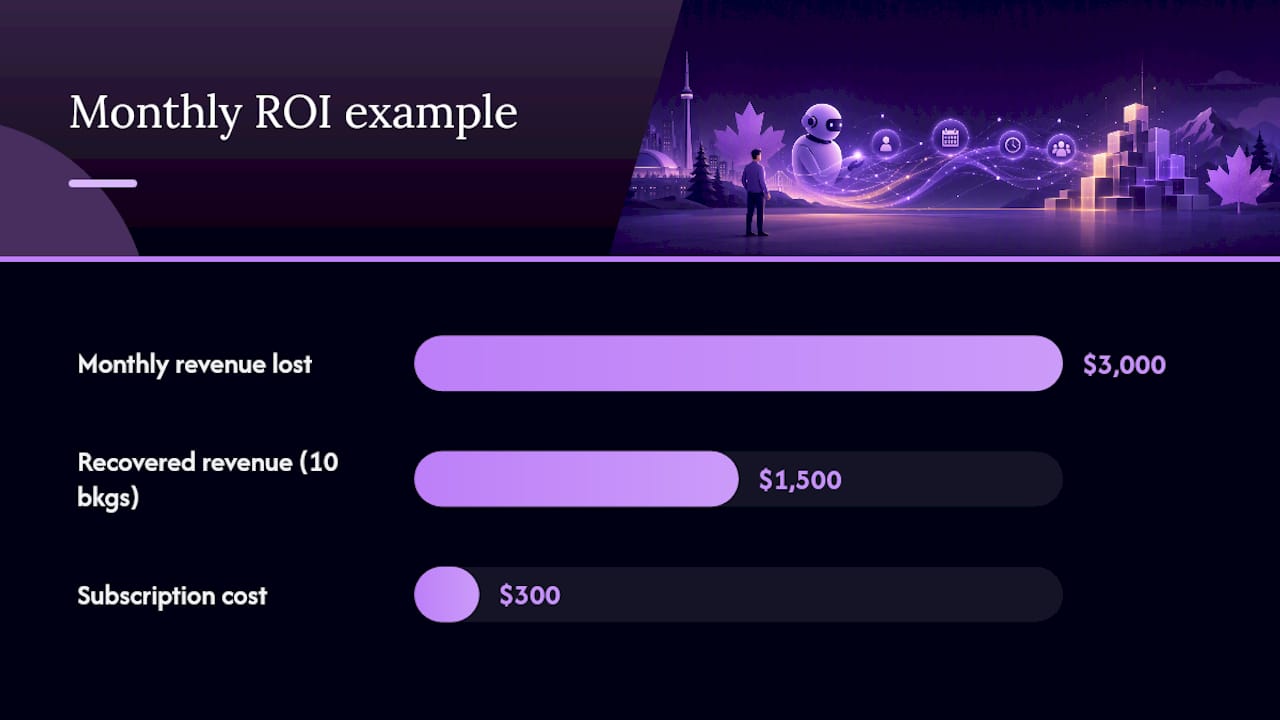
Assume a service business receives 200 calls per month. At an average booking value of $150, that is $3,000 in monthly revenue previously lost. If the automation subscription costs $300 per month and captures even half of those missed bookings (10 bookings = $1,500), the payback is clear within the first month. These are illustrative figures; your actual numbers will depend on your call volume, booking rate, and average transaction value.
Dexcoretechnologies reports a high potential ROI for Canadian service businesses using its AI receptionist platform. That figure is a brand-sourced signal, not an independent audit, but the underlying logic holds: capturing missed calls that convert to bookings at any reasonable rate pays back a subscription-priced tool quickly.
How do you choose the right front desk automation partner?
Prioritise integration fidelity, privacy commitments, support responsiveness, and realistic setup timelines over marketing feature lists. A vendor with 50 listed features and a six-month implementation timeline is less useful than one with 15 features that are live in four weeks.
Questions to ask during every vendor demo:
- Which specific calendar, CRM, and POS systems do you integrate with natively, and which require a third-party connector?
- What is your uptime SLA, and what happens when the system goes down?
- How does the system escalate to a human when it cannot handle a call?
- Can we access a sandbox or staging environment before go-live?
- What does the pilot period cover, and what metrics do you commit to measuring?
- What is the exit and data migration policy if we leave?
- What customisation limits exist on call scripts and booking flows?
- What support is included in the base subscription, and what costs extra?
Red flags to walk away from:
- Vague or evasive answers about data residency and PIPEDA compliance
- No case studies with concrete metrics (bookings gained, missed-call reduction)
- Setup estimates longer than 12 weeks with no clear milestone checklist
- Hidden fees for integrations, onboarding, or script changes discovered after the demo
- Support SLAs that only promise a response within 48–72 hours
- No live-human failover or escalation path documented in the contract
Evaluating AI-assisted features during a pilot is the only reliable way to assess how a system handles real-world edge cases. Marketing demos use curated scenarios. Your callers will not.
Pro Tip: Ask for references from Canadian businesses in your industry specifically. A system that works well for a Toronto dental clinic may need significant script tuning before it handles a Vancouver HVAC contractor's calls correctly.
What results can Canadian businesses expect from Dexcoretechnologies?
Dexcoretechnologies deploys AI receptionist and workflow automation built specifically for Canadian service businesses, with onboarding designed to get a pilot live in 1–4 weeks.
A representative deployment looks like this: a multi-location service business was missing a significant share of after-hours calls, with no automated follow-up in place. Dexcoretechnologies configured a 24/7 AI receptionist integrated with the business's existing calendar and CRM, added an SMS follow-up sequence for missed calls, and set up team notifications for escalations. Within the pilot period, the business had measurable data on calls handled, bookings generated, and staff time reclaimed.
The platform covers AI receptionist services for service businesses and restaurant reservation automation, with industry-specific workflow design for contractors, clinics, and transport and delivery firms. Subscription plans include weekly, monthly, and pay-per-use options, with professional onboarding and ongoing support included.
What most people get wrong about front desk automation
The conventional wisdom says the hard part is choosing the right software. It is not. The hard part is data mapping and staff change management, and most buyers do not find that out until they are two weeks into a rollout.
Data mapping is where pilots quietly fail. The AI receptionist needs to know your service types, your availability rules, your booking constraints, and your escalation triggers. If that information is not documented clearly before configuration starts, the system will book appointments your staff cannot fulfil, or it will escalate calls that should have been handled automatically. The fix is straightforward: spend a full day mapping your current call flows before you touch any vendor configuration.
Staff resistance is the second surprise. Receptionists and front-desk staff sometimes interpret automation as a threat rather than a tool. The businesses that deploy fastest are the ones that reframe the conversation early: automation handles the repetitive inbound volume so staff can focus on the work that actually requires a person. That framing needs to come from ownership, not from the vendor.
The third surprise is edge-case calls. Every business has them: the caller who wants something the system was not trained to handle, the caller who speaks a mix of English and French, the caller who is upset and needs a human immediately. A well-structured pilot surfaces these within the first two weeks. Build your escalation path before go-live, not after.
Structure the pilot to expose these issues on purpose. Use real call volume, not a curated test set. Review every escalation log daily for the first two weeks. Tune the script based on what you see, not what you assumed callers would say. The businesses that get the most out of front desk automation are the ones that treat the pilot as a learning exercise, not a checkbox.
Dexcoretechnologies: start your front desk automation pilot today
Missed calls are not a staffing problem. They are a systems problem, and Dexcoretechnologies solves it with a 24/7 AI receptionist that books appointments, captures leads, and sends confirmations without a human on shift.

For Canadian service businesses, the practical advantage is speed: Dexcoretechnologies gets a pilot live in 1–4 weeks, with professional onboarding included. The system integrates with your existing calendar, CRM, POS, and dispatch tools, so you are not rebuilding your stack. Subscription plans are flexible (weekly, monthly, or pay-per-use), and there is no requirement to commit to a full rollout before the pilot validates your numbers.
During the pilot, confirm three things: missed-call reduction, bookings generated from previously unanswered calls, and PIPEDA-compliant data handling. Dexcoretechnologies's team handles configuration and supports you through go-live. Book a demo or start your pilot to see what your current missed-call rate is actually costing you.
Sources
The following sources informed the claims and recommendations in this article: