
The fastest path to a reliable customer relationship management system is this: deploy an AI receptionist that captures structured contact and booking data into a hygiene-first CRM, add a workflow engine that routes and escalates automatically, and prove a measurable KPI uplift before you expand. For Manitoba businesses fielding missed calls and losing leads after hours, that stack is the starting point, not the end goal.
Three priorities before anything else:
- Define 1–3 measurable goals. A specific, measurable target like increasing lead-to-customer conversion from 18% to 25% within two quarters beats any vague objective.
- Lock data hygiene and routing precedence. The order matters: deduplicate first, then match accounts, then allocate by territory, then distribute by capacity.
- Set an audit cadence for AI agents. Treat every automation rule as part of a release cycle with scheduled reviews, not a set-and-forget switch. PIPEDA and CASL compliance depend on it, and so does your forecasting accuracy.
Dexcoretechnologies is built around exactly this model for Canadian businesses.
Table of Contents
- What does a CRM and automation stack actually look like?
- Which CRM techniques actually make automation reliable?
- How do you design AI receptionist workflows that feed the CRM reliably?
- What does a practical implementation checklist look like?
- How do you measure ROI and which KPIs should you start with?
- What Canadian compliance requirements apply to CRM and AI receptionists?
- How do you evaluate vendors, and why does Dexcoretechnologies fit Canadian businesses?
- Key takeaways
- What most CRM guides get wrong about adoption
- Dexcoretechnologies: book a demo for your Manitoba business
- Useful sources and further reading
What does a CRM and automation stack actually look like?
Every reliable stack has six layers, and skipping one creates a gap that shows up later as bad data or broken routing.
- AI receptionist. Captures inbound calls 24/7, books appointments, and writes structured contact records into the CRM. The booking confirmation is the first pipeline milestone.
- Operational CRM. Stores objects (contacts, accounts, deals), enforces mandatory fields, and tracks pipeline stages tied to objective events. Operational CRM comes first; analytical and predictive layers follow only after workflows are stable.
- Workflow and automation engine. Triggers tasks, sends notifications, and moves records between stages based on defined rules. Every field that drives routing or an SLA must be structured (picklist, boolean, date, number), never free text.
- Integration bus or iPaaS. Connects the CRM to calendar, billing, e-sign, POS, and dispatch systems. Before enabling any bi-directional sync, decide the authoritative system per entity and per field, and write survivorship rules to prevent data drift.
- Analytics and BI layer. Sits on top of clean operational data. Do not build dashboards until the data model is stable.
- Supporting systems. Calendar, e-sign, billing, and POS each contribute a verifiable milestone signal: a calendar booking confirms a meeting, an e-signature envelope confirms a contract sent, an invoice confirms a billing trigger.
Design the data model before you configure a single automation. Objects, associations, and mandatory normalized fields first. Automations built on a shaky data model produce routing errors and bloated records that are expensive to clean up later. For CRM integration guidance specific to Canadian businesses, that sequencing is the single most common gap.
Which CRM techniques actually make automation reliable?
Data hygiene as the operating system
Bad data is the most common reason CRM automation fails quietly. Treat hygiene as infrastructure, not a cleanup task. Validate on entry using picklists and format checks, run automated dedupe detection, quarantine uncertain matches for human review, and schedule ongoing audits. Entry validation and continuous audits prevent the compounding errors that break routing and inflate pipeline numbers.
Lead routing done in the right order
A tiered routing flow keeps ownership disputes out of your team meetings. The sequence: deduplicate the incoming record, match it to an existing account or contact, allocate by territory, filter by availability and capacity, then distribute via round-robin with an acceptance SLA and an escalation path if no one accepts. Log the routing_reason and routing_version on every assignment. When a rep questions why a lead landed with them, you answer with evidence, not a guess.

Milestone-based pipeline stages
Tie every pipeline stage to a verifiable event, not a rep's subjective judgment. Calendar meeting completed, e-sign envelope sent, invoice issued. Record stage_changed_by, stage_changed_at, and stage_change_source on every transition. Milestone-based stages keep forecasting honest because the trigger is an action, not an opinion.
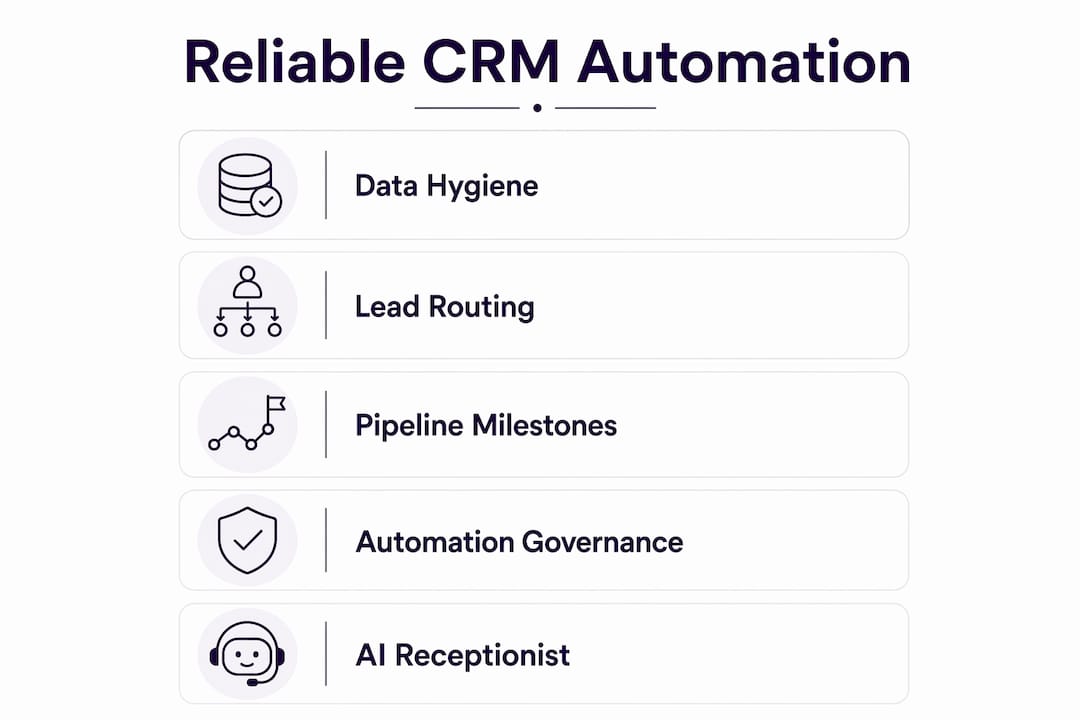
Automation governance
Every automation change needs a change request, a test environment run, a release window, and a rollback plan. After deployment, run a reconciliation check to confirm revenue reporting is intact. AI agents need regular audits and a release cycle, not just an initial setup.
Pro Tip: Frame CRM features as personal time-savers for each role, not management oversight tools. A service coordinator who sees that the AI receptionist eliminates 40 minutes of manual call logging per day adopts the system. One who hears "management can now track your activity" does not.
How do you design AI receptionist workflows that feed the CRM reliably?
The workflow in plain prose: an inbound call hits the AI receptionist, which captures structured fields and either creates a new contact or merges with an existing one. The record routes to the appropriate pool, a task or booking is created, and the pipeline milestone updates on acceptance or booking confirmation. Every step writes an audit field.
Capture fields to define before go-live:
- Contact name, phone, email
- Intent tag (predefined picklist, not free text)
- Preferred appointment slots (date/time enums)
- UTM source and campaign
- Consent flags for CASL opt-in
routing_reasonfield
Audit schedule:
- Daily: acceptance SLA checks (did assigned reps respond within the window?)
- Weekly: dedupe report (new duplicates created in the past seven days)
- Monthly: data-quality score across mandatory fields
- Quarterly: full automation review, AI rule performance, and routing logic update
Handoff rules matter as much as capture rules. When a call matches an existing account owner, the task goes to that owner with a timestamp. New assignments get a first-contact logging entry. The AI appointment scheduling layer should write the booking confirmation back to the CRM as the milestone trigger, not as a note.
What does a practical implementation checklist look like?
Phased timeline:
- Weeks 0–2: Discovery and goals. Map the customer journey, define 1–3 measurable KPIs, and document current baseline metrics. Map the journey first, then configure the tool to match real processes.
- Weeks 2–4: Data model and hygiene rules. Define objects, mandatory fields, picklist values, and dedupe logic. Set up the test environment.
- Weeks 2–6: Integrations and QA. Connect calendar, billing, and any POS or dispatch system. Verify field-level write rules and sync direction.
- Weeks 6–7: Pilot. Run the AI receptionist on one workflow only. Measure the target KPI daily.
- Weeks 7–8: Measure and iterate. Review KPI lift, fix routing gaps, and confirm audit fields are populating.
- Weeks 8–16: Phase-two rollout. Expand to additional workflows and channels.
Pre-launch checklist:
- Backup and migration plan confirmed
- All mandatory fields verified in production
- SLA alerts tested and firing
- Rollback procedure documented and assigned
- Role-based training completed for each team
Adoption actions: daily stand-ups during the pilot week, a feedback loop with a named owner, and an executive sponsor who communicates the "time saved per role" metric, not just the business KPI.
How do you measure ROI and which KPIs should you start with?
Start with 3–5 initial metrics and baseline them before adding any predictive reporting. Adding dashboards before the data is clean produces noise.
Recommended starting KPIs:
- Lead-to-customer conversion rate
- Time to first contact
- First-response SLA compliance
- Pipeline velocity (days per stage)
- User adoption rate (logins and field completion)
Baseline-to-target template:
| Metric | Baseline | Target | Timeframe | Owner |
|---|---|---|---|---|
| Lead-to-customer conversion | 18% | 25% | 2 quarters | Sales lead |
| Time to first contact | 4 hours | — | 6 weeks | Ops manager |
| SLA compliance | — | — | 8 weeks | Team lead |
The conversion example (18% to 25% in two quarters) is a documented goal template worth using as your first target. Dexcoretechnologies cites a potential ROI of up to 942% for businesses that eliminate missed calls and automate lead capture, though your actual result depends on call volume, current conversion rate, and average deal value.
What Canadian compliance requirements apply to CRM and AI receptionists?
Vendor security questions to ask before signing:
- Where is customer data stored? Canadian data residency is a hard requirement for many Manitoba businesses.
- Is data encrypted in transit and at rest?
- What are the access controls and audit log capabilities?
- What is the breach notification process and timeline?
- Are data processing terms available in the service agreement?
Compliance checklist:
- PIPEDA: Obtain consent before collecting personal information, limit use to the stated purpose, and provide access on request.
- CASL: Store opt-in consent as a structured boolean field with a timestamp. Commercial electronic messages require express or implied consent with a clear unsubscribe mechanism.
- Provincial health rules: Clinics and health businesses in Manitoba must also comply with Manitoba's Personal Health Information Act (PHIA) for any patient data flowing through the CRM.
- Map retention schedules per data category and anonymise analytics data where the individual record is not needed.
- Maintain an audit trail for every AI decision that affects a customer record, and include human acceptance gates for high-risk actions like billing triggers or health-related routing.
For secure integration examples that address data-residency requirements, IT case studies from comparable implementations are a useful reference.
How do you evaluate vendors, and why does Dexcoretechnologies fit Canadian businesses?
Vendor evaluation checklist:
- Canadian data residency option confirmed in writing
- Integration depth: calendar, e-sign, billing, POS, dispatch
- Automation governance tools: change log, rollback, test environment
- Auditability of AI agent decisions
- Onboarding support included, not sold separately
- Pricing model transparent (no hidden per-seat fees at scale)
Demo questions to ask every vendor:
- Show a live routing trace for a single inbound lead, including
routing_reasonlogged. - Demonstrate dedupe detection and survivorship when two records match.
- Run a rollback for an automation change in a test environment.
- Show audit fields (
stage_changed_by,stage_changed_at) populating on a pipeline move. - Export a CASL consent record with timestamp for a named contact.
Dexcoretechnologies is a strong fit for Manitoba service businesses, contractors, clinics, and restaurants that need 24/7 AI call answering, real-time appointment booking, and workflow automation connected to their existing calendar and CRM. The platform includes professional onboarding, Canadian data residency options, and AI receptionist features built for the specific handoff patterns that service businesses use daily. For lead generation automation that feeds directly into a CRM pipeline, the integration is designed to write structured fields from the first call, not after a manual data-entry step.
Key takeaways
A reliable CRM and AI receptionist stack requires measurable goals, a clean data model and human-in-the-loop governance before any automation goes live.
| Point | Details |
|---|---|
| Define measurable goals first | Set a specific target like increasing lead-to-customer conversion from 18% to 25% within two quarters before configuring anything. |
| Data model before automations | Define objects, mandatory fields, and picklist values before building a single workflow rule. |
| Milestone-based pipeline stages | Tie every stage to a verifiable event (booking, e-sign, invoice) and log audit fields on every transition. |
| Start with 3–5 KPIs | Baseline each metric before adding dashboards; adoption rate belongs on the list alongside conversion. |
| Dexcoretechnologies for Canadian fit | 24/7 AI receptionist with Canadian data residency, appointment booking, and professional onboarding included. |
What most CRM guides get wrong about adoption
The conventional advice is to pick the right software, train the team, and measure results. That sequence sounds logical, but it puts the tool before the person, and that is where most Manitoba businesses stall.
The teams that actually adopt a CRM are the ones who see it remove a task they already hate. A service coordinator who used to spend an hour transcribing voicemails becomes an advocate the moment the AI receptionist does it automatically. A technician who used to chase dispatch confirmations by phone becomes a convert when the system texts them the job details before they ask.
Management dashboards and conversion reports matter, but they motivate managers, not the people entering data. The adoption plan should be built role by role, starting with the most painful manual task each person does today. Fix that first. The data quality and the KPI lift follow naturally.
The other thing guides understate: human-in-the-loop governance is not a compliance checkbox. It is what keeps your forecasting credible. An AI routing rule that silently breaks after a territory change will corrupt your pipeline data for weeks before anyone notices. Quarterly reviews of AI rules, with a named owner and a documented rollback path, are the difference between a CRM that gets trusted and one that gets worked around.
Dexcoretechnologies: book a demo for your Manitoba business
Missed calls are the most expensive problem a service business does not measure. Dexcoretechnologies gives Manitoba businesses a 24/7 AI receptionist that answers every call, books appointments in real time, captures structured lead data, and routes requests into your existing CRM and calendar without a human in the loop.

The platform is built for Canadian businesses: data residency options, CASL consent capture as a structured field, and professional onboarding included in every plan. Whether you run a clinic, a contracting operation, a restaurant, or a service business, the AI receptionist for service businesses is configured to your specific workflow, not a generic template. Contractors can also explore the AI dispatch and booking option built for field-service teams.
Book a demo at dexcoretechnologies.ca to see a live routing trace and a CASL consent export before you commit to anything.
Useful sources and further reading
- CRM strategy explained: what it is and how to build a winning one (Corefactors) — source for the 18% to 25% conversion goal template, milestone-based pipeline stages, and the 3–5 KPI recommendation used throughout this guide.
- The CRM automation playbook: routing, lifecycle stages, data hygiene and reporting (ThinkBot) — the primary reference for lead routing precedence, data hygiene operating system, audit fields, and bi-directional sync governance.
- Create a CRM strategy in 8 steps or less (Salesforce) — supports the human-in-the-loop governance and AI agent audit cadence sections.
- CRM guide: strategy, tools and growth (Heimdall Partner) — source for the operational-first rollout sequence (operational CRM before analytics).
- How to build a CRM strategy (monday.com) — stepwise implementation guidance: journey mapping, team ownership, and configuration sequencing.
- Lead generation automation: a practical guide for 2026 (Dexcoretechnologies blog) — how AI agents feed lead data into CRM systems and why continuous rule refinement matters.
- AI appointment scheduling software for Canadian service businesses (Dexcoretechnologies blog) — how booking confirmations write back to the CRM as milestone triggers.
- Best CRM integration tools and consultants in Canada (Dexcoretechnologies blog) — integration sequencing and consultant guidance for Canadian businesses.
- AI SDR software (LeadPilot) — partner resource on AI-driven lead qualification and engagement for readers wanting deeper agentic lead-handling examples.
- IT case studies (Secure Techies) — secure integration and data-residency project examples relevant to the privacy and compliance section.