
For most Canadian SMBs, the right path is straightforward: start with your CRM's native phone integration, get number-to-user mapping working, enable click-to-dial and screen pops, then layer in API or webhook customisations only when your booking or routing logic genuinely demands it. That sequence gets you live in days rather than months, keeps maintenance simple, and covers the features most operations teams actually use.
Here is what that looks like in practice:
- Start native. HubSpot, Salesforce, Zoho CRM, and Microsoft Dynamics all offer built-in telephony connectors. Native integrations are the fastest and easiest path for most businesses; API or webhook methods offer more customisation but require more development effort.
- Map numbers to users immediately. Calls only log correctly and trigger screen pops when phone numbers are explicitly associated with the right CRM user or department — this step is skipped more often than any other.
- Add automation in layers. SMS confirmations, appointment write-back, and intelligent missed-call handling can be added after the core integration is stable.
- Next step: Check whether your CRM and current phone provider have a native connector, then schedule a Dexcoretechnologies discovery call if you need a full AI receptionist and booking automation layer on top.
Table of Contents
- How do the main CRM phone integration methods compare?
- How to set up phone integration with your CRM
- What technical details should Canadian businesses check first?
- How do you test a CRM phone integration before full rollout?
- What does CRM phone integration cost and how long does it take?
- What are the privacy and compliance requirements in Canada?
- Which KPIs should you track after integrating phone and CRM?
- Why Dexcoretechnologies is a practical choice for Canadian businesses
- Key takeaways
- The case for keeping it simple (at first)
- Dexcoretechnologies handles the integration and the answering
- Useful sources and documentation
How do the main CRM phone integration methods compare?
Four common approaches connect a CRM to a phone system, and each suits a different situation.
Native integrations are built directly into the CRM. Zoho Voice, for example, works inside Zoho CRM without a third-party connector, handling number association and user management from within the CRM interface. Setup takes hours, not weeks. The trade-off is that you are limited to what the vendor has built.

CTI (Computer Telephony Integration) softphones sit as browser extensions or desktop apps and bridge your existing phone system to the CRM. They suit teams that already have a phone platform they cannot replace. Expect a one-to-three week setup and some browser compatibility work.
SIP trunks connect your on-premises PBX or high-volume telephony infrastructure directly to the CRM. Right for call centres or multi-location businesses with existing SIP hardware. Setup runs two to eight weeks and usually requires a telecom partner.
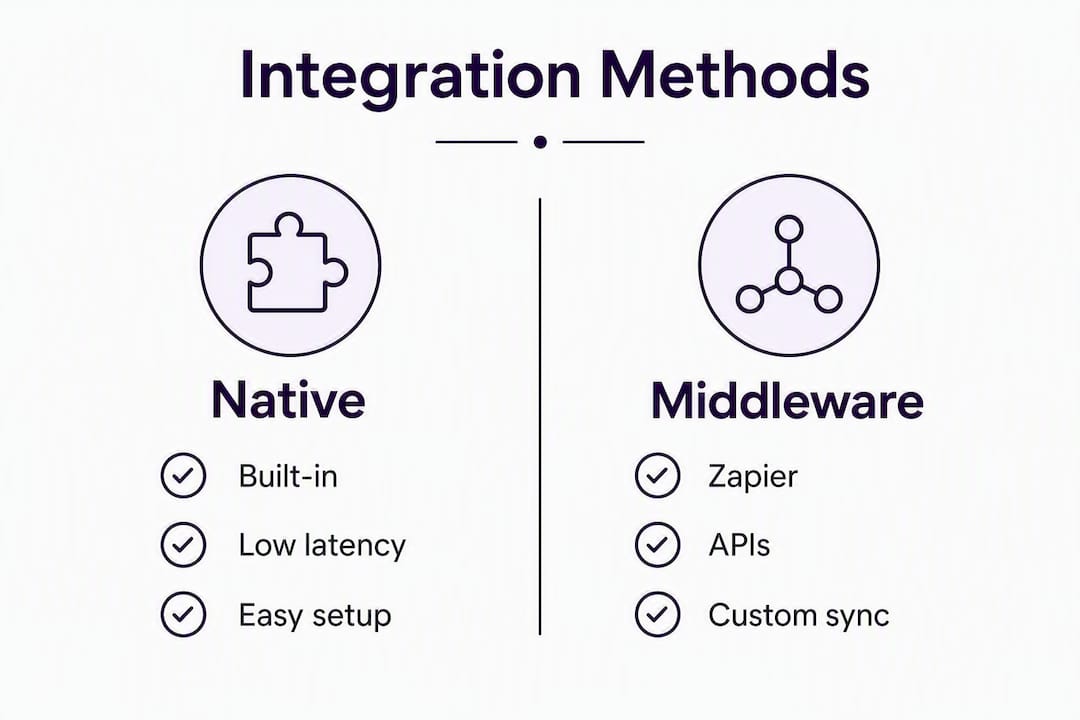
Zapier/middleware handles lighter automations when no native connector exists. It introduces potential latency and ongoing maintenance of individual zaps, but it keeps developer costs near zero for routine tasks. For smaller teams, native integrations and Zapier can avoid the need to hire dedicated developers for routine automations.
Webhooks and APIs are the right choice when you need two-way data sync: updating contact records in both the phone system and the CRM simultaneously, writing appointments back to a calendar, or building custom routing logic. Webhooks suit one-way real-time notifications; APIs suit two-way communication where updating contact info on both systems is required. Plan four to twelve or more weeks and budget for developer hours.
Pro Tip: Always try the native connector first. Even if it covers only 80% of your requirements, the reduction in maintenance overhead and vendor dependencies is worth more than the extra features an API build promises on paper.
How to set up phone integration with your CRM
Prerequisites
Confirm these before touching any settings: CRM admin rights, active phone numbers (DID or toll-free), your telephony provider's account credentials, and sign-off from whoever owns the phone bill.
Setup steps
- Enable telephony in your CRM settings (Zoho: Setup > Telephony; HubSpot: Settings > Calling; Salesforce: Setup > Call Center; Dynamics: Settings > Phone).
- Install the CTI extension or softphone if your provider requires one (Chrome or Edge are most broadly supported).
- Import or sync agents from your CRM user list into the telephony configuration.
- Assign specific phone numbers to users and departments inside the telephony settings — skipping this step is the single most common reason screen pops and call logs fail.
- Map call fields to CRM objects (see table below).
- Enable click-to-call and screen-pop settings; test with an internal call.
- Configure call recording and transcription, and confirm consent notice wording.
- Set up appointment/booking write-back flows and SMS confirmation triggers.
Feature-to-CRM field mapping
| Phone feature | CRM object | Field/trigger |
|---|---|---|
| Screen pop (call pop) | Contact / Lead | Matched by caller ID on inbound |
| Auto call logging | Activity / Call log | Duration, direction, outcome |
| Call recording | Activity attachment | Recording URL, transcription text |
| Click-to-dial | Contact / Deal | Outbound call initiated from record |
| SMS | Activity / Message log | Message body, timestamp, direction |
| Appointment write-back | Event / Booking | Date, time, service type, contact link |
Vendor action items before go-live
Ask your telephony vendor to confirm: number porting timelines (allow two to four weeks for Canadian numbers), codec support for your network, and whether call recordings are stored in Canada or abroad.
What technical details should Canadian businesses check first?
Phone number types matter. Canadian DIDs (Direct Inward Dial numbers), toll-free numbers, and local numbers each have different porting timelines and carrier requirements. Budget two to four weeks for a port if you are moving numbers from an existing carrier.
Browser and extension support varies. Zoho's built-in telephony (PhoneBridge) works inside the CRM web app; some call features are web-only and not available on mobile apps. Confirm your team's primary device before committing to a CTI-heavy setup.
SIP trunk deployments add NAT traversal and codec compatibility checks. Your IT team or telecom partner needs to verify that your firewall passes SIP traffic and that your carrier supports the codecs your PBX uses (G.711 is the safe default in Canada).
Mobile behaviour is the most overlooked gap. Screen pops and click-to-call often work only in the browser version of a CRM. If your field staff use the mobile app, test those workflows explicitly before rollout.
Watch for this: Calls will only log correctly and trigger screen pops for the correct CRM user when phone numbers are explicitly associated within telephony integration settings. A number assigned to the main office line but not to a specific agent will log calls to no one.
How do you test a CRM phone integration before full rollout?
Acceptance criteria
| Feature | Pass criteria |
|---|---|
| Screen pop accuracy | Correct contact record opens within 3 seconds of inbound ring |
| Call log fields | Duration, direction, outcome, and agent name all populated |
| Booking write-back | Appointment appears in CRM and calendar almost immediately after booking |
| Recording availability | Recording URL accessible in the activity record within 5 minutes |
| SMS delivery | Confirmation message received by test contact within 90 seconds |
| Click-to-dial | Outbound call initiates from CRM record; call logged automatically |
Rollout timeline
Week 1 (Pilot): Enable integration for two to three users. Run all test scripts above. Fix any number-association or field-mapping gaps.
Weeks 2–3 (Phased rollout): Add one department at a time. Confirm call logs and screen pops are resolving correctly for each new group.
Week 4 (Full launch): Enable for all users. Set a rollback plan: keep the old call-logging method active in parallel for one week so you can revert without data loss if a critical issue surfaces.
What does CRM phone integration cost and how long does it take?
Time and cost depend almost entirely on which method you choose.
- Native integration: Two days to two weeks. Cost is usually included in your existing CRM and telephony subscriptions, plus a few hours of admin time.
- CTI softphone setup: One to three weeks. Add a per-user monthly licence for the CTI connector (varies by provider) and internal IT time.
- SIP trunk migration: Two to eight weeks. Carrier setup fees, possible hardware costs, and telecom partner fees apply.
- API/webhook customisation: Four to twelve or more weeks. Developer hours are the main cost driver; a custom booking write-back integration for a mid-sized Canadian business typically runs several thousand dollars in build time.
For a small-to-medium business going the native route, the total out-of-pocket cost beyond existing subscriptions is often minimal. Complexity climbs fast when you add IVR menus, multi-location routing, or deep two-way calendar syncs. That is when a managed solution like Dexcoretechnologies starts making more financial sense than a custom build.
What are the privacy and compliance requirements in Canada?
PIPEDA (the Personal Information Protection and Electronic Documents Act) governs how Canadian businesses collect, store, and use personal information gathered during phone calls. The key obligations for phone and CRM data:
- Purpose limitation: Collect only the call data you have a stated reason to collect. Document that reason in your privacy policy.
- Call recording consent: In most Canadian provinces, at least one party to the call must consent to recording. For business calls, a pre-recorded notice ("This call may be recorded") satisfies the requirement in most cases. Log consent choices as a field in the CRM contact record.
- Data residency: Ask every vendor where call recordings and transcriptions are stored. Many cloud telephony providers store data on U.S. servers by default. If your clients are in regulated industries (health, legal, financial), Canadian data residency may be a contractual requirement.
- Technical safeguards: Require encryption in transit (TLS) and at rest, role-based access controls so only authorised staff can play back recordings, and audit logging for any access to call data.
- Retention policy: Define how long call recordings are kept and automate deletion. Indefinite retention creates unnecessary liability.
Pro Tip: Build consent capture directly into your AI receptionist or booking flow. Map a "recording consent" field to every new CRM contact record so your compliance audit trail is automatic, not manual.
Which KPIs should you track after integrating phone and CRM?
A 360-degree view of customers, reduced duplicate work, and better team alignment are the structural benefits. These are the numbers that prove it:
- Answer rate: Percentage of inbound calls answered (human or AI). Baseline this before integration.
- Missed-call-to-lead conversion: How many missed calls become a booked appointment or qualified lead within 24 hours.
- Average time to booking: From first call to confirmed appointment. Automated booking write-back typically cuts this significantly.
- Bookings per call: Total bookings divided by total calls. Rises when screen pops give agents full context before they speak.
- Call handle time: Average call duration. Drops when agents have instant access to contact history.
- No-show rate: Tracks whether automated SMS reminders reduce missed appointments.
For ROI, the calculation is straightforward: take the number of previously missed calls per month, apply your average conversion rate and deal value, and compare that recovered revenue against the monthly cost of the integration. Even a modest improvement in missed-call recovery tends to pay for a native integration within the first billing cycle.
Collect a 30-day baseline before go-live, then review weekly for the first 90 days.
Why Dexcoretechnologies is a practical choice for Canadian businesses
Most CRM phone integrations get you call logging and screen pops. Dexcoretechnologies goes further: its AI receptionist answers calls 24/7, books appointments in real time, and writes those bookings back to your CRM, calendar, dispatch system, or POS without any human in the loop.
What the platform covers:
- 24/7 AI call answering with no hold times or voicemail gaps
- Real-time appointment booking and write-back to CRM and calendar
- Intelligent missed-call handling (calls back or sends SMS automatically)
- SMS confirmations and reminders to reduce no-shows
- Workflow automation for lead capture, team notifications, and routing
- Integrations with CRM, calendar, dispatch, and POS systems
- Industry-specific workflows for restaurants, clinics, contractors, and transport businesses
Onboarding includes professional setup, number association, user import, and a first-30-day pilot checklist so you are not configuring this alone. Dexcoretechnologies claims a potential ROI of up to 942% for businesses that replace manual call handling with its automation layer. For service businesses running on appointments, that figure reflects the compounding effect of recovering missed calls, reducing no-shows, and freeing staff from phone duty simultaneously.
Key takeaways
Native CRM phone integration is the fastest, lowest-risk starting point for Canadian SMBs; add AI receptionist automation when you need 24/7 coverage and booking write-back.
| Point | Details |
|---|---|
| Start with native integration | Native connectors deploy in days and cover screen pops, auto-logging, and click-to-dial without developer work. |
| Map numbers to users explicitly | Calls only log to the correct CRM record when phone numbers are assigned to specific users or departments. |
| Pilot before full rollout | Run a one-week pilot with two to three users and validate all acceptance criteria before enabling for the full team. |
| Track five core KPIs | Monitor answer rate, missed-call-to-lead conversion, time to booking, handle time, and no-show rate from day one. |
| Dexcoretechnologies for AI + booking | Dexcoretechnologies adds 24/7 AI answering and automated booking write-back on top of your existing CRM integration. |
The case for keeping it simple (at first)
The businesses that get the most out of CRM telephony are rarely the ones with the most complex setups. They are the ones that got the basics right: numbers mapped correctly, calls logging automatically, and screen pops firing every time. That foundation takes a week to build and pays off immediately.
The conventional wisdom pushes operations managers toward API-first thinking, as though a custom integration is inherently more professional. For most Canadian SMBs, that is backwards. A native connector that works reliably beats a custom webhook build that needs a developer every time something breaks. Save the API investment for the moment your booking logic genuinely cannot be handled any other way — multi-step conditional routing, deep two-way calendar syncs, or niche POS write-backs.
Where AI receptionist automation fits is equally misunderstood. It is not a replacement for your CRM integration; it is the layer that makes the integration matter after hours. A call that comes in at 9 PM on a Tuesday either gets answered and booked automatically, or it becomes a missed lead by morning. The CRM integration tools you choose should account for that gap from the start, not as an afterthought.
Dexcoretechnologies handles the integration and the answering
Most businesses spend weeks configuring a phone integration and still end up with an unanswered call at 7 PM. Dexcoretechnologies solves both problems at once: a fully managed AI receptionist that answers every call, books appointments in real time, and writes everything back to your CRM and calendar automatically.

There are no missed calls, no voicemail backlogs, and no after-hours gaps. For Canadian restaurants, clinics, contractors, and service businesses, that means recovered revenue from calls that would otherwise go nowhere. Subscription plans include professional onboarding and ongoing support, so you are not setting this up alone.
Start a free trial and see how Dexcoretechnologies handles your calls and bookings from day one, or explore the service business workflows built specifically for Canadian operations.
Useful sources and documentation
- CRM Phone Integrations: A Practical Guide | Quo — Covers all four integration methods (native, Zapier, webhooks, APIs) with pros, cons, and when to use each.
- Zoho Voice: Native integrations with Zoho CRM and Desk — Official Zoho documentation on setting up native telephony, including number association and user management.
- Zoho CRM: Telephony integration setup — Step-by-step configuration for enabling click-to-call, call pop-ups, auto-logging, and agent import inside Zoho CRM.
- Zoho CRM: Native integration details — Explains number-to-user association requirements and common screen-pop troubleshooting.