
Phone automation resolves repeatable patient calls end to end, not just routes them somewhere else in the building. A well configured system books appointments, cancels and reschedules, handles refill requests, and hands off only the calls that genuinely need a human. Start small: pick one high-volume call type, appointment booking is usually the easiest, and pilot it before touching anything else.
TL;DR:
- Most clinics should focus on automating appointment booking and cancellations first, as these are high-volume, low-complexity workflows that save staff time.
- Implementing automation requires baseline metrics like missed-call rate and voicemail backlog to identify pain points and prioritize workflows effectively.
- Regularly review call transcripts and KPIs during pilot testing to ensure system accuracy, resolve issues early, and avoid extensive troubleshooting after full deployment.
- Data security relies on verifying compliance measures such as consent capture, encryption, secure export, and explicit escalation rules for clinical red flags before full-scale rollout.
- Choosing between cloud-based and on-premise platforms should consider support for your EMR API, data residency needs, and uptime guarantees, with cloud solutions favored for ease and speed.
Table of Contents
- What operational signals tell you it's time for clinic phone automation?
- Which clinic call workflows should you automate first?
- How do you roll out phone automation from pilot to full scale?
- How do you keep patient data safe in automated calls?
- How should automation connect to your EMR and scheduling tools?
- What KPIs prove phone automation is working?
- What does phone automation cost, and how should you budget for it?
- Cloud-based or on-premise: which fits your clinic?
- What makes an automated call feel good to a patient?
- How do you handle multiple languages and accessibility needs?
- What happens when the automation system goes down?
- Publisher perspective: lessons from deployments and common pitfalls
- How Dexcoretechnologies fits into your clinic's automation plan
- Sources
- FAQ
What operational signals tell you it's time for clinic phone automation?
You don't need a consultant to tell you a phone system is broken. The front desk already knows, and the numbers back it up.
Start by pulling five baseline metrics before you configure anything:
- Missed-call rate: what percentage of incoming calls go unanswered during business hours?
- Average hold time: how long does a caller wait before reaching someone?
- Repeat callers: how many patients call back two or three times for the same request?
- Voicemail backlog: how many messages sit unreturned at end of day?
- Staff overtime on calls: are front-desk staff logging extra hours just to clear the queue?
Most clinics can gather this from existing call logs and a two-week front-desk time audit. No new software required. Once you have the numbers, map each one to a workflow: a high missed-call rate points to booking automation, a voicemail backlog points to after-hours handling, and repeat callers usually mean refill requests or intake questions are eating staff time that a scripted flow could resolve on the first attempt.
Which clinic call workflows should you automate first?
Not every call type deserves the same priority. Rank them by volume and by how mechanical the resolution actually is.
- Appointment booking, rescheduling, and cancellations. This is the highest-volume, lowest-complexity workflow in most clinics, and it's the one Cliniconex identifies as one of the top tasks worth automating first, alongside reminders and intake forms. Expect fewer missed bookings and a meaningful cut in the time your front desk spends on the phone confirming slots.
- New-patient intake and form capture. Automated intake reduces the data entry your staff would otherwise re-key from paper or verbal notes, and it shortens the actual visit because the chart is already populated.
- Prescription refill requests and routine administrative triage. These calls follow a predictable script, which makes them easy to hand off and fast to resolve without a live agent.
- Missed-call recovery and outbound callbacks. A caller who hangs up after two rings is a booking you likely lost. Automated callback flows reclaim that revenue instead of writing it off.
- After-hours handling with safe escalation rules. Coverage outside business hours matters, but only if urgent symptoms get routed to a real person immediately.
Pro Tip: Pilot booking and cancellations together, not separately. Cancellations free up slots that your booking automation can immediately refill, so the two workflows compound each other from week one.
How do you roll out phone automation from pilot to full scale?
Treat this like any operational change: define what success looks like before you touch a single call.
Start with a narrow pilot scope and three KPIs: resolution rate without human handoff, reclaimed bookings, and staff-hours saved per week. Map out the call flows and escalation rules on paper first, then configure a sandbox connection to your scheduling system or EMR so nothing touches live patient records until you've tested it.
Run a soft launch on one call type, leveraging insights from an AI Automation agency for regulated sector implementations. During the first few weeks, review call transcripts and analytics on a set schedule, not ad hoc, so you catch new call intents and clinic-specific phrasing the system wasn't built for. Industry guidance on tuning consistently points to this same pattern: regular review catches drift before it becomes a patient complaint.
Train front-desk staff on the new handoff points before go-live, and run a live escalation test where someone simulates an urgent call to confirm it reaches a person, not a queue.
Only scale to additional call types once the pilot hits its KPIs. Clinics that skip this step and automate five workflows at once tend to spend months untangling which one is actually causing the problem when something breaks.
How do you keep patient data safe in automated calls?
Compliance here isn't abstract. It comes down to four checks you can verify before signing anything.
- Every automated call should capture consent at the start and produce an auditable transcript, not just a summary.
- Confirm the vendor offers a business associate agreement and supports data residency or secure export if your clinic requires it.
- Verify encryption at rest and in transit, plus role-based access so only authorized staff can pull transcripts or recordings.
- Hard-code escalation rules for clinical red flags, chest pain, suicidal ideation, severe allergic reaction, whatever applies to your patient population, and test them during the pilot, not after.
BAA-signed, bring-your-own-infrastructure deployment models let clinics keep patient information inside their own controlled environment while still using an AI answering layer. That distinction matters more than most vendor pitches let on: data residency and audit trails are the two things a compliance officer will actually ask about.
How should automation connect to your EMR and scheduling tools?
The integrations that matter most are the boring ones: appointment schedulers, EMR write-back, SMS confirmations, and internal team notifications when something needs attention.
- Map fields between your automation platform and your EMR before go-live, not during it. A mismatched field (patient ID formats are a common culprit) causes duplicate records fast.
- Run sandbox tests specifically for idempotency, meaning the system shouldn't create a second booking if a patient calls twice about the same appointment.
- Confirm write-back happens automatically so call outcomes land in the same record your clinicians already use, instead of a separate spreadsheet nobody checks.
Vendor platforms built for this typically describe scheduling, triage, and EMR write-back as a single connected flow rather than three separate tools. That's the model worth insisting on. Anything less just moves the double-entry problem from your front desk to your IT team.
What KPIs prove phone automation is working?
Five numbers tell you almost everything: calls answered, resolution without handoff, reclaimed bookings, average handle time saved, and change in no-show rate.
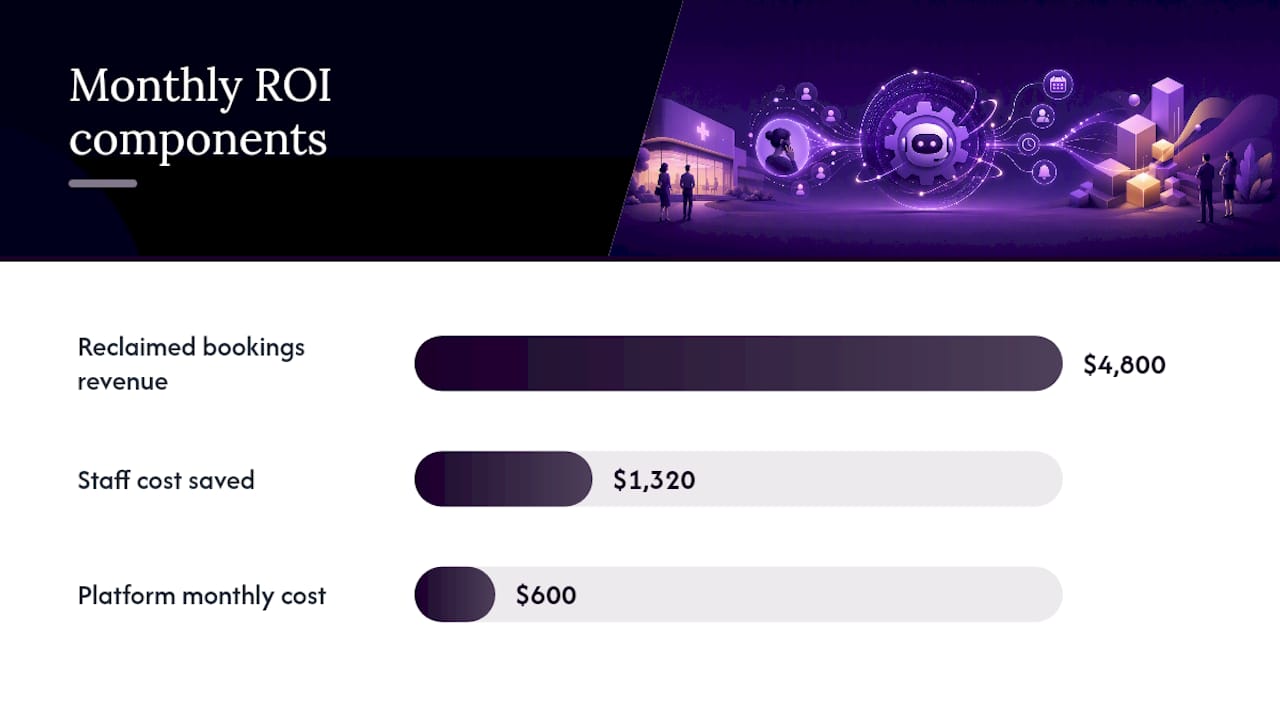
A simple ROI formula works for most clinic budgets: (value of reclaimed bookings plus staff cost saved) minus total implementation cost. Say your clinic reclaims 40 bookings a month at an average visit value of $120, that's $4,800 in recovered revenue, plus roughly 15 staff-hours saved weekly at $22 an hour, another $1,320 a month. Against a monthly platform cost of $600, the math clears fast even before you count reduced no-shows.
Vendor case studies commonly cite improved fill rates from automated waitlist management as an added benefit worth tracking separately. The dashboard tells you volume. The transcripts tell you whether patients actually had a good experience.
What does phone automation cost, and how should you budget for it?
Most clinic phone automation runs on a subscription model, priced either as a flat monthly fee or per-call-volume tier. Budget for three cost categories, not just the sticker price.
Platform cost covers the subscription itself, typically scaled to call volume and the number of workflows you automate. A single-workflow pilot, booking only, costs less than a full-coverage deployment handling intake, refills, and after-hours triage.
Implementation cost covers onboarding, EMR integration setup, and script configuration. Many vendors bundle this into onboarding packages rather than charging separately, so ask directly what's included before comparing sticker prices across vendors.
Ongoing tuning cost is the one clinics most often forget to budget for. Someone needs to review transcripts, adjust scripts, and add new call intents as they emerge. If that's an existing staff member's time, budget the hours. If it's a vendor service, get the tuning cadence in writing.
A reasonable approach: budget for a three-month pilot on one call type, track the reclaimed-booking and staff-hours-saved numbers from the KPI section above, and use that data to justify (or reject) the cost of scaling to additional workflows. Clinics that skip the pilot and negotiate a full-suite contract upfront lose the leverage of proven numbers when it's time to renew.
Cloud-based or on-premise: which fits your clinic?
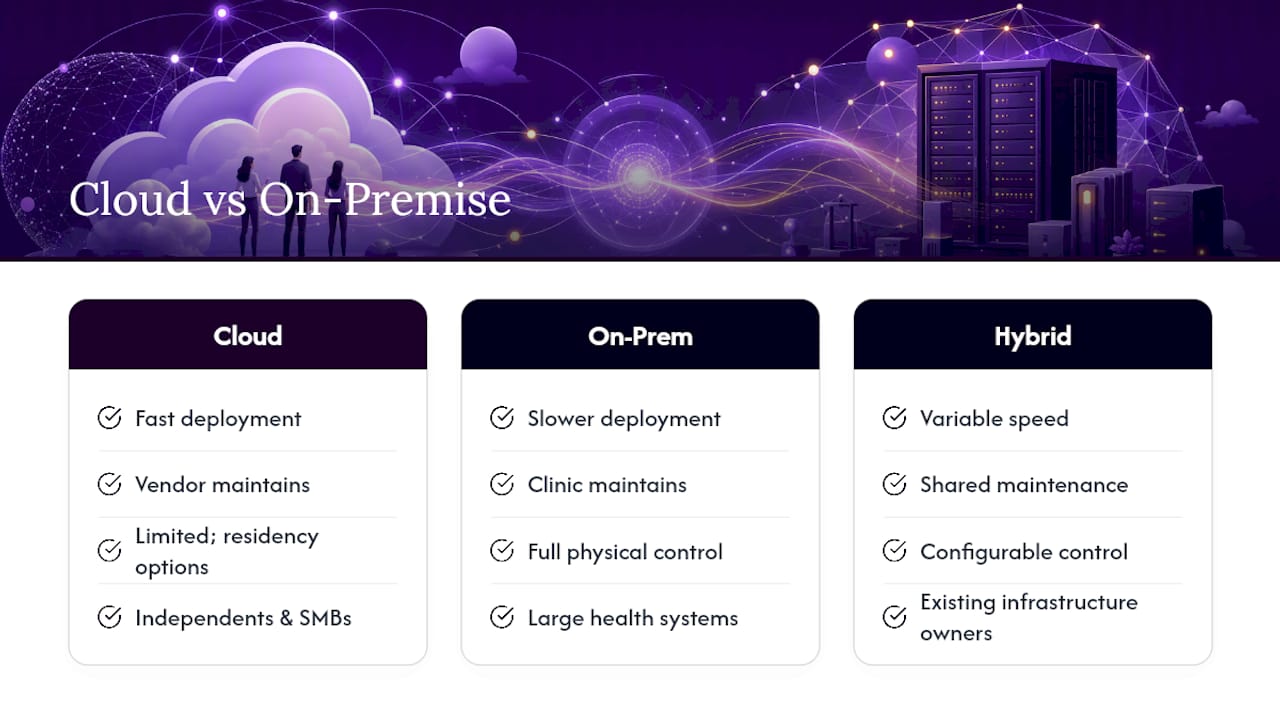
Almost every clinic phone automation platform on the market today runs cloud-based, and for good reason: faster deployment, automatic updates, and no server hardware for your IT contractor to maintain.
On-premise or hybrid deployments still exist, mostly for larger health systems with existing infrastructure investments and strict internal data-control policies. The tradeoff is real: on-premise gives you more direct control over where data physically sits, but it also means your clinic owns the maintenance burden, the security patching, and the uptime.
For most independent clinics and small to mid-size practices, cloud-based platforms with a signed business associate agreement and documented data residency options solve the control question without the infrastructure overhead. The practical evaluation criteria come down to three questions: does the vendor support your EMR's API, can they commit to a specific data residency region if your clinic requires it, and what's the actual uptime guarantee in the contract, not the marketing page.
Avoid choosing a platform based on architecture alone. A cloud platform with weak escalation logic is worse than a well-configured on-premise system, and vice versa. Architecture is a compliance and IT conversation. Call handling quality is a separate evaluation entirely, and it deserves its own testing during the pilot phase.
What makes an automated call feel good to a patient?
A patient calling to book an appointment doesn't care whether a human or a system answers. They care whether the call is fast, accurate, and doesn't make them repeat themselves three times.
Good automated call design follows a few consistent principles. First, the system should identify itself clearly and set expectations immediately: "I can help you book, reschedule, or reach the clinic directly" tells the caller what's possible in one sentence. Second, it should never trap a caller in a loop with no way out. Every automated flow needs an obvious, spoken path to a human, not buried three menu levels deep.
Third, tone matters more than most clinics assume. A voice that sounds scripted and robotic erodes trust fast, especially with older patients or anyone calling about something stressful. Systems that retain context across calls, remembering that a patient called yesterday about the same issue, feel dramatically more competent than ones that start from zero every time.
Finally, confirmation matters as much as resolution. A patient who books an appointment needs to hear the date and time repeated back, and ideally receive an SMS confirmation immediately after. That small redundancy is what actually prevents no-shows, not the booking itself.
How do you handle multiple languages and accessibility needs?
Clinics serving diverse populations can't design phone automation around a single language and call it done. Multilingual support needs to be built into the initial call flow, not bolted on as an afterthought once patients start complaining.
The most functional approach offers a language selection at the very start of the call, before any other menu option, so patients aren't forced to navigate an English-only tree just to reach the option that helps them. For clinics with a strong second-language patient population, routing directly to a native-language flow rather than a translated script tends to produce fewer misunderstandings.
Accessibility goes beyond language. Patients with hearing impairments may rely on SMS-based booking rather than voice calls entirely, so a system that supports text-based scheduling as a parallel channel closes a real gap. Speech recognition also needs testing against a range of accents and speech patterns, not just a single test voice during setup. Older patients and patients with speech-affecting conditions are the two groups most likely to get misrouted by a system tuned only for clear, fast speakers.
Test these edge cases explicitly during the pilot phase rather than assuming they'll surface naturally. A multilingual patient who gets stuck in an English menu once probably won't call back, they'll just go elsewhere.
What happens when the automation system goes down?
Every clinic running phone automation needs a documented answer to one question: what happens to incoming calls the moment the system fails?
Build a contingency plan before go-live, not after the first outage. That means a documented failover path, calls route to a live answering service or a designated staff line if the automated system is unreachable, and a clear internal alert so staff know within minutes, not hours, that something's wrong.
Call overflow services built for healthcare already operate on this exact model: they absorb call volume when internal capacity is exceeded, with trained agents who understand medical terminology and know how to flag urgent messages for immediate follow-up. That same overflow logic works as a backup layer for automation failure, not just staffing shortages.
Test the failover during the pilot, deliberately. Simulate an outage and confirm calls actually reroute the way the documentation says they will. Clinics that never test this find out the hard way, usually during a genuine system outage, that the failover path was misconfigured the entire time.
Publisher perspective: lessons from deployments and common pitfalls
The clinics that struggle with automation almost always made the same mistake: they let it make clinical judgment calls it was never built for. Keep escalation rules explicit and conservative. Commit to reviewing transcripts weekly during the first month, and assign one person to own that review. Small pilots with clear KPIs beat ambitious full-suite rollouts every time I've seen the comparison play out.
— James
How Dexcoretechnologies fits into your clinic's automation plan
This provider offers a system that runs 24/7, answering and booking appointments in real time, and integrates with scheduling and workflow tools commonly used in clinics so missed calls can turn into recovered bookings instead of lost patients.

Before committing to any platform, run a short evaluation: request a demo, confirm the sandbox environment writes back to your scheduler correctly, check that a business associate agreement and data residency terms are available if your clinic needs them, and define your pilot KPIs upfront so you're comparing real numbers, not sales claims. Dexcoretechnologies is built for exactly this kind of staged rollout across service businesses, including appointment-driven clinics that need booking automation without losing the personal handoff for urgent calls. If you're ready to see how it handles your actual call volume, start with a demo and pilot one workflow before deciding to scale.
Sources
For more on overflow workflows, see TriageLogic's overview and Aptible's data residency guidance.
- Five tasks to automate at your medical clinic
- How Call Overflow Management Works in Healthcare
- Data residency and HIPAA considerations for AI in healthcare - Aptible
FAQ
What Are Some Examples of Automation in Healthcare?
Common examples include automated appointment booking and reminders, prescription refill requests, patient intake form capture, and missed-call recovery through automated callbacks, all of which reduce front-desk workload without eliminating human oversight.
What Is the Best Phone System for a Medical Office?
The best system depends on call volume and workflow complexity, but most independent clinics do well with a cloud-based platform offering 24/7 answering, appointment booking, EMR write-back, and a documented business associate agreement, similar to what Dexcoretechnologies provides for appointment-driven businesses.
How Do I Automate My Clinic's Phone System?
Start by measuring your missed-call rate and identifying your highest-volume call type, then pilot automation on that single workflow, typically appointment booking, before configuring escalation rules and expanding to additional call types.
What App Can Patients Use to Speak Directly With a Doctor?
That depends on your clinic's own telehealth or messaging platform rather than phone automation itself. Automated phone systems are designed to book, triage, and route calls, then hand urgent or clinical conversations to your existing telehealth tool or a live provider.