
On-call scheduling automation is an AI receptionist and workflow system that answers calls 24/7, captures missed leads, and books appointments in real time instead of routing them to voicemail. It recovers revenue that would otherwise vanish overnight or during rush hours, and it cuts no-shows through automated reminders. DEXCORE Technologies builds these systems to route requests and notify staff the moment a lead comes in. Start by measuring your current answer rate before you change anything.
TL;DR:
- Businesses typically answer only about 38% of calls, resulting in nearly two-thirds of inbound demand going unanswered and often lost permanently.
- Automated booking systems can increase answer rates, capture leads, and save staff hours, especially during after-hours when many calls go unanswered.
- Critical features include real-time calendar sync, multi-channel access, live call/chat booking, and human handoffs for complex requests to ensure no booking opportunities are missed.
- Implementing a pilot for two to four weeks allows tracking of capture and conversion rates, emphasizing the importance of measuring answer rates before investing in automation.
- Focusing on answer rate improvements rather than just cost savings maximizes revenue recovery and reduces leaks caused by missed calls and unattended voicemails.
Table of Contents
- How on-call scheduling automation actually works
- Benefits and ROI: the metrics that actually shift
- Key features operations teams must require
- Implementation checklist and timeline
- Integration and workflow examples that avoid gaps
- Operational best practices that keep no-shows down
- What operators consistently get wrong about this
- How DEXCORE gets you started without the guesswork
- Sources
How on-call scheduling automation actually works
A call, text, or web chat comes in. The system detects intent almost instantly, figures out whether the caller wants a booking, a quote, or general information, then checks live calendar availability before saying a word about times or slots. If a slot works, it books the appointment right there in the conversation. If not, it captures the lead's details and flags the request for a human.
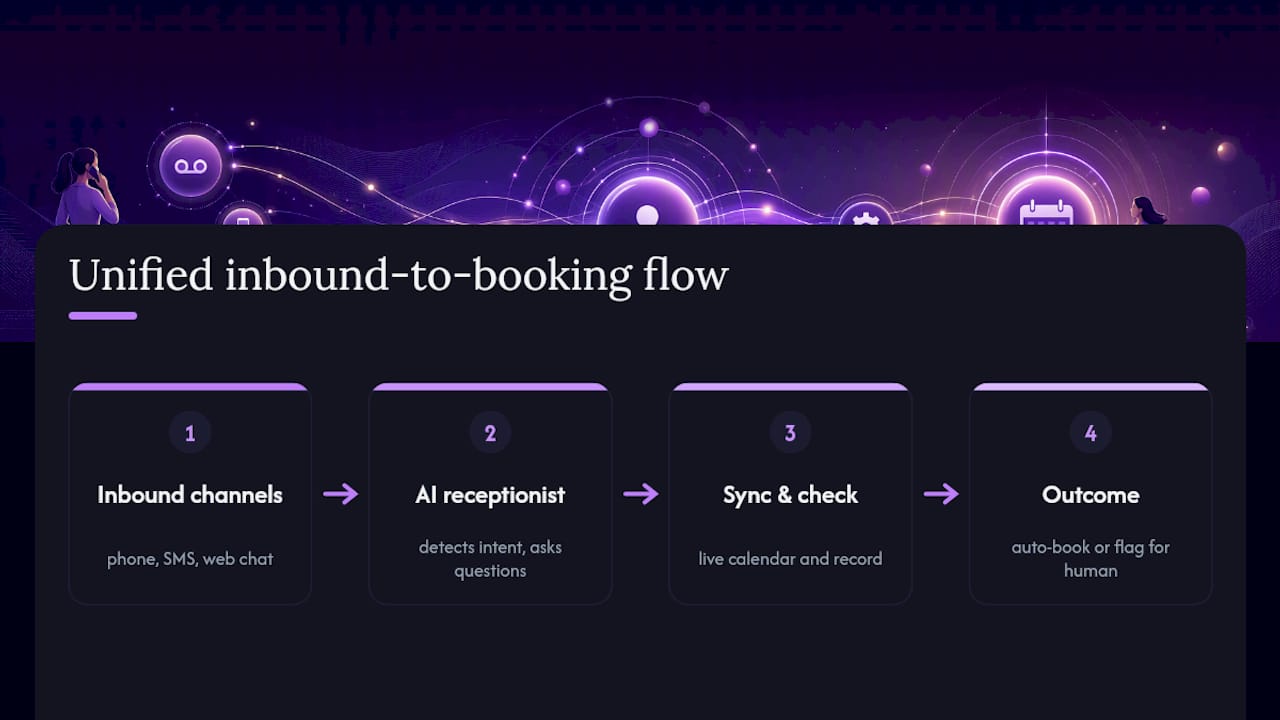
That's the real difference between this and a static scheduling link sitting on your website. A link waits for someone to click it, scroll through open times, and fill out a form. An AI receptionist can answer calls and chats live, ask a couple of qualifying questions ("Is this for one person or a group?", "What service do you need?"), and close the booking in under a minute, on the phone, without a human ever touching it.
The channels converge into one system rather than three separate silos. A phone call, an SMS reply, and a website chat all feed the same calendar and the same customer record, so a lead who calls Tuesday and texts back Thursday is recognized as the same person, not treated as a fresh inquiry each time.
Benefits and ROI: the metrics that actually shift
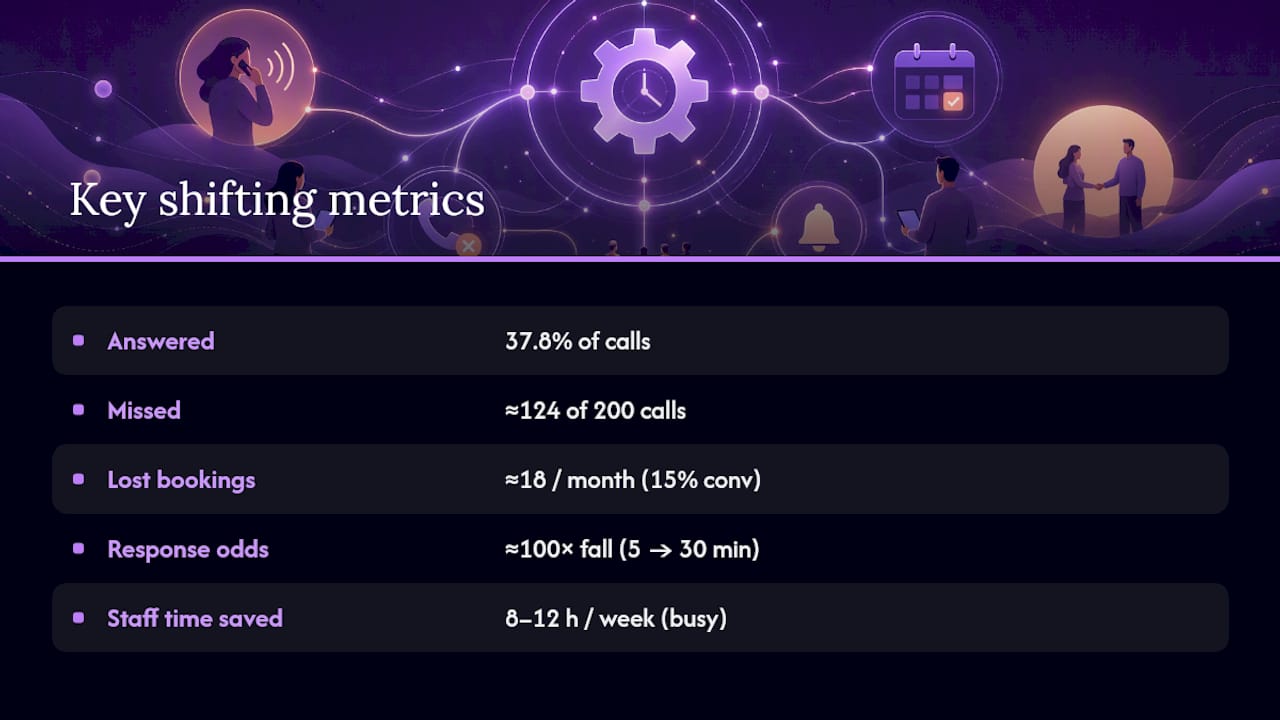
Small businesses answer only about 37.8% of incoming calls live. The rest go to voicemail, and the majority of those callers never leave a message or call back. That's not a minor leak. It's most of your inbound demand disappearing before anyone on your team even knows it existed.
The math that matters: if your business gets 200 calls a month and answers 38% of them, you're missing about 124 calls. Even a modest 15% conversion rate on those means roughly 18 lost bookings every month, compounding year over year.
Speed compounds the problem. Studies on lead response show contact odds fall roughly 100-fold when response time slips from 5 minutes to 30. A missed call today, returned tomorrow, is often a lead already booked somewhere else.
On the recovery side, self-service booking and automated intake can save staff several hours a week, with busier operations seeing 8 to 12 hours reclaimed. Automated reminder sequences also reduce no-shows meaningfully, since the biggest driver of a missed appointment is simply forgetting, not changing one's mind.
Key features operations teams must require
Not every scheduling tool marketed as "automation" actually closes the loop. Before you commit, confirm the platform handles these:
- Real-time two-way calendar sync with Google or Outlook, so a booking made by the AI instantly blocks that slot everywhere, and a manual change on your end updates the AI's availability too.
- Live call and chat booking, not just a form. The system should ask questions, handle objections about timing, and confirm a slot mid-conversation.
- Multi-channel coverage across phone, SMS, and web chat, feeding one unified record.
- Human handoff for complex requests, insurance questions, or anything outside the system's confidence threshold.
- Automated confirmations and multi-step reminders, plus deposit or payment capture at the time of booking where that applies.
- Conditional routing that sends a plumbing emergency to the on-call technician and a routine cleaning to next week's open slot.
- Transparent pricing and data portability, so your customer history isn't locked into a system you can't leave.
Pro Tip: Ask any vendor for their average booking-completion rate on live calls, not just their answer rate. Answering a call means nothing if the AI can't actually close the booking.
Implementation checklist and timeline
Rolling this out doesn't require shutting down your phone lines for long. It requires sequencing.
- Audit your current leak. Pull call logs for 30 days. Count total calls, calls answered live, and after-hours volume. This is your baseline, and you'll compare against it later.
- Map your booking rules. Document staff availability, service types, and any scheduling constraints (buffer time, double-booking limits, service zones for dispatch).
- Pick your starting channel. After-hours phone coverage is the lowest-risk entry point since nearly 38% of online bookings happen outside business hours anyway, and nobody currently answers those calls regardless.
- Connect calendar and CRM. Integration should be a same-week task, not a month-long project, if the vendor's platform is built for it.
- Configure reminders and escalation rules, including which requests route to a human immediately.
- Run a 2 to 4 week pilot. Track capture rate and booking-to-show conversion daily.
- Train staff on reading the dashboard and handling the handoffs the AI escalates to them.
Most businesses can go from audit to a working after-hours pilot inside two weeks.
Integration and workflow examples that avoid gaps
Every booking should do more than fill a calendar slot. When a call comes in, the system should create or update a contact record in your CRM automatically, tagging the source (phone, SMS, or chat), the service requested, and any intake answers the caller gave. That data becomes searchable history the next time that customer calls.
For dispatch-based businesses, a completed booking should trigger an immediate team notification with the customer's location, an estimated arrival window, and which technician or vehicle is assigned. A service-business AI receptionist built for this workflow can push that notification the moment the caller hangs up, not an hour later when someone checks a shared inbox.
More complex bookings, like a multi-service appointment, a deposit requirement, or insurance verification, need chained logic: collect payment info, confirm coverage, then schedule. A well-built system handles that sequence, similar to the setup patterns covered in chat-based booking guides for phone and web chat combined.
Operational best practices that keep no-shows down
Reminder timing matters more than most operators assume. A cadence of 48 hours, 24 hours, and 1 hour before the appointment, with a two-way option to confirm or reschedule by text, catches most cancellations early enough to refill the slot.
- Every confirmation message should include a one-click reschedule link, not just a phone number to call back.
- Missed appointments need an automatic follow-up sequence, not silence, since a no-show is often still a warm lead.
- Track four numbers monthly: answer/capture rate, booking-to-show ratio, time-to-first-human-follow-up, and total after-hours captures.
- Run a monthly audit comparing these against your original baseline to catch drift before it becomes a pattern.
What operators consistently get wrong about this
Most businesses evaluate on-call scheduling automation like it's a cost-cutting tool. That's backwards. The real value sits on the revenue side, and treating it as a marketing-spend equivalent changes how you measure success. If you spend $2,000 a month on ads to generate leads, and 62% of your inbound calls go unanswered, you're funding a leak, not a funnel.
The businesses that get this right measure answer rate first, before touching a single feature or workflow. DEXCORE Technologies builds toward that discipline, integrating call handling, booking, and CRM notifications so nothing depends on someone checking a voicemail box at 9 a.m. the next day.
— James
How DEXCORE gets you started without the guesswork
DEXCORE Technologies runs 24/7 AI call answering, live booking, and CRM or dispatch notifications as one connected system, not three disconnected tools stitched together after the fact. That matters because the businesses losing the most revenue are usually the ones running a scheduling link, a separate CRM, and a phone line that nobody answers past 5 p.m., with no data flowing between any of them.

If you run a restaurant, a clinic, or a dispatch-based service business, the fastest way to see the gap is a free revenue audit against your current call logs. Check out the restaurant AI receptionist page if you're in food service, or the service business solution page for contractors and appointment-driven operations. Either way, book a short pilot and measure your capture rate before and after. That single number tells you everything you need to know about what you're currently losing.