For most restaurants, the fastest reliable path is a native POS integration where your vendor already supports it, with a middleware or aggregator layer as the fallback for broad delivery marketplace coverage. Custom API work belongs at the bottom of the list, reserved for workflows no off-the-shelf connector handles.
Three scenarios change that default:
- Single location, quick turnaround: go native if your POS vendor lists the partner you need.
- Multiple delivery marketplaces: middleware normalises order formats faster than juggling five separate connectors.
- Complex or enterprise workflows: custom APIs and webhooks give you the control that packaged options can't.
Payment processors like Stripe note that unified terminals already sync capture, routing, and settlement, which is the same principle behind good POS integration generally.
Key Takeaways
Native POS integrations solve most restaurant needs fastest, and pairing them with monitored middleware or a managed automation partner closes the reliability gap that DIY setups usually miss.
| Point | Details |
|---|---|
| Default to native first | Check your POS vendor's partner list before considering middleware or custom builds. |
| Middleware for marketplace scale | Use an aggregator layer when you need several delivery channels connected quickly. |
| Map data before building | Modifiers, tip fields, and server IDs cause most post-launch failures if skipped. |
| Budget realistic timelines | Native integrations run days to weeks; custom API builds can take four to twelve-plus weeks. |
| Monitor after launch | Dexcoretechnologies pairs POS and workflow integrations with ongoing monitoring and support. |
Links and documentation to check next
- Stripe's payment processing guide covers terminal integration and PCI scope.
- Global Payments' restaurant overview lists native integration categories.
- Choose's POS integration page explains native connector reliability.
- OrderOut's order engine page details middleware order routing.
Table of Contents
- What is restaurant POS integration, and how does it work?
- What are the real benefits of integrating your POS?
- Which systems should a restaurant connect to its POS first?
- How do you plan and roll out a POS integration?
- What technical concepts should restaurant operators understand?
- Why do restaurant POS integrations break, and how do you fix them?
- How does a managed provider handle POS integration for restaurants?
- Get hands-off POS integration with Dexcoretechnologies
- Frequently asked questions about restaurant POS integration
- Sources
What is restaurant POS integration, and how does it work?
Restaurant POS integration connects your point-of-sale system to the other software running your business: delivery apps, kitchen display systems, inventory trackers, payment gateways, and reservation platforms. There are three main routes, and picking the wrong one is the single most common reason restaurant technology projects stall.
Native integrations are built and maintained by your POS vendor. They're fastest to deploy, need almost no ongoing maintenance, and keep the POS as the single source of truth for orders and menus. Choose notes that native connectors work silently precisely because they avoid daisy-chained failure points.
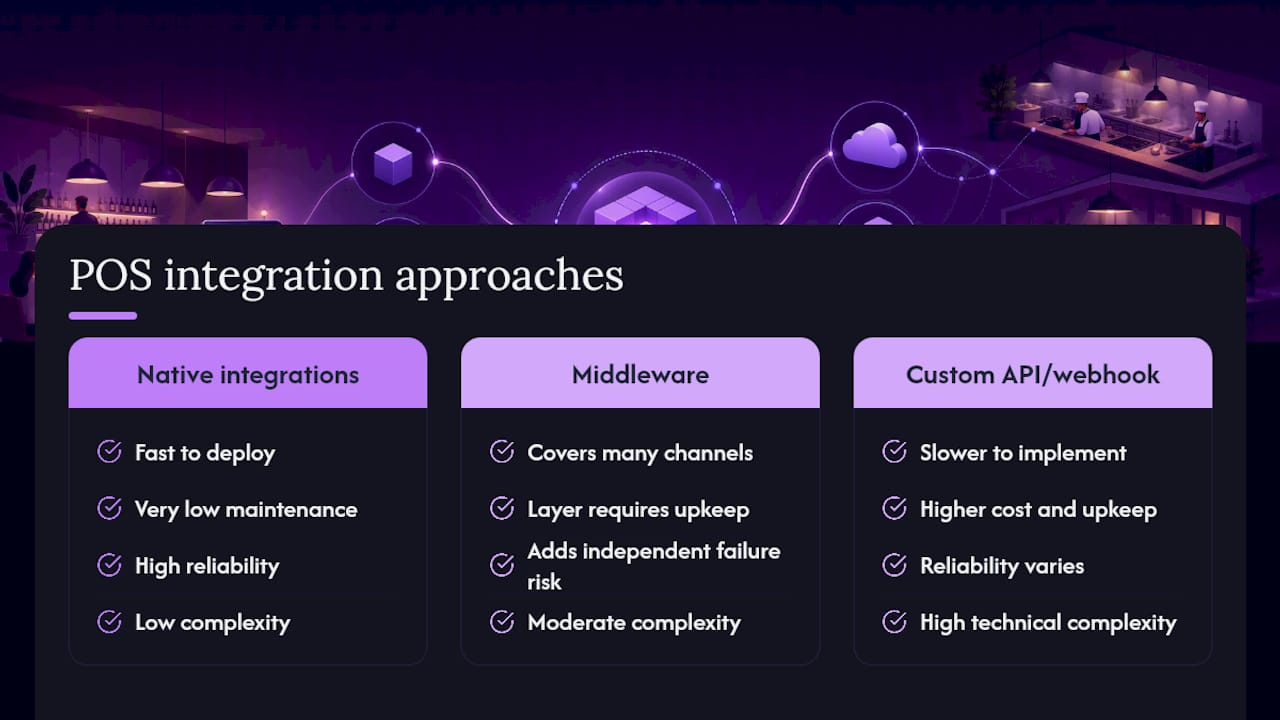
Middleware and aggregators sit between your POS and everything else, normalising different data schemas and order formats into one language. They cover more delivery channels at once, but add a layer that can fail independently of your POS.
Custom API or webhook builds make sense only when your workflow genuinely doesn't fit a packaged option, think multi-brand kitchens or unusual loyalty logic. They cost more and take longer.
Pro Tip: Check your POS vendor's partner directory before signing anything. If a native connector exists for the marketplace or system you need, it almost always beats a general-purpose middleware layer on reliability alone.
What are the real benefits of integrating your POS?
The payoff shows up in three places: labour, accuracy, and cash flow.
- Manual order entry disappears. Orders from delivery apps or online ordering route straight into the kitchen display or printer queue, cutting the double-keying that causes most menu and pricing mismatches.
- Tip allocation and server tracking become reliable, which KeyTransact points out is essential for accurate end-of-shift payroll reconciliation, not a nice-to-have feature.
- Inventory and recipe costing sync automatically, so purchasing reflects what actually sold instead of a manual count from last night.
Well-built integrations typically push orders into the POS in under three seconds, fast enough that kitchen staff never notice a handoff happened at all.
Which systems should a restaurant connect to its POS first?
Prioritise by business impact, not by what's easiest to set up. A workable sequence looks like: delivery marketplace → middleware (if used) → POS → kitchen display → inventory update → accounting sync.
Common systems worth connecting, roughly in order of payoff:
- Delivery marketplaces and online ordering platforms
- Kitchen display systems and receipt printers
- Payment gateways and terminals
- Inventory and recipe costing software
- Reservations and guest CRM tools, OpenTable is a common example worth checking for native POS support
- Accounting and accounts payable software
- Workforce scheduling and timekeeping tools
If you're on an enterprise platform like Oracle Simphony, check the vendor's own partner ecosystem first. If you're weighing marketplace aggregation, Deliverect is frequently the reference point, and third-party order engines exist specifically to normalise marketplace orders when no native connector is available.
How do you plan and roll out a POS integration?
Treat this as a five-stage project, not a single install.
- Assess your current POS's native partner list, expected order volume, and how staff actually work today, not how the manual says they should.
- Map every data field that matters: modifiers, combo pricing, tip fields, server IDs, tax settings, and what happens when a payment fails.
- Choose your method. Ask vendors about uptime guarantees, support hours, and how errors get retried before you sign anything.
- Build and test in a sandbox. Run real test orders, including refunds, voids, and modifier-heavy tickets, then run a short parallel period alongside your old workflow.
- Roll out and monitor. Launch in phases, train staff on the fallback plan (printer or tablet backup), and watch closely for the first two weeks.
Timelines vary by method: native integrations often take days to two weeks, middleware projects run one to four weeks depending on channel count, and custom API builds commonly take four to twelve weeks or longer. Costs scale the same way, native is usually the cheapest since the vendor absorbs most of the engineering.
What technical concepts should restaurant operators understand?
You don't need to code, but a few terms will save you from bad vendor conversations.
- APIs vs. webhooks: an API is a request-response connection; a webhook pushes data the instant something happens, which is why webhooks are what actually gets an order into your kitchen in real time.
- Real-time vs. batch: real-time suits order flow and kitchen pacing, batch is fine for end-of-day accounting syncs where a few hours' delay doesn't matter.
- Data mapping: modifiers, SKUs, tax rules, tip handling, and server IDs all need to map correctly, and your POS should remain the system of record for all of it.
- Security: tokenised payment terminals reduce your PCI compliance scope, according to Stripe, and any integration touching payment data needs encrypted credentials and tightly scoped access.
Why do restaurant POS integrations break, and how do you fix them?
Most failures trace back to a handful of repeat offenders: flattened modifiers, split tickets, delayed order pushes, missed tip fields, and accounting totals that don't reconcile.
- Reproduce the issue in a sandbox environment before touching live orders.
- Check the integration's data mapping logs first, most "broken" orders are actually mapping errors, not outages.
- Confirm printer failover is working; middleware platforms often build in retry queues specifically so a connectivity blip doesn't stall the kitchen.
- Verify tip and server ID mapping during a live test shift, not just in the sandbox.
Pro Tip: Keep a one-page manual order-entry procedure on hand for the first 72 hours after launch. Staff need something to fall back on the moment technology is not the excuse for a missed table.
How does a managed provider handle POS integration for restaurants?
A managed integration partner typically runs discovery first, mapping your menu, modifiers, and payment flows before touching a live system. Testing happens in a sandbox against real order scenarios, then rolls out in phases with monitoring already running on day one.
What separates a properly managed setup from a DIY build is what happens after launch:
- 24/7 monitoring for failed pushes or printer disconnects
- Incident response when an order stalls mid-route
- Scheduled menu and mapping audits so drift doesn't accumulate quietly
Dexcoretechnologies builds this kind of ongoing oversight into its restaurant automation offering for operators who want the integration monitored, not just installed.
Practical tips from an implementation lead
Modifier accuracy breaks more launches than anything else, test it obsessively before go-live. Stage your channel launches one marketplace at a time instead of flipping every switch on day one. Practise refunds and voids in sandbox until they're boring. And talk to your floor staff before rollout, not after, confusion at the register costs more than any software bug.
Get hands-off POS integration with Dexcoretechnologies
Beyond a one-time integration build, restaurants need someone watching the connections after launch, catching a stalled printer queue or a missed order before a guest notices. That's the gap Dexcoretechnologies fills. Alongside 24/7 AI call answering and appointment booking, Dexcoretechnologies builds workflow automation that connects your POS, CRM, calendar, and dispatch systems into one monitored setup, with onboarding and ongoing support included rather than billed separately.

If missed orders, manual re-entry, or unmonitored integrations are costing your restaurant staff hours every week, book a discovery call through the restaurant automation page and find out what a managed setup would look like for your kitchen.
Frequently asked questions about restaurant POS integration
Is native POS integration always cheaper than middleware? Usually, since the vendor maintains the connector, but if you need five or more delivery marketplaces, middleware can end up cheaper than stitching together multiple native connectors separately.
How long does a typical POS integration take? Native setups often take days to two weeks. Middleware projects generally run one to four weeks. Custom API work can take four to twelve weeks or more depending on complexity.
Do I need a developer to integrate my POS? Not for native or most middleware integrations, vendors handle setup. Custom API and webhook work usually does require developer involvement.
What breaks most often after a POS integration goes live? Modifier mapping and tip or server ID fields cause the majority of post-launch issues, followed by delayed order pushes during connectivity blips.
Does integrating my POS with delivery apps affect PCI compliance? Tokenised payment terminals reduce your PCI scope according to Stripe, but any new data connection should still be reviewed for credential and access control practices.
Sources
- How restaurant payment processing works | Stripe
- Restaurant Payment Processing, Software and Solutions | Global Payments
- Restaurant POS Integration | Clover, Toast, Square | Choose
- 3rd-Party Order Engine — Orders Into Your POS | OrderOut
- Restaurant Payment Processing & POS — KeyTransact