
Phone reservation automation lets an AI receptionist answer every call, capture booking details, and write the appointment into your calendar or PMS in real time. The immediate payoff is fewer missed bookings, round-the-clock coverage, and staff hours freed from repetitive phone work. Companies like Dexcoretechnologies build this class of solution specifically for appointment-driven businesses that can't afford a dropped call.
TL;DR:
- Automation's key benefit of reduced missed calls depends heavily on ensuring real-time, two-way system synchronization to prevent double bookings or missed reservations.
- Proper integration with existing systems like PMS, CRM, POS, and SMS gateways is crucial, and vendors should demonstrate live, bidirectional sync during the sales process.
- Deployment typically takes four to six weeks, starting with SOP mapping, system configuration, and testing, followed by a soft launch before full operation.
- ROI appears within the first month through fewer missed calls and increased booking completion, while staff-hour savings may take longer, around two months, to fully materialize.
- Starting with a limited pilot at a single location or service line allows effective tuning and risk mitigation before scaling automation across multiple sites.
Table of Contents
- What does phone reservation automation actually include?
- What benefits can you actually measure from automation?
- How does automation fit into your existing tech stack?
- What's the rollout checklist from selection to go-live?
- What pitfalls cause automation projects to fail?
- How do you estimate ROI and budget for automation?
- How does automation change the customer experience?
- How do you get staff to actually adopt the new system?
- Is your customer data safe with an automated phone system?
- How long does full deployment take, and when does ROI show up?
- What's the smartest way to start?
- Want the managed path instead of building it yourself?
- Sources
- FAQ
What does phone reservation automation actually include?
An automated phone-reservation setup is a stack of connected pieces, not a single gadget. Each piece does one job, and they all have to talk to each other for the system to work.
- Telephony routing: directs incoming calls to the AI agent instead of a ringing phone nobody answers.
- AI receptionist (voice agent): holds a natural conversation, asks the right questions, and handles interruptions or rescheduling requests.
- Booking workflow: turns the conversation into a structured reservation, complete with time, party size or service type, and contact details.
- Calendar, PMS, or CRM sync: writes that reservation into the system your staff already use, instantly.
- Confirmations and reminders: sends an SMS or email so the customer has a record and shows up.
When a caller books a table or an appointment, the voice agent checks live availability, confirms the slot, and pushes it into the same booking engine your front desk uses. Restaurants, clinics, contractors, and transport or delivery companies all run variations of this same chain. A restaurant might sync to its point-of-sale reservation list; a clinic syncs to patient scheduling software instead.
What benefits can you actually measure from automation?
The value shows up in a handful of concrete places, and most of them are trackable within the first billing cycle.
- Fewer missed bookings: every call gets answered, even after hours or during a rush.
- 24/7 coverage: no more lost weekend or overnight inquiries.
- Staff time reallocated: front-of-house or reception staff spend less time on the phone and more time with the customer in front of them.
- Cleaner CRM data: every call generates a structured record instead of a scribbled note.
- Fewer no-shows: automated confirmations and reminders are a standard tactic reservation platforms use to cut down on empty tables and open appointment slots.
Pro Tip: Track your missed-call rate for two weeks before you automate anything. That baseline number is the only way you'll know if the system paid for itself.
A vendor frames its case with a claimed high return on investment, driven by combining call answering with full workflow automation rather than voice response alone. Treat that figure as the vendor's own illustration of what's possible under strong conditions, not a guarantee for every business. Your actual number depends on call volume and average booking value, something the ROI section below walks through directly.
How does automation fit into your existing tech stack?
Two-way sync is the detail that decides whether automation feels seamless or becomes a headache. Without it, your AI receptionist books a slot that never appears on the calendar your staff are actually looking at, or worse, double-books a table someone just reserved by walking in.
Two-way sync matters because it lets updates flow in both directions: a new booking through the phone system appears instantly in your PMS or CRM, and any change made manually by staff (a cancellation, a walk-in, a reschedule) flows back to the automation layer so it never offers an already-taken slot. Enterprise reservation platforms build their entire pitch around this kind of real-time connection between booking and inventory systems, and for good reason: it's the single biggest technical safeguard against double bookings.
Before signing with any provider, confirm these integration points:
- Calendar or scheduling system – does the automation write directly, or through a manual export step?
- PMS or practice management software – is the connection native, or does it rely on a third-party bridge that adds lag?
- CRM – will every call automatically create or update a customer record?
- POS (for restaurants) – does table status update in real time?
- SMS or email gateway – can confirmations fire automatically without staff triggering them?
- IP-PBX or SIP trunk – can your existing phone lines route to the AI agent without new hardware?
Pro Tip: Ask any vendor to show you the sync happening live, in both directions, during the sales call. If they can only show you calls coming in but not changes flowing back out, you're looking at a one-way system dressed up as two-way.
What's the rollout checklist from selection to go-live?
Deployment goes smoother when you treat it as a project with a fixed sequence, not a switch you flip overnight.
- Map your SOPs. Write down exactly how staff currently handle bookings, cancellations, and edge cases like large groups or urgent appointments.
- Define routing and escalation rules. Decide which calls the AI handles fully and which get transferred to a human.
- Prepare your calendar or PMS. Clean up existing data so the sync starts from an accurate baseline.
- Configure phone routing. Point your existing number to the new system without disrupting current callers.
- Set the voice persona. Match tone and vocabulary to your brand, whether that's a formal clinic or a casual bistro.
- Connect your integrations. Calendar, CRM, POS, SMS gateway, one at a time, testing each as it goes live.
- Run simulated calls. Test common scenarios and deliberately awkward ones (a caller who mumbles a date, a request for a service you don't offer).
- Train staff on the handoff. Everyone needs to know what the system does automatically and what still lands on their desk.
- Soft launch. Run it alongside your existing process for a short window before fully switching over.
Once live, the work isn't done:
- Monitor call completion rates and booking accuracy weekly for the first month.
- Collect staff feedback on which calls get escalated and why.
- Adjust scripts and routing rules based on real call patterns, not assumptions made during setup.
What pitfalls cause automation projects to fail?
Most failed rollouts trace back to a handful of repeatable mistakes.
- Availability mismatches: the system offers a slot that's already gone because sync is delayed or one-way.
- Poor caller experience: a voice agent that can't handle a rescheduling request or an unusual accent frustrates callers into hanging up.
- Over-automation: routing every call through the AI with no escalation path leaves complex requests stuck in a loop.
- Data silos: bookings that live in the automation tool but never reach the system staff actually use each day.
The fix for most of these is procedural, not technical: define clear escalation rules, keep an audit log of every automated interaction, and set a staff SLA for reviewing flagged or ambiguous calls within a set number of hours.
Pro Tip: Give your voice agent a graceful exit line for anything outside its rules, something like "let me connect you with our team." A clean handoff protects the customer experience far more than trying to force the AI to handle everything.
How do you estimate ROI and budget for automation?
A simple formula gets you close: (recovered bookings × average booking value) + (staff hours saved × hourly wage), minus your subscription and setup costs. Run that math with your own numbers before trusting any vendor's headline figure, since actual returns depend heavily on your call volume and average transaction size.
Budget for phone reservation automation typically includes:
- A one-time setup fee, which some providers list as from $500, covering onboarding and configuration.
- A recurring subscription, with various plans offered at weekly rates.
- Multi-location businesses often pay per-location according to the provider's pricing structure.
- Integration or custom workflow work, which varies by how many systems you're connecting.
How does automation change the customer experience?
Customers notice one thing above all else: whether their call gets answered. A phone that rings out or dumps callers into voicemail signals that a business isn't paying attention, and that impression sticks. Automation removes that failure point entirely, but it introduces a new variable: how natural the conversation feels.
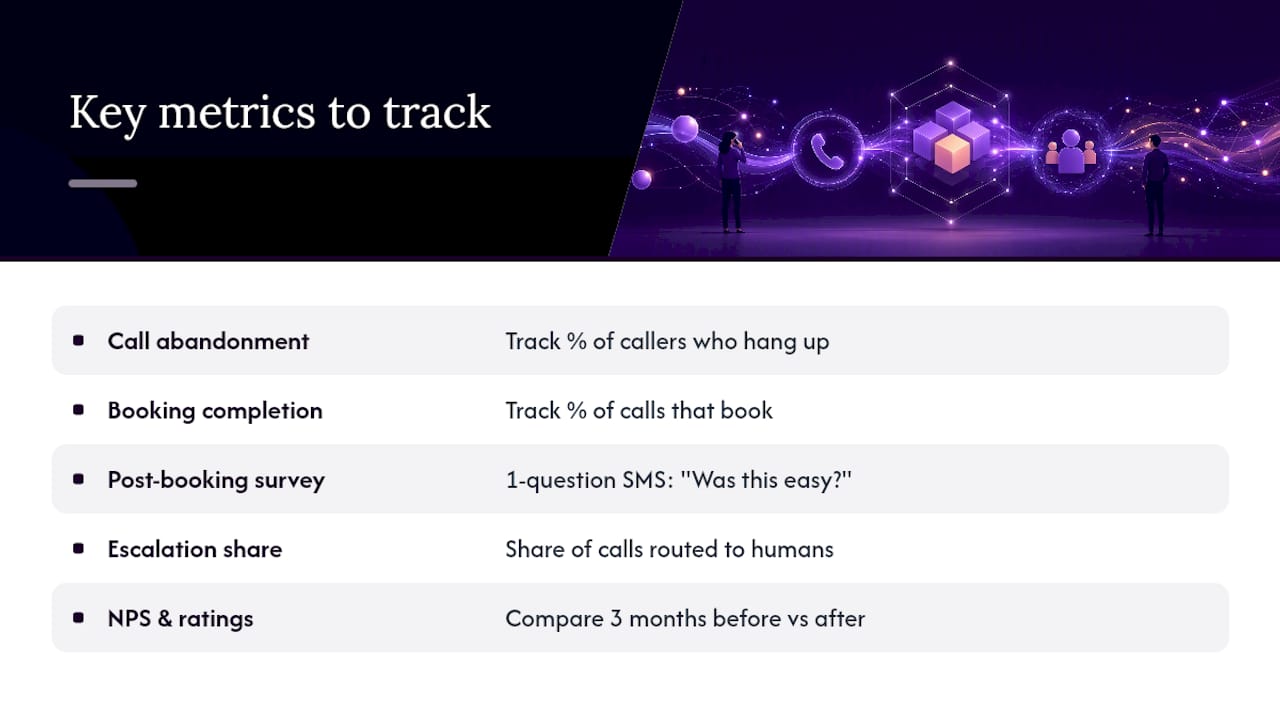
The best way to measure the shift is to track a few specific signals rather than relying on gut feeling. Watch your call abandonment rate (how many callers hang up before finishing), your booking completion rate (how many calls end in a confirmed reservation), and any post-booking survey responses you can collect through the confirmation SMS. A short one-question follow-up, "was this easy to book?", gives you a running satisfaction score without adding friction.
Pay attention to escalation patterns too. If a large share of calls get kicked to a human, that's a signal your voice agent's scripts need tuning, not that automation itself is failing. Compare your Net Promoter Score or average review rating in the three months before automation against the three months after. Most businesses see the clearest improvement in the "responsiveness" category of reviews specifically, since that's the exact pain point automation targets. If ratings dip instead, it usually points to a caller-experience gap, like a voice agent that can't handle rescheduling gracefully, rather than a flaw in the automation concept itself.
How do you get staff to actually adopt the new system?
Automation projects stall more often from people problems than technical ones. Staff who feel replaced or bypassed will quietly route around the system, taking calls manually out of habit or distrust, which defeats the purpose of deploying it in the first place.
Start change management before the system goes live, not after. Walk your team through exactly what the AI receptionist handles and what still requires their judgment. Frame it as removing repetitive phone work, not replacing their role, since the accurate framing is that staff get more time for in-person service, follow-ups, and the calls that genuinely need a human touch.
Run a short training session focused on the handoff points: what an escalated call looks like on their end, how to review flagged bookings, and how to correct the system when it gets something wrong. Give staff a simple channel to flag issues in the first weeks, whether that's a shared document or a quick daily check-in, because early friction reports are your best source of tuning data.
Expect a two to three week adjustment period where staff double-check the automation's work more than they will later. That's normal and worth encouraging rather than rushing. Once trust builds and the booking accuracy holds up, most teams stop manually verifying every call and let the system run on its own.
Is your customer data safe with an automated phone system?
Every call through an automated reservation system generates data: names, phone numbers, appointment details, sometimes payment or health information depending on your industry. That data has to move between your telephony provider, the AI platform, and your PMS or CRM, which means three separate systems now hold pieces of a customer's information instead of one.
Ask any vendor directly how call recordings and transcripts are stored, for how long, and who can access them. Confirm whether data is encrypted both in transit and at rest, and whether the provider's servers and data handling comply with Canadian privacy law, specifically the Personal Information Protection and Electronic Documents Act, if you're operating in Canada. For clinics or other businesses handling health information, ask whether the platform can meet the stricter provincial health privacy requirements that apply to that sector.
A clean audit log matters just as much as encryption. You want a record of every automated interaction, what the system captured, what it wrote back to your PMS or CRM, and whether a human reviewed or corrected it. That log is your first line of defence if a booking dispute or a data question ever comes up, and it's worth confirming during the sales process rather than after a problem happens.
How long does full deployment take, and when does ROI show up?
Most implementations follow a predictable arc, though the exact pace depends on how many systems you're connecting and how complex your booking rules are.
Week one typically covers SOP mapping and initial configuration, the work that happens before the AI ever takes a live call. Weeks two and three usually bring connector setup (calendar, PMS, CRM, POS) and voice persona tuning, followed by simulated call testing to catch edge cases before real customers hit them. A soft launch, running the automated system alongside your existing process, often runs through week four, giving staff a safety net while the system proves itself on real traffic.
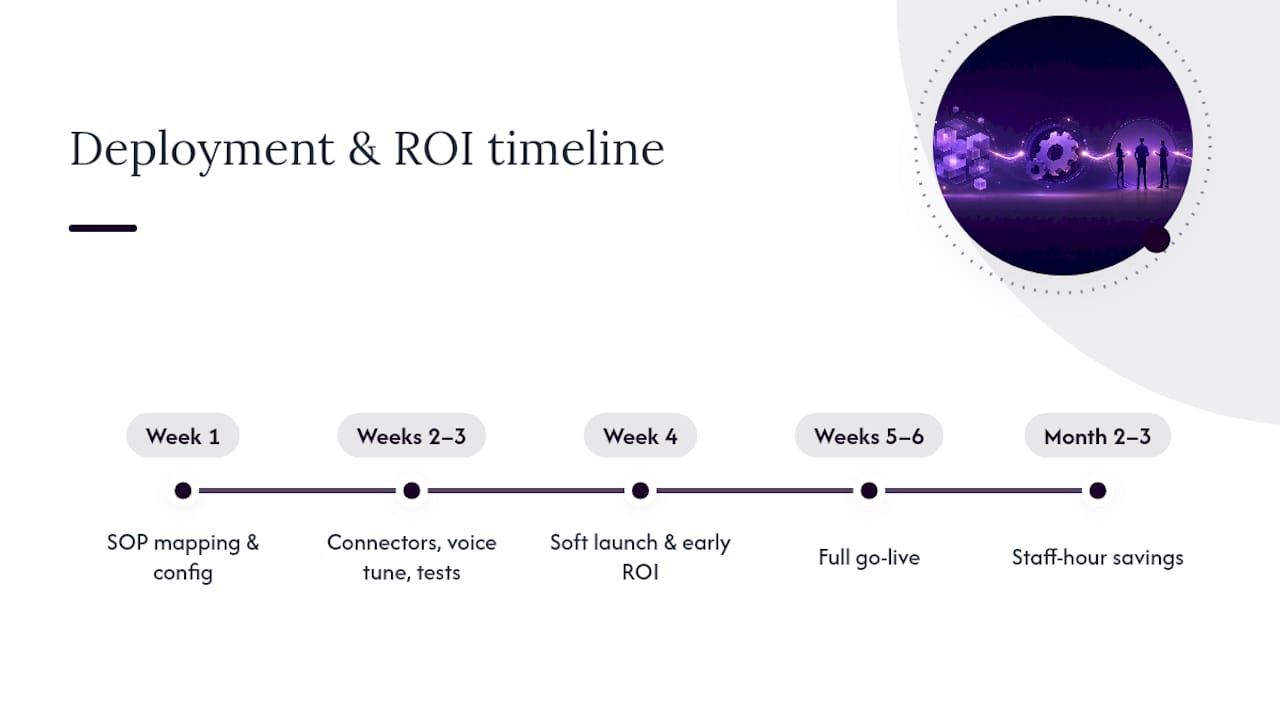
By week five or six, most businesses move to a full go-live, with the AI receptionist handling the majority of incoming calls. The first measurable ROI signals, fewer missed calls and a rise in completed bookings, usually show up within that same first month, since missed-call recovery is immediate once the system is answering every ring. Staff-hour savings take a bit longer to materialize fully, often another month or two, as your team adjusts their own workflows around the time automation frees up.
A phased pilot at a single location or for one service line before a full multi-location rollout is worth the extra few weeks it adds to the timeline. It gives you real data to tune scripts and confirm ROI assumptions before scaling the investment across every location.
What's the smartest way to start?
Start with a pilot, not a full rollout. Pick one location or one service line, capture your SOPs in writing before you configure anything, and let the AI receptionist run alongside your existing process for a few weeks before cutting over completely.
The businesses that get this right watch their metrics closely in those early weeks and train staff on the handoff points rather than assuming the system will just work. Automation amplifies whatever process you feed it, good or bad, so fix the process first.
— James
Want the managed path instead of building it yourself?
Some providers offer a done-for-you alternative to piecing together telephony, CRM, and calendar connectors on your own: one system, professionally configured around your existing workflow, with onboarding and support included in every plan. Where a voice-assistant-only tool just answers the phone, some providers build the full chain, call answering, booking, notifications, and routing, so a captured lead never falls through a gap between disconnected tools.

Its service business plans start with Dexcoretechnologies's Flexible Setup plan at $124.25 per week, or the Value Plan at $99.25 per week for businesses that don't need the added flexibility tier. A one-time setup fee covers onboarding and SOP configuration, the groundwork recommended before any automation goes live. Restaurants can look at the restaurant-specific AI receptionist built around POS and table-management integrations, while transport and delivery operators have a dedicated dispatch automation option built for routing and scheduling calls at volume.
If you're ready to see how it fits your own call volume and booking process, request a demo through the service business page and ask for an implementation checklist as part of the walkthrough.
Sources
FAQ
How long does phone reservation automation take to set up?
Most deployments run four to six weeks from SOP mapping to full go-live, including a soft launch period where the system runs alongside your existing process. Complexity of integrations, like how many systems need to sync, is the biggest factor affecting that timeline.
Can automation cause double bookings?
Only if the sync between your booking system and your calendar or PMS is one-way or delayed. Two-way sync, which reservation platforms treat as a core requirement, updates both systems the moment a change happens, which is the main safeguard against this.
What does phone reservation automation cost?
Dexcoretechnologies lists service business plans starting at $99.25 per week for its Value Plan, with a one-time setup fee from $500. Pricing varies by plan and number of locations, so check the current plans for the option that fits your call volume.
Does automation work for clinics and service businesses, not just restaurants?
Yes. The same core components, telephony routing, an AI receptionist, and calendar or CRM sync, apply across clinics, contractors, and transport companies, with the workflow customized to each industry's booking rules.
Can I trial automation before committing fully?
A phased pilot at one location or for one service line is the recommended way to test automation with limited risk while gathering real data on call volume and booking accuracy before scaling further.