
Service call routing automatically sends every inbound call to the best destination, an agent, a queue, a self-service menu, voicemail, or an AI receptionist, based on who is calling, what they need, and who is available right now. Use it the moment your team fields more than one type of call, splits work across shifts or locations, or has ever lost a customer to a missed call during a busy stretch.
The system leans on a handful of parts working together: an IVR to collect input, an ACD-style engine to queue and distribute calls, routing rules that encode your priorities, and a CRM or caller-ID lookup that adds context before the call ever reaches a person. Get those four right and the payoff is immediate:
- Fewer blind transfers because the first stop is already the right one
- Faster resolution since agents see caller history before they say hello
- No missed opportunities during peak hours or after close, because fallback paths catch what live staff can't
- Clearer reporting on where calls actually go and why
Key Takeaways
Service call routing works best when simple rules, honest fallback paths, and regular skill audits combine to keep every call moving toward the right destination.
| Point | Details |
|---|---|
| Define outcomes first | Decide what "good routing" means for your business before building any rules. |
| Audit skills regularly | Outdated skill tags cause mismatched routing even in a well-built system. |
| Build explicit fallback paths | Every entry point needs a defined secondary destination for busy or after-hours periods. |
| Test during peak load | Pilot changes when call volume is highest, not during a quiet stretch. |
| Consider a turnkey AI receptionist | Dexcoretechnologies combines routing, booking, and missed-call capture into one system for businesses that don't want to build rules manually. |
Table of Contents
- What is service call routing and what are its core parts?
- Which type of call routing fits your business?
- How does a call actually get routed, step by step?
- Which features actually matter when you evaluate a routing system?
- What business results should you expect, and which KPIs prove it?
- How do you set up service call routing from scratch?
- What are the best practices, and what mistakes should you avoid?
- What do routing setups look like in practice, across different businesses?
- How does this work in an actual business, not just in theory?
- How do you protect caller data as it moves through the routing engine?
- Does call routing need to change as your business grows?
- What about channels beyond the phone call itself?
- Should you run routing in the cloud or keep it on-premises?
- What does it take to keep routing accurate over time?
- If you want a turnkey option: why an AI receptionist and workflow automation is a practical solution
- Where to learn more about call routing design
- Frequently asked questions about service call routing
- Sources
What is service call routing and what are its core parts?
Service call routing is the logic that decides, in the fraction of a second after a phone rings, which person or system should answer it. The operational problem it solves is simple to state and hard to fix by hand: as soon as a business has more than one agent, one location, or one type of request, someone has to make a routing decision on every single call, and doing that manually with a receptionist juggling sticky notes does not scale.
Four components do the heavy lifting:
- IVR (interactive voice response): the menu that asks callers to press a number or say what they need, capturing intent before a human gets involved.
- ACD (automatic call distributor): the queueing engine that holds calls and hands them to the next available or best-matched destination.
- ANI/DNIS data: ANI identifies the caller's number, DNIS identifies which number they dialed, and both feed the routing decision instantly.
- Skill tags and routing rules: labels applied to agents (billing, French language, emergency dispatch) matched against the rules you configure.
A fifth piece ties it together: the CRM lookup, which pulls account history, recent tickets, or appointment status the moment a call lands, so the routing engine and the agent both know who they are dealing with. Call flows also need clearly defined endpoints, not just entry points. A call can land on a live agent, a specialized queue, a voice agent that handles simple requests on its own, voicemail with a callback trigger, or a scheduled callback slot. According to ServiceTitan's documentation on Contact Center Pro, a routing workflow needs a unique entry point, an optional pre-routing message, and one or more routing modules chained together, which is exactly the skeleton every routing system, regardless of vendor, is built on.
Which type of call routing fits your business?
Most businesses don't pick one routing strategy. They blend two or three, and GetVoIP's breakdown of intelligent call routing confirms that mixed-strategy designs are the norm rather than the exception, because different call types genuinely need different logic.
- Skills-based routing sends calls to the agent whose tagged expertise matches the request, not just whoever's free next. It shines when your team has real specialization gaps, like a bilingual line or a technical escalation tier, but Wikipedia's entry on skills-based routing notes vendors claim it improves service and utilization while analysts caution that too many overlapping skill rules can slow things down instead.
- Intelligent or intent-based routing (ICR) reads caller data, account history, and stated intent to pick the single best match automatically. It's the right call for businesses juggling several service lines where a generic queue means a lot of "let me transfer you."
- Round-robin routing cycles calls evenly across a pool of agents. It's the simplest option and works well for teams where every agent can handle every call type equally.
- Time-based routing changes the destination depending on the hour, day, or shift. Perfect for businesses with defined office hours plus an after-hours on-call rotation or answering service.
- Priority and fallback routing flags certain callers (VIP accounts, existing customers with open tickets) to jump the queue, with a defined secondary path if the first-choice destination doesn't answer.
- Fixed-order hunt groups ring a set list of extensions in sequence until someone picks up. Old-school, reliable, and still common in small offices with two or three phones.
Pro Tip: Start with round-robin or time-based routing if your team is under five people. Skills-based and intent-based routing only pay off once you have enough call volume and enough distinct skill sets to justify the extra configuration work.
How does a call actually get routed, step by step?
Picture a call arriving at a plumbing company that runs both scheduled maintenance and emergency dispatch. Here's what happens in the two or three seconds before a human even notices the phone rang:
- The call hits the number dialed (DNIS), which tells the system which routing workflow to load.
- ANI captures the caller's number and checks it against the CRM for account history, an open work order, or VIP status.
- If configured, an IVR prompt asks the caller to specify the reason for the call, feeding intent data into the decision.
- The routing engine evaluates rules in order: is this an emergency? Is a preferred technician tagged for this account? Is it inside business hours?
- The engine checks availability of the top-ranked destination. If that agent, queue, or team is busy or offline, it cascades to the next fallback target automatically.
- The call lands on its final endpoint, a live agent, a specialized queue, a voice agent that can book directly, or voicemail with a callback trigger.
That cascading step matters more than most managers realize. ServiceTitan's guidance is explicit that after-hours and overflow workflows need dedicated fallback targets, voice agents or voicemail-to-action triggers, rather than letting a queue simply ring out with nobody there to catch it. Common integrations that feed or receive data during this flow include:
- CRM platforms for account lookup and history
- Calendar and dispatch software for appointment-driven businesses
- POS systems for restaurants confirming reservations or orders
- Ticketing systems that auto-open a case the moment a call routes
- Voice agents that can complete simple bookings without ever touching a human queue
Which features actually matter when you evaluate a routing system?
Not every feature on a vendor's spec sheet earns its place. Here's what separates a system that works from one that looks good in a demo but frustrates your team by month two.
Must-haves:
- A visual call-flow builder you can edit without submitting an IT ticket
- Multi-skill routing that supports overlapping tags, not just one skill per agent
- Native CRM integration, not a workaround that requires manual syncing
- Real-time dashboards showing queue depth, wait times, and agent status
- Explicit fallback and overflow logic for every entry point, not just the main line
- Multi-channel support so voice, chat, and email share one routing logic
Worth prioritizing once the basics are solid:
- Intent-based routing that reads what the caller says, not just what they press
- AI voice agents that can resolve simple requests, like confirming an appointment, entirely on their own
- Self-service flows for account lookups, order status, or rescheduling
- Callback scheduling so callers don't have to sit in a queue at all
How you rank these depends on team size. A five-person office needs the fallback logic and CRM integration far more than intent-based AI routing. A 40-agent contact centre handling five service lines needs skills-based routing and real-time dashboards before anything else.
| Point | Details |
|---|---|
| Fallback logic | Every entry point needs a defined secondary destination, not just the primary one. |
| CRM integration | Native lookups beat manual syncing and cut agent research time per call. |
| Dashboard visibility | Real-time queue and wait-time data lets managers catch problems before customers complain. |
| Multi-channel logic | Voice, chat, and email should share one routing engine, not three separate ones. |
What business results should you expect, and which KPIs prove it?
Effective routing shows up in four places: fewer transfers, faster resolution, better agent utilization, and lower cost per contact. GetVoIP's analysis of intelligent call routing ties these outcomes directly to matching callers with the right destination the first time, rather than relying on agents to sort it out through repeated transfers.
Five KPIs tell you whether your routing setup is actually working:
- Average speed to answer (ASA): how long callers wait before reaching a person or self-service option.
- Average handle time (AHT): how long each call takes once it's answered, a number that should drop as routing accuracy improves.
- First-call resolution (FCR): the percentage of calls solved without a callback or transfer, arguably the single best proxy for routing quality.
- Abandonment rate: callers who hang up before reaching anyone, which spikes when routing sends people into the wrong queue.
- Transfer rate: how often a call has to move after it's answered, a direct signal that the initial match was wrong.
Coverage from Quartz on contact-centre efficiency points out that routing which uses context and offers self-service before escalating tends to lower costs while improving outcomes, because it stops treating every call like it needs a live agent. A realistic target isn't zero transfers. It's a steady month-over-month drop in transfer rate as your skill tags and rules get more accurate, paired with FCR that climbs as fewer callers get bounced between departments.
How do you set up service call routing from scratch?
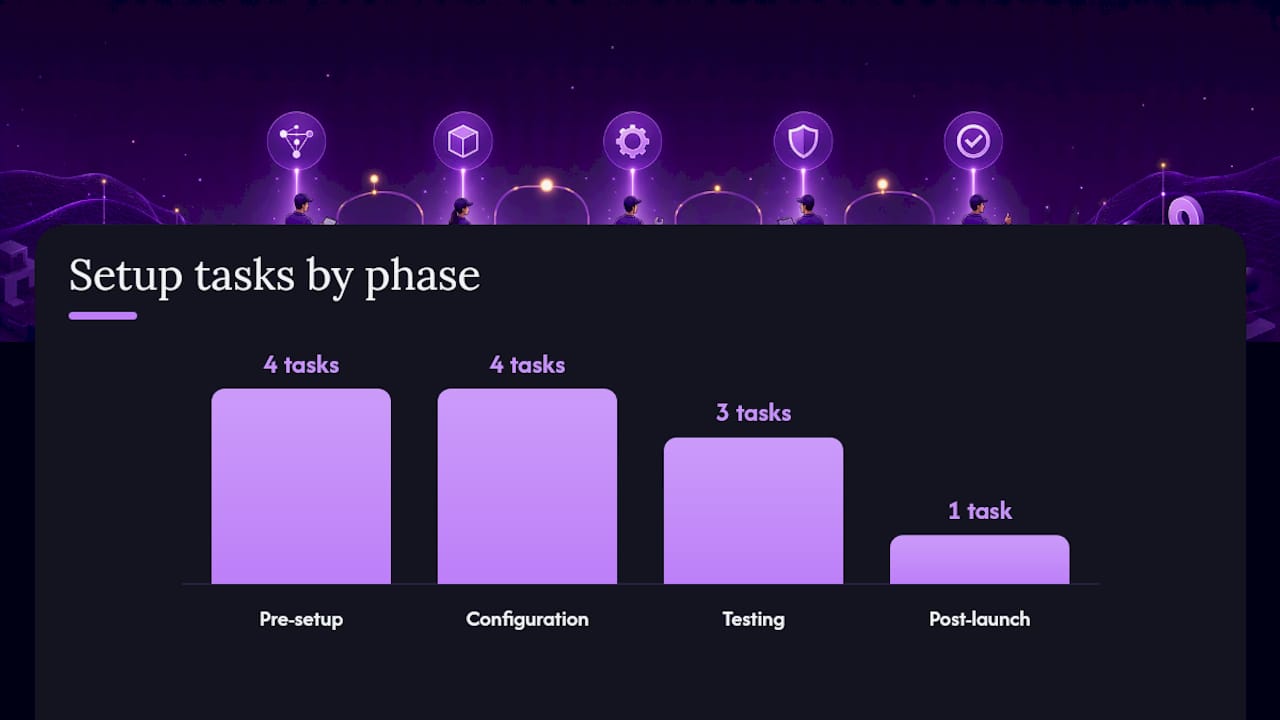
Skip straight to configuration and you'll build a system that looks fine on paper and fails the first busy Monday. Work through these phases in order.
Pre-implementation:
- Define the service outcomes you're optimizing for (faster booking, fewer missed emergency calls, better after-hours coverage).
- Map every call type your business actually receives, not the ones you assume are most common.
- Audit which agents genuinely have which skills, and be honest about gaps.
- Identify every data source available for routing decisions (CRM, calendar, POS, ticketing).
Configuration: 5. Build a unique entry point for each phone number or campaign, since ServiceTitan notes that new marketing numbers need to be assigned to an active workflow before any campaign goes live. 6. Build IVR prompts and routing modules, date and time rules, skill queues, voice agents, in a visual flow builder. 7. Set explicit fallback and overflow paths for every single entry point, including after-hours. 8. Connect your CRM, calendar, or dispatch system so routing decisions use live account data.
Test and go-live: 9. Test every entry point manually after activation to confirm calls route where you expect. 10. Run a staged pilot with one line or one shift before rolling out company-wide. 11. Set up real-time dashboards so you can watch queue behaviour in the first week. 12. Schedule a post-launch audit at 30 days to catch skill mismatches or rules nobody flagged in testing.
| Phase | Key Task | Why It Matters |
|---|---|---|
| Pre-implementation | Map call types and audit agent skills | Prevents routing rules built on assumptions rather than real call patterns |
| Configuration | Assign entry points and fallback paths | Stops calls from disappearing into an unstaffed queue |
| Testing | Pilot on one line before full rollout | Surfaces mismatches while the blast radius is still small |
| Post-launch | Audit skill tags and rules at 30 days | Keeps routing logic aligned as staff and services change |
What are the best practices, and what mistakes should you avoid?
Do this: keep your routing rules as simple as the business genuinely requires, no simpler and no more complex. Tag skills conservatively and revisit them on a schedule. Define a clear fallback target for every entry point, and stress-test the system during your actual peak call volume, not a quiet Tuesday afternoon.
Don't do this: pile on skill tags until agents carry a dozen overlapping labels nobody remembers assigning. Wikipedia's summary of skills-based routing is blunt about this trade-off, noting that while vendors promise improved utilization, the added complexity of over-tagged systems can actually reduce service quality when nobody keeps the rules current. Don't treat routing as a set-and-forget project either. Skills change as staff turn over or pick up new training, and a rule set built two years ago quietly stops matching reality. And don't let IVR menus grow past three or four options; long menus create the exact transfer problem good routing is supposed to solve, because frustrated callers just press zero and hope.
- Keep skill tags to the minimum that actually differentiates your team
- Give every fallback path an owner who checks it monthly
- Test routing changes during peak hours before trusting them permanently
- Retire IVR options nobody uses in the last quarter's call data
Pro Tip: Restrict who can edit skill tags to one or two people. When anyone on the team can add a tag on the fly, skill data drifts fast, and within a few months the routing engine is making decisions based on labels that no longer describe anyone's actual expertise.
What do routing setups look like in practice, across different businesses?
A mid-sized contact centre handling both general support and a premium account tier typically blends skills-based routing with priority routing. General questions go into a broad skills queue; flagged premium accounts jump ahead and land with a dedicated small team, protecting the relationships that matter most without slowing down everyone else.

An appointment-driven business, a clinic or a home services company, gets the most mileage from time-based routing layered with callback scheduling and calendar integration. During office hours, calls go straight to whoever's on the booking desk. After hours, the same number routes to a callback queue tied directly into the calendar, so the first available slot the next morning is already offered before a human ever calls back.
Restaurants and contractors sit at an interesting edge case. A restaurant taking dinner reservations doesn't need a skills matrix, it needs something that can answer instantly, confirm party size, and check the reservation system without pulling a server off the floor. A contractor is the reverse: routine estimate calls can go to a booking flow, but anything that sounds like a burst pipe needs to reach live staff within seconds. An AI receptionist built for contractor workflows handles that split automatically, capturing the routine request and flagging urgent language for immediate live dispatch.
How does this work in an actual business, not just in theory?
A single-location service business with two technicians and one front-desk phone was losing bookings every time both technicians were out on jobs. Every unanswered call went to a generic voicemail box, and most callers didn't leave a message. They called the next company on the list instead.
The fix combined an AI receptionist with basic workflow automation instead of adding staff. Incoming calls now hit intent-detection first: routine booking requests get captured and scheduled directly against the calendar, while anything flagged urgent triggers an immediate SMS to the on-call technician. No call disappears into an unmonitored voicemail box anymore, because the AI receptionist itself becomes the fallback destination rather than dead air.
The business reports a meaningful drop in missed calls converting to lost jobs, since every call now ends in either a booked appointment, a logged lead, or a routed dispatch alert rather than an unanswered ring. That outcome lines up with the broader case for workflow automation as the layer that turns a routing decision into a completed action, booking, notification, or CRM entry, without a human needing to manually close the loop. Dexcoretechnologies designed this kind of setup specifically to close the exact gap most fallback-free phone systems leave wide open.
- Intent detection separates routine requests from urgent ones automatically
- Missed calls convert to booked appointments or logged leads instead of disappearing
- SMS alerts route urgent requests to on-call staff within seconds
- No call ends in an unmonitored voicemail box
How do you protect caller data as it moves through the routing engine?
Every routing decision touches personal information: a phone number, an account history, sometimes payment or health details depending on the industry. That data typically passes through several systems, the phone carrier, the IVR, the CRM, and any AI voice agent, before a call even connects, and each handoff is a point where data can leak or get logged somewhere it shouldn't.
Treat data protection as a design requirement, not an afterthought bolted on after launch. Limit which systems in your routing chain actually need access to sensitive caller data, log access to CRM lookups the same way you'd log any other sensitive system access, and confirm any AI voice agent vendor states clearly how call recordings and transcripts are stored and for how long. If your business handles healthcare, financial, or other regulated information, your routing and recording setup needs to meet the compliance standard that applies to your industry and jurisdiction. This is general operational guidance, not legal advice. Confirm your specific obligations with a qualified compliance professional or your regulator, since requirements vary by sector and location.
Does call routing need to change as your business grows?
Routing that works fine for eight agents in one office often breaks quietly at thirty agents across two locations, not because the software fails, but because nobody redesigns the rules to match the new scale. What used to be a flat round-robin queue needs to become a structured hierarchy with skill tiers, location-aware routing, and escalation paths that didn't exist when the whole team sat in one room.
Multi-location call routing adds a layer most single-site businesses never have to think about: should a call to your Calgary number ever land with a Toronto agent if Calgary is swamped? Get that decision wrong and you either strand callers in a local queue that's overloaded or you route everything centrally and lose the local knowledge that made service good in the first place. The practical middle ground is location-first routing with an overflow rule that spills to other sites only once local capacity is exhausted, keeping local context intact while still catching overflow.
Build for this earlier than feels necessary. A routing system configured only for your current headcount means a rebuild project every time you open a new location or add a shift, and rebuild projects are exactly when fallback paths get forgotten.
What about channels beyond the phone call itself?
Voice was never the only channel customers reach out on, and treating routing as a phone-only problem creates a second, disconnected system for chat, email, and social messages, each with its own queue, its own rules, and its own blind spots. A customer who emails, then calls an hour later because nobody replied, is living proof the two channels aren't talking to each other.
The stronger design applies the same routing logic across channels: skill tags, priority rules, and CRM context should route a chat message the same way they route a call, and ideally through the same underlying engine. A support request tagged "billing" should reach the billing-skilled team whether it arrived by phone, live chat, or a Facebook message. Multi-channel routing also means a customer's history follows them. If someone called about an issue yesterday and emails about it today, the routing engine should recognize the connection instead of treating it as a fresh, unrelated request.
Should you run routing in the cloud or keep it on-premises?
Cloud-based routing wins on nearly every practical dimension for a growing business: faster setup, easier updates to routing rules without an IT ticket, and the ability to add a new location or agent without buying new hardware. Most current routing platforms, including the modules described in ServiceTitan's documentation, are built cloud-first specifically because rules change often enough that a visual, remotely editable flow builder beats a static, hardware-bound system.
On-premises systems still show up in a few specific situations: heavily regulated environments with strict data-residency requirements, or legacy infrastructure that's already paid off and works. The trade-off is real. On-premises routing generally means slower changes, since rule updates often require vendor support or a technician visit, and it means the business carries the maintenance and hardware refresh cost that cloud providers absorb into a subscription. For most service businesses without a specific regulatory reason to stay on-premises, cloud-based routing is the more practical default.
What does it take to keep routing accurate over time?
Routing rules aren't a project you finish. They're closer to a garden you either tend or watch go feral. The single biggest failure mode isn't picking the wrong routing strategy at launch, it's picking a reasonable strategy and then never touching it again while the business underneath it keeps changing.
Skill audits matter more than most managers budget time for. An agent who was the go-to for a certain product line six months ago might have moved teams, and if nobody updated the tag, the routing engine keeps sending that agent calls they can no longer handle well. Cross-training compounds this. Every time someone picks up a new skill, that's a routing opportunity that goes unused until someone updates the tag. And fallback rules deserve the same scrutiny as primary rules, since a fallback path nobody has tested since it was built is really just an assumption wearing a label.
Add one line to your monthly operations checklist: review skill tags and fallback destinations for accuracy, not just uptime. Uptime tells you the system is running. It doesn't tell you the system is still routing calls to the right people.
If you want a turnkey option: why an AI receptionist and workflow automation is a practical solution
Dexcoretechnologies exists for the business that read all of the above and thought: correct, but who's actually going to build and maintain this. An AI receptionist handles that gap directly. It answers every call live, day or night, captures what the caller actually needs, completes bookings straight into your calendar, and hands off to a real person the moment a request needs human judgment, all without you writing a single routing rule by hand.

The setup mirrors what this article just walked through, minus the manual configuration. Onboarding typically covers connecting your calendar, dispatch, or CRM system, mapping your team's availability and skills, and setting the fallback and escalation triggers that catch urgent calls after hours. Core capabilities include 24/7 answering, real-time appointment booking, missed-call capture that converts straight into a logged lead, and integrations built for restaurants, clinics, contractors, and transport or delivery operations specifically.
If you run a restaurant juggling reservations during a dinner rush, or a service business that can't staff a phone every hour it's open, the practical next step is booking a demo to see how the system handles your actual call patterns before you commit to anything.
Where to learn more about call routing design
For readers who want to go deeper on the technical or vendor side, a few sources cover the ground this article only summarized.
- XiVO's skills-based routing documentation walks through creating skills, applying them to agents, and building rule sets, useful if you're configuring skill tags directly.
- ServiceTitan's Contact Center Pro routing guide is the clearest practical reference for entry points, routing modules, and marketing-number assignment.
- GetVoIP's explainer on intelligent call routing is the best plain-language overview of how ICR combines caller data and business rules.
- Wikipedia's entry on skills-based routing is useful for the balanced view of vendor claims versus analyst skepticism.
- Quartz's piece on contact-centre efficiency frames routing as a profitability lever, not just a service one.
Frequently asked questions about service call routing
What's the difference between call routing and an ACD? An ACD is the queueing engine that holds and distributes calls. Call routing is the broader set of rules and logic, skills, priority, time-based conditions, that tells the ACD which destination to pick.
Do small businesses actually need intelligent call routing? Not always. A five-person team often does fine with time-based routing and one solid fallback path. Intelligent, intent-based routing pays off once call volume and service variety grow enough to justify the added configuration.
How often should skill tags be audited? Monthly at minimum, and immediately after any staffing change. Tags that go untouched for six months are one of the most common causes of routing mismatches.
Can call routing include chat and email, not just voice? Yes, and it should. Applying the same skill and priority rules across voice, chat, and email keeps a customer's history and context connected regardless of which channel they use.
What happens if the primary routing destination doesn't answer? A well-built system cascades automatically to a predefined fallback target, another agent, a voice agent, or voicemail with a callback trigger, rather than leaving the caller stuck in a queue that never resolves.
Sources
- Skill-based routing — XiVO documentation
- Set call routing rules in Contact Center Pro
- What is Intelligent Call Routing & How Does it Work?
- Skills-based routing
- How to make the modern customer contact centre efficient and profitable